Is It Safe to Install Claude Code Skills? How to Check One First
Claude Code skills run with your files, shell and credentials. ClawHavoc put 1,184 malicious skills in one registry. How to check one before you install.
A skill is instructions loaded into an agent that can already read your files, run shell commands and reach the network, so the skill inherits all of it. Between January 27 and February 5, 2026, Antiy CERT catalogued 1,184 malicious skill packages on one registry. Three checks close the gap.
Updated September 2026: the guidance below is unchanged. The figures now include Snyk’s ToxicSkills study, which measured the steady-state risk rather than the campaign: 36.82% of 3,984 skills carried at least one security issue, and 13.4% carried a critical one.
Skills — reusable instruction sets that extend what an agent can do — are a big part of why Claude Code is useful. Anthropic’s own documentation describes them as packaged instructions, scripts and resources the model loads on demand. Most people install them without reading them. That is the problem, and it is a solvable one: read the skill, require a pre-publish scan, and verify the archive hash on install.
Key figures
| Figure | What it measures | Source |
|---|---|---|
| 1,184 | Malicious skill packages catalogued on ClawHub as of Feb 5, 2026 | Antiy CERT |
| 12 | Author IDs those packages were attributed to | Antiy CERT |
| 341 | Malicious skills found in the first full audit of the registry | Koi Security, via The Hacker News |
| 2,857 | Skills listed when that audit ran — 11.9% of them malicious | Koi Security |
| 335 | Of the 341 tied to one coordinated operation | Koi Security |
| 3,984 | Skills Snyk analysed across two registries for ToxicSkills | Snyk |
| 36.82% | Carried at least one security issue (1,467 skills) | Snyk |
| 13.4% | Carried a critical-severity issue (534 skills) | Snyk |
| 91% | Of confirmed malicious skills also used prompt injection | Snyk |
| 10.9% | Exposed hardcoded secrets | Snyk |
| 1 byte | Enough of a change to break a SHA-256 tree hash | SkillSafe verification model |
The studies disagree on totals because they counted different things over different windows. They agree on direction: a double-digit percentage of a public skill registry was hostile. We broke the numbers down in the ClawHavoc post-mortem and the first skill-ecosystem audit.
What a skill actually is
A Claude Code skill is a set of instructions loaded into your agent’s context. On the surface, it looks like a markdown file — readable, portable, easy to share. It is not an MCP server and not a plugin: skills carry procedure, MCP carries a live connection to tools and data, and plugins bundle both for distribution. But skills can do a lot more than display text.
A skill can instruct your agent to:
- Read files anywhere on your filesystem
- Execute shell commands
- Make outbound network requests
- Access environment variables, including API keys and credentials
- Modify source code
This isn’t a vulnerability in Claude Code — it’s how powerful AI agents work. The agent has access to your environment because that’s what makes it useful. A skill that helps you deploy to production needs to run commands. A skill that integrates with an API needs credentials.
The surface area is real, and it runs deeper than most developers realize. OWASP’s Agentic Skills Top 10 exists for the same reason the web application Top 10 does: the risk classes are now well enough understood to enumerate.
The current state of skill distribution
Right now, most Claude Code skills are shared via raw GitHub URLs, gist links, or open registries with no security review. The install flow looks something like:
Create skillsafe skill from https://github.com/someone/their-skill/blob/main/SKILL.mdYour agent fetches that URL and loads whatever is there. There is no scan. There is no integrity check. There is no guarantee that what you downloaded today is what was there yesterday — or that the repository hasn’t been compromised since you last used it.
This is the same threat model that plagued npm in its early years. A malicious skill doesn’t need a sophisticated exploit chain. It just needs to instruct your agent to exfiltrate your .env file or send your API keys to an attacker-controlled endpoint. The attack is as simple as the instruction — which is why 91% of Snyk’s confirmed malicious skills also carried prompt-injection text: the instruction is the payload.
The ClawHavoc campaign showed what happens next
ClawHavoc is the worked example. Between January 27 and February 5, 2026, Antiy CERT catalogued 1,184 malicious skill packages across 12 author IDs, most delivering the Atomic macOS Stealer. Koi Security’s first audit, published February 2, found 341 malicious skills among 2,857 listings — 11.9% of the registry — with 335 of them belonging to one coordinated operation. Koi described the lure plainly:
You install what looks like a legitimate skill — maybe solana-wallet-tracker or youtube-summarize-pro. The skill’s documentation looks professional. But there’s a “Prerequisites” section that says you need to install something first.
— Koi Security, quoted in The Hacker News
Many of the skills looked legitimate. They were functional, had real descriptions, and had accumulated install counts that made them appear trustworthy. Install count is not a trust signal; it is a popularity signal, and popularity is exactly what a typosquat manufactures.
The attack worked precisely because the registry had no pre-publish scanning, no tamper detection, and no way for users to verify what they were installing.
What good skill security looks like
Protecting yourself as a Claude Code user comes down to three things:
1. Verify before you install
Don’t install skills from arbitrary GitHub URLs without reviewing the content first. Read the skill file. Understand what it instructs your agent to do. If the skill references external scripts or makes network calls, understand why.
2. Use a registry with pre-publish scanning
The key distinction is when scanning happens. A registry that scans at install time tells you the skill was clean when you downloaded it — it doesn’t tell you it’s the same file the publisher uploaded, or that it was reviewed before it was ever shared. Pre-publish scanning, combined with cryptographic tamper detection, closes both gaps.
3. Check for tamper detection
Even a skill that was clean at publish time can be modified in transit. A SHA-256 tree hash over the entire archive, stored at publish time and re-verified at download, makes tampering detectable. Without this, you’re trusting that nothing changed between when the author uploaded it and when you installed it.
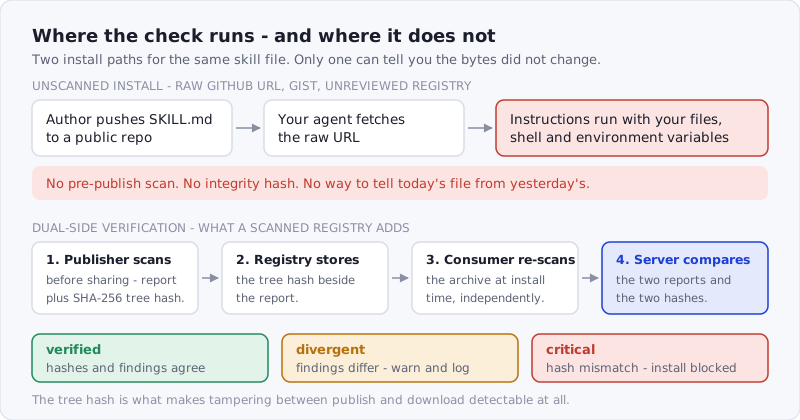
Figure: the unscanned path has no point at which anything is checked. The verified path checks four times, and a hash mismatch blocks the install outright.
Skills vs. MCP vs. Connectors vs. Plugins
If you’ve spent any time in the agent tooling space, you’ve encountered all four of these terms — sometimes used interchangeably, which causes real confusion. Here’s how they actually differ:
| MCP | Connector | Plugin | Skill | |
|---|---|---|---|---|
| What it provides | A set of callable tools for a specific scenario | A pre-built bridge to an external service or data source | A packaged capability that extends the agent’s interface or feature set | A complete solution — workflow, reasoning, and tool orchestration for a specific scenario |
| Core question | How to connect? | How to integrate? | What can it do? | What to do, why, and when? |
| Use when | You need DB access, external APIs, file system ops, third-party service calls | You want turnkey integration with a known service (Slack, GitHub, Notion, Salesforce) without writing connection code | You want to add a new UI surface, capability, or behavior to the agent’s base feature set | Multi-step workflows, enforcing consistent processes, encoding domain expertise, preserving institutional knowledge |
| Defines | Tool signatures and transport protocol | Auth, schema mapping, and data flow between agent and service | Feature boundary and interface contract | Step-by-step execution plan with conditions and failure handling |
The short version:
- MCP gives a worker access to tools: a hammer, a wrench, scissors
- Connector gives a worker a pre-configured workstation already wired to the factory floor
- Plugin gives a worker a new skill module bolted onto their suit
- Skill tells the worker when and how to use everything in the right sequence to complete a specific job
They’re complementary, not competing. A Skill can call tools exposed via MCP, use data piped in through a Connector, and run inside a host environment extended by a Plugin. The Skill is the orchestration layer on top.
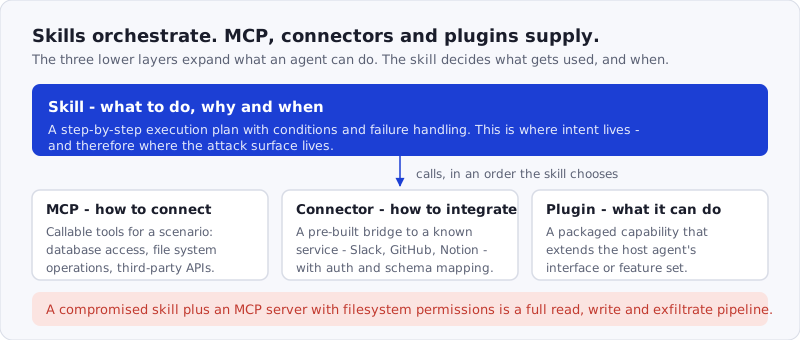
Figure: capability lives in the lower three layers; intent lives in the skill. That asymmetry is why the skill is the highest-leverage thing to compromise.
This distinction matters for security. MCP servers, connectors, and plugins all expand the agent’s capabilities — but a malicious Skill is what directs those capabilities. A compromised Skill with access to an MCP server that has filesystem permissions is a full read/write/exfil pipeline. The Skill is where intent lives, which is why it’s also where the attack surface lives. The server side has its own failure modes — see our MCP security guide and the write-up on tool poisoning via hidden metadata.
How SkillSafe approaches this
SkillSafe was built specifically to address the skill supply chain problem for Claude Code and other AI agents.
The verification model works in three steps:
-
Publisher scans before sharing. Before a skill can be shared publicly, the author runs a full local scan. This produces a structured security report and a SHA-256 tree hash of the entire archive.
-
Registry stores the hash. The tree hash is stored immutably alongside the scan report. Any change to any file in the skill — even a single byte — will break the hash.
-
Consumer re-scans on install. When you install a skill, your client independently re-scans it. The server compares both reports. A tree-hash mismatch means the archive changed between publish and download — that produces a
criticalverdict, and the desktop app blocks the install. Disagreements in findings or scanner metadata produce adivergentverdict — you’ll see a warning and the divergence is logged.
This is dual-side verification. It means you’re not just trusting the registry’s scan — you’re verifying the skill yourself, every time. The mechanics are documented in full in how dual-side verification works.
Getting started
The fastest way to install a verified skill is the SkillSafe desktop app — browse the registry, click View in SkillSafe app on any skill, and it installs into your AI tool automatically.
Prefer the command line? Every SkillSafe skill is cloneable via git, so the skills CLI installs it in one line:
npx skills add https://api.skillsafe.ai/owner/skill-nameEither path pulls the exact, scanned version from the registry and runs the same re-scan on download, so verification happens automatically — no manual config required.
Every shared skill in the SkillSafe registry has passed a pre-publish scan — scanning is required before a skill can be shared publicly. Tamper detection is on by default. Hash mismatches are treated as critical and block the install entirely — they don’t just flag and proceed anyway. Lesser divergences between the two scan reports surface as warnings and are logged.
Frequently Asked Questions
Can a Claude Code skill steal my API keys?
Yes, if you install one that is designed to. A skill’s instructions run inside an agent that can read environment variables, open files and make outbound requests, so “exfiltrate .env to this endpoint” is a valid instruction, not an exploit. Snyk found 76 confirmed malicious payloads across 3,984 skills, and 10.9% of skills exposed hardcoded secrets of their own. Read the file, and scan it before install.
How do I scan a Claude Code skill before installing it?
Paste the repository URL into the SkillSafe scanner; it returns a severity-rated report naming each finding and the file it appears in. On the registry, the report is attached to the version you install, and your client re-scans the downloaded archive and compares both results. A tree-hash mismatch is a critical verdict and the desktop app blocks the install rather than warning and proceeding.
What is the difference between MCP and skills?
MCP defines how an agent connects to tools — tool signatures and a transport protocol. A skill defines what to do, why and when — a step-by-step plan that may call those tools in a chosen order. They stack rather than compete: a skill orchestrates MCP tools. For security purposes the difference is that MCP grants capability while the skill directs it, which makes the skill the higher-leverage target.
Are Claude Code plugins the same as skills?
No. A plugin extends the host agent’s own interface or feature set — it adds a surface. A skill adds a procedure: the workflow, the conditions and the failure handling for a specific job, running inside whatever surfaces exist. A plugin answers “what can this agent do?”; a skill answers “what should it do next?” Both need review before install, for the same reason: both execute with your permissions.
Is it safe to install skills from GitHub?
Only if you read them, and only if you can tell the file has not changed since you read it. A raw GitHub URL gives you neither a pre-publish review nor a stored hash, so today’s fetch and yesterday’s fetch are indistinguishable. ClawHavoc’s 1,184 packages all looked like ordinary repositories. Prefer a source that scans before publish and re-verifies at install.
The bottom line
Skills are powerful. That’s the point. But power without verification is a liability, and the AI skill ecosystem is in the same place npm was a decade ago — before anyone took supply chain security seriously.
If you’re using Claude Code skills today, ask yourself: do you know what’s in them? Do you know they haven’t been modified since the author published them?
If the answer is no, that’s worth fixing. It takes about 30 seconds: paste the repository URL into the scanner and read the report.