How Dual-Side Verification Protects Against Supply Chain Attacks
Dual-side verification scans a shared AI skill twice, once by the publisher and once by you, then compares both reports and a SHA-256 tree hash before install.
Dual-side verification scans a shared skill twice: the publisher scans before sharing, your client re-scans the bytes it actually downloaded, and SkillSafe compares both reports plus a SHA-256 tree hash. Matching hashes and matching findings return verified. A hash mismatch returns critical and the install is blocked.
Updated September 2026: the model below is unchanged. The one behavioural change since publication is that the git clone route now returns a 503 rather than an empty file when a stored blob is missing, so a partial download can no longer masquerade as a clean one.
Every registry that scans code exactly once has the same hole: the report describes the artifact at upload time, not the artifact you received. SLSA’s threat model enumerates that gap link by link — the source, the build, the package repository and the distribution channel are four separate places where what you get can stop matching what was reviewed. The xz-utils backdoor is the reference case: the malicious code was never in the git tree that reviewers read, only in the release tarballs, and it scored CVSS 10.0 as CVE-2024-3094.
Key figures
| Figure | What it measures | Source |
|---|---|---|
| 2 | Independent scans per shared version, one per side | SkillSafe verification model |
| 3 | Possible verdicts: verified, divergent, critical | SkillSafe verification model |
| 256 bits | Length of the tree hash compared across both sides | FIPS 180-4 |
| 64 | Hexadecimal characters a person can eyeball in that hash | FIPS 180-4 |
| 5 | Severity levels a finding can carry, critical down to info | SkillSafe scanner |
| 10.0 | CVSS base score of CVE-2024-3094, the xz-utils backdoor | NVD |
| 0.3 to 0.8 | Seconds an sshd login took, the anomaly that exposed that backdoor | Andres Freund, oss-security |
| 3 | Build levels defined by SLSA v1.0, the closest public analogue | SLSA v1.0 |
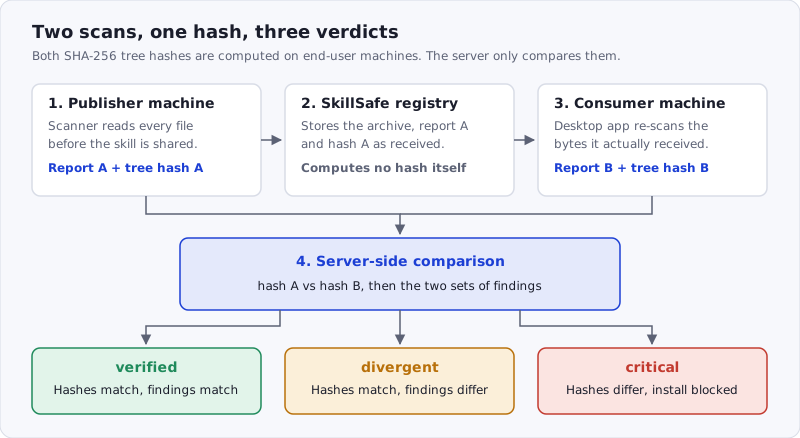
Figure: both hashes are computed on end-user machines. The server’s only job is to compare them, which is what keeps a compromised registry from producing a clean verdict.
Why single-side scanning isn’t enough
Traditional package registries scan code once — at upload time. If the registry is compromised, or if the package is modified after scanning, consumers have no way to detect it. The scan report reflects the state of the code at a single point in time, not what you actually download.
This is the gap that supply chain attacks exploit. A clean scan report means nothing if the artifact you receive has been altered.
The xz case is worth sitting with, because it defeats every control that reads the source. Reviewers read the repository. The build shipped something else. The discovery was accidental: a maintainer noticed sshd logins had slowed from roughly 0.3 to 0.8 seconds — about 500 milliseconds of unexplained CPU — and followed the anomaly down to the tarball. Nothing in the review pipeline was looking at the bytes that were actually distributed.
The dual-side model
SkillSafe runs 3 independent checks over every shared version.
Step 1: Publisher scan
Before sharing a skill, the publisher runs the SkillSafe scanner locally. The scanner performs AST-based static analysis on every file, checking for:
- Command injection — shell execution via
subprocess,os.system, backtick interpolation, and similar patterns - Data exfiltration — outbound HTTP requests, DNS lookups, environment variable access that sends data externally
- Obfuscation — base64-encoded payloads, eval/exec usage, encoded strings that decode to executable code
- File system abuse — writes outside the project directory, access to sensitive paths like
~/.sshor credential stores - Privilege escalation — attempts to modify system files, install global packages, or change permissions
Each finding is assigned 1 of 5 severity levels, from critical down to info. The scan produces a structured report with that severity-rated list, and the report is attached to the skill version when shared.
Step 2: Consumer re-scan
When someone installs a shared skill, the SkillSafe client automatically re-scans the downloaded archive. This produces a second, independent scan report from the consumer’s perspective.
The consumer’s scanner runs the exact same analysis as the publisher’s. It’s the same code, the same rules, the same AST parsing. The only difference is who ran it and when.
Step 3: Server-side comparison
The server receives both scan reports and compares them along two axes:
Tree hash verification — Each scan report includes a SHA-256 tree hash computed over the raw bytes of the skill archive. If the publisher’s tree hash doesn’t match the consumer’s tree hash, the archive was modified in transit or at rest. This is a hard failure.
Finding comparison — The server compares the sets of security findings from both reports. If the publisher’s scan found 2 low-severity warnings but the consumer’s scan found an additional critical finding, something changed between publish and install.
The comparison produces one of three verdicts:
- Verified — Tree hashes match and findings are consistent. The skill is safe to use.
- Divergent — Tree hashes match but findings differ. This can happen if scanner versions differ, but warrants investigation.
- Critical — Tree hashes don’t match. The archive was tampered with. The AI SkillSafe desktop app blocks the installation.
Why tree hashes matter
A tree hash is a SHA-256 digest computed over the entire skill archive (the .zip file). The digest is 256 bits long, written as 64 hexadecimal characters, drawn from an output space of 2^256 values. Unlike content-based hashes that check individual files, the tree hash covers everything: file contents, file names, directory structure, and metadata.
This means an attacker can’t:
- Replace a single file without changing the hash
- Add a new file (like a malicious post-install script) without detection
- Modify file permissions or metadata without detection
- Reorder or rename files to disguise changes
Flipping 1 byte anywhere in the archive changes the digest completely. And the tree hash is computed client-side before upload and again client-side after download. The server stores and compares hashes but never computes them — it has no opportunity to forge a matching hash.
That property is the point. A hash the distributor calculates on your behalf verifies the distributor, not the artifact — which is why NIST’s Secure Software Development Framework asks producers to give consumers an integrity check that does not run on the distribution channel.
What attacks does this prevent?
| Attack Vector | How It’s Detected |
|---|---|
| Registry compromise (modified archive on server) | Tree hash mismatch at consumer re-scan |
| Man-in-the-middle (modified archive in transit) | Tree hash mismatch at consumer re-scan |
| Publisher key theft (attacker publishes as publisher) | Consumer re-scan reveals new findings |
| Dependency confusion (name squatting) | Namespace verification + scan findings |
| Time-of-check to time-of-use | Consumer scans the actual downloaded bytes |
| Release-only backdoor (xz-utils pattern) | Consumer hashes the distributed bytes, not the repo |
What it does not prevent is a skill that was malicious from the start and scanned as malicious on both sides. Dual-side verification answers “did this change?”, not “is this a good idea?” The scan findings answer the second question, which is why both reports are published rather than reduced to a pass/fail flag. For the instruction-level threat — a skill whose text steers the agent rather than whose code does — see our write-up on the SkillJect scanner and the MCP security rules for tool surfaces.
Try it yourself
You can see dual-side verification in action with any shared skill:
- Scan — paste a GitHub-hosted skill URL into the web scanner for a structured security report (no account needed).
- Publish — save and share your skill from the AI SkillSafe desktop app; sharing attaches your publisher-side scan report to the version.
- Install with verification — install the skill through the desktop app. It automatically re-scans the downloaded archive, submits the consumer-side report, and shows you the comparison verdict (verified / divergent / critical) inline.
- Plain install — prefer the command line?
npx skills add https://api.skillsafe.ai/{ns}/{name}clones the skill directly via git.
The skill page on skillsafe.ai shows the verification status for every shared version, including the scan report and verdict.
Frequently Asked Questions
What is dual-side verification?
It is a scheme where the same artifact is scanned and hashed twice by two different parties — the publisher before sharing and the consumer after downloading — and a server compares the results. It produces 3 verdicts: verified, divergent, critical. The design goal is that no single compromised party, including SkillSafe, can produce a clean verdict for a modified archive.
Can the SkillSafe server forge a matching tree hash?
No, because it never computes one. Both SHA-256 digests are produced on end-user machines and uploaded with the scan reports; the server only compares 2 strings it received. To fake a verified result an attacker would need a preimage for a 256-bit digest, or control of both the publisher’s machine and the consumer’s — at which point the archive is the least of your problems.
What does a “divergent” verdict actually mean?
The archives are byte-identical but the two scans disagree on findings. In practice this is nearly always a scanner version skew: the consumer ran a newer rule set that flagged something the publisher’s build did not. It is not proof of tampering, but it is a prompt to read both reports before installing, which is why the verdict is surfaced rather than silently resolved.
Does a verified skill mean the skill is safe?
No. verified means what you downloaded is exactly what the publisher scanned and shared. It says nothing about whether the publisher’s intent was good. Read the scan report’s findings alongside the verdict, and treat skills that request network access, credential reads or subprocess execution as capabilities you are granting, not as details. Browse verified skills on SkillSafe, or read more on the security page and in the verification API documentation.
Related reading: supply-chain posts · Agent Skills format documentation