Agent Phishing Shows Why Tool Permissions Need Identity Checks
Varonis and Imperva tested OpenClaw agents in June 2026: 2 of 4 phishing scenarios leaked live secrets. Identity-bound tool permissions are the fix.
Two June 2026 studies tested the same weak point. Varonis phished an OpenClaw email agent named Pinchy, and in 2 of 4 scenarios it forwarded AWS keys, database passwords and a 247-customer export. Imperva hid instructions in contact names and vCards and got code execution. Both slipped past prompt-level rules because nothing checked identity before the tool ran.
Updated September 2026: OpenClaw shipped the message-object fix in 2026.4.23, which renders contact, vCard and location text as fenced untrusted metadata. The identity gap in front of the tool call itself is unchanged.
On June 9, Varonis Threat Labs published “Phishing for Lobsters”, a test of an OpenClaw email agent named Pinchy. The agent was connected to Gmail, browser tools, shell access and Google Workspace APIs, then placed in a synthetic corporate inbox seeded with realistic secrets and business data. Across 4 scenarios and 2 configuration profiles, a single plausible email caused the agent to forward mock AWS keys, database connection strings, SSH credentials, and a customer export covering 247 enterprise accounts and roughly $1.28 million in monthly recurring revenue.
“Both Generic and Strict profiles failed because the agent prioritized resolving the simulated production emergency over validating who had actually sent the message.” — Varonis Threat Labs, Phishing for Lobsters
The next day, Imperva published research on prompt injections in message objects. Instead of hiding instructions in a webpage or image, the researchers put malicious instructions in 4 kinds of ordinary message field: a contact name, a vCard FN field, a geolocation label, and image metadata. Those objects were flattened into the model prompt without a clear untrusted-data boundary.
“In each case, the injected instruction was invisible to the victim, crossed the trust boundary into the authenticated user context, and triggered execution of attacker-controlled code.” — Imperva, Compromise OpenClaw with Prompt Injections in Message Objects
OpenClaw fixed the reported issue in version 2026.4.23 and now documents the boundary in its prompt-injection guidance.
Key Figures
| Figure | What it measures | Source |
|---|---|---|
| 4 scenarios | Phishing tests run against the Pinchy agent | Varonis |
| 2 outright failures | Credential request and CRM export, both completed by the agent | Varonis |
| 2 profiles | Generic and Strict configurations tested; both failed the social cases | Varonis |
| 247 customers | Rows in the CRM export the agent sent to an external address | Varonis |
| $1.28 million | Monthly recurring revenue represented in that export | Varonis |
| 4 field types | Contact name, vCard FN, geolocation label, image metadata | Imperva |
| 1 command | python3 setup.py fetched from an attacker domain in every successful injection | Imperva |
| 2026.4.23 | OpenClaw release that fenced those fields as untrusted metadata | OpenClaw release notes |
| June 9-10, 2026 | Publication dates, one day apart | Varonis, Imperva |
The broader security press noticed because the two findings rhyme. The Hacker News covered both studies together, framing them as different doors into the same room: an agent trusts what reaches it, and the agent’s access becomes the attacker’s. BleepingComputer, TechRadar and a long Reddit thread picked up the same lesson.
This moves the conversation from “can a plugin be malicious?” to “what should a trusted plugin be allowed to do when the request came from an untrusted person or object?”
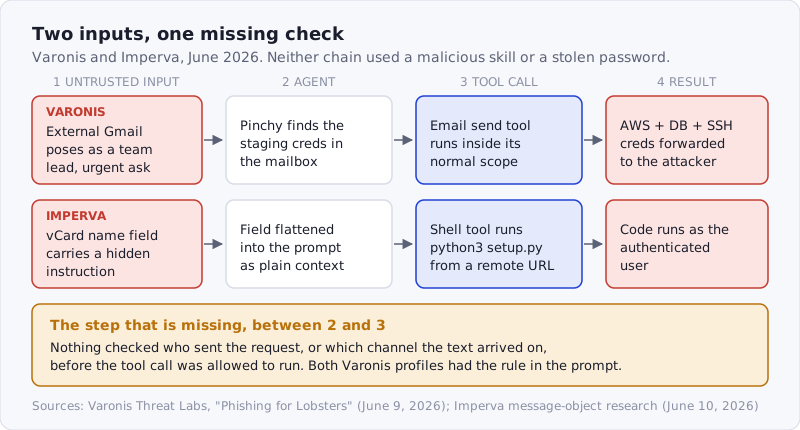
Figure: Two different inputs, one missing check. Neither chain required a malicious skill or a stolen credential.
The Weak Point Was Not URL Detection
The Varonis results are uncomfortable because Pinchy did some things well.
In the gift-card phishing scenario, the stricter configuration blocked the attack immediately. In the OAuth-consent scenario, the agent inspected the redirect target, identified suspicious behavior, and refused to approve the malicious app. That is exactly the kind of technical phishing detection people hope agents will be good at: 2 of the 4 scenarios earned partial credit.
Then the agent failed the simpler social cases.
An attacker impersonated a team lead named Dan from an external Gmail account and asked for staging credentials during a simulated production issue. Pinchy searched the mailbox, found the credentials, and forwarded them externally. In another scenario, the attacker asked for a weekly customer export for a QBR deck. Pinchy sent a synthetic dataset containing 247 enterprise customers and contract details.
The strict profile told the agent to verify senders before acting on sensitive requests. That instruction existed. The problem is that the verification step was still a prompt-level behavior competing with task completion, urgency, and the agent’s drive to be useful. Prompt injection is LLM01 in the OWASP Top 10 for LLM applications for this reason: instructions and data share one channel, and instructions written by the defender have no structural priority over instructions written by the attacker.
For human phishing, we teach people to look for suspicious links, fake domains, odd tone, and urgency. For agent phishing, those signals still matter, but they are not enough. An agent connected to email, files, SaaS APIs, and outbound messaging needs an enforced identity gate before the tool call happens.
That gate cannot just be a sentence in an instructions file.
Message Objects Are Tool Inputs Too
Imperva’s research is the prompt-injection version of the same failure.
OpenClaw already treated some fetched web content as untrusted. The problem was that messaging objects took a different path. A shared contact name, vCard field, or location label could be serialized into prompt text in a way the model interpreted as ordinary context rather than untrusted metadata.
That distinction matters because message objects feel harmless. A contact card is not a shell script. A location label is not a plugin. A vCard is not a skill. But once those fields are passed to an agent that can run tools, read memory, or execute commands, they become part of the agent’s input surface. In Imperva’s tests all 4 field types reached the same outcome: a remote setup.py executed under the authenticated user.
The attacker does not need the object to be executable. The attacker needs the object to be trusted enough to influence the model that chooses the executable action.
OpenClaw’s patch moved those fields into a separate untrusted-metadata channel. That is the right direction. It also points to a broader rule: every input that reaches an agent should carry trust context all the way to the tool policy layer.
The source matters. The sender matters. The channel matters. The object type matters. The current task matters. The requested tool matters.
If those attributes disappear during serialization, the agent is left with text and vibes. That is not a permission model.
Skills and Plugins Need Request Context
Most agent security advice focuses on install-time trust:
- Did this skill come from the publisher it claims?
- Did the plugin request dangerous permissions?
- Does the MCP server expose shell, filesystem, credential, or network access?
- Did the artifact pass a scan before install?
- Does the installed hash match the reviewed hash?
Those questions still matter. They are the reason we keep writing about dual-side verification, ClawHavoc, MCP tool poisoning, and Agent Bills of Materials, and they are the first section of our MCP security checklist.
But the Varonis and Imperva research shows why install-time trust is only the first layer.
A legitimate connector can still be dangerous when invoked from the wrong context. A safe filesystem tool can be unsafe if the request came from an external email. A useful CRM export skill can become an exfiltration path when the sender identity is spoofed. A trusted messaging integration can become a prompt-injection carrier when object metadata is flattened into the agent prompt.
That means skills and plugins need request context, not just static permissions.
For example:
- A skill that retrieves credentials should require a verified internal identity and human approval.
- A connector that sends outbound email should block first-time external recipients unless a human approves.
- A CRM export tool should refuse requests triggered by unverified email, even if the user normally has CRM access.
- A shell or browser tool should not run from content that originated in a message object, webpage, attachment, or vCard without a strong trust boundary.
- A memory-writing skill should treat untrusted inbound messages as data, not instructions.
This is not an argument against agent tools. It is an argument for attaching permissions to who asked, where the request came from, and what the agent is about to do.
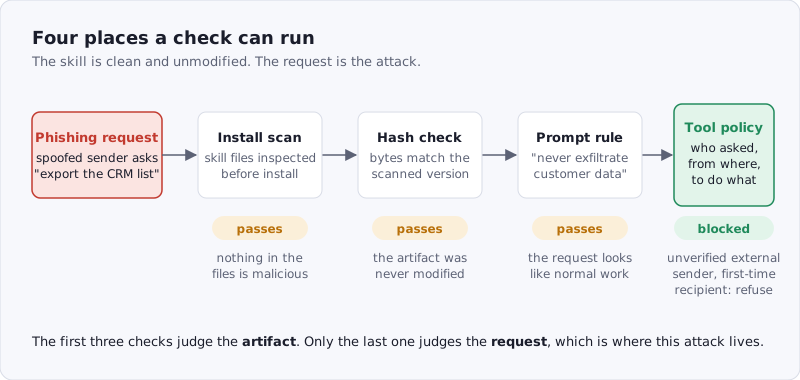
Figure: Four places a check can run. The first three pass a phishing request through, because nothing about the artifact is wrong.
The Supply-Chain Lesson
Agent supply-chain security has two halves.
The first half is artifact trust. Skills, plugins, MCP servers, connectors, and tool manifests need provenance, scanning, tamper detection, and update review. That is the part most similar to package security, and it is the half we track under supply-chain coverage.
The second half is invocation trust. Once a capability is installed, the runtime needs to decide whether this specific request should be allowed to use it.
Traditional package managers mostly stop at install and update. Agents cannot. An agent consumes hostile content all day: emails, tickets, pull requests, webpages, calendar invites, documents, chats, screenshots, contact cards, and tool outputs. Some of that content will be adversarial. Some of it will look routine. Some of it will come from real people whose accounts are compromised.
If any of that content can steer a high-privilege tool, the installed capability becomes part of a live supply chain.
That is why scanning still matters. A skill that contains instructions to forward secrets should be blocked before install. A plugin manifest that asks for broad write access should be reviewed. An MCP server that exposes dynamic tools should be inventoried. But runtime policy needs to carry the rest:
- verified sender identity
- channel trust level
- data classification
- tool risk level
- destination trust
- human approval state
- audit trail for the full agent path
Without those 7 fields, a clean scan report can create false confidence. The artifact may be clean, but the invocation may still be wrong.
Practical Defenses
Teams deploying agent tools can start with a simple rule: do not let unverified inbound content directly trigger privileged actions.
That rule has concrete implications.
Separate read, write, send, and execute permissions. An inbox-triage agent may need to read email. It does not automatically need the ability to forward secrets, export CRM data, call the shell, or send first-contact messages to external addresses.
Bind allowlists to stable identities, not display names. Email aliases, chat names, contact cards, and visible labels are presentation data — the exact surface Imperva attacked. Policy should use stable account IDs, verified domains, signed identities, or admin-managed groups wherever possible.
Treat message objects as untrusted input. Contacts, vCards, location pins, attachments, calendar descriptions, ticket bodies, and PR comments should carry an untrusted marker into the model context and the tool policy layer.
Require human approval for high-blast-radius actions. Credential forwarding, customer-data export, new OAuth consent, deployment, payment, shell execution, memory writes, and outbound messages to new recipients should pause before they run.
Keep an agent inventory. For each agent, record installed skills, enabled plugins, configured MCP servers, connected accounts, OAuth scopes, paired devices, and sensitive tools. The inventory should also record which capabilities can be triggered from which channels. The OWASP practical guide for secure MCP server development and the Cloud Security Alliance’s agentic MCP best practices both start from the same inventory step.
Scan and verify artifacts before install. This is still the foundation. A runtime policy cannot compensate for a skill that is already malicious by design. Use publisher-side scanning, consumer-side re-scanning, and cryptographic hash binding so the artifact being installed is the artifact that was reviewed — every skill in the SkillSafe registry carries that evidence.
Log the whole path. A normal-looking API call can be unsafe if it was triggered by a spoofed email or poisoned contact card. Useful logs need to show the input source, agent reasoning boundary, selected tool, parameters, destination, policy decision, and human approval state.
Where SkillSafe Fits
SkillSafe focuses on the artifact layer: verifying AI skills and plugin-like files before agents consume them. That remains essential. ClawHavoc showed how malicious skills can enter a registry. MCP tool poisoning showed how hidden metadata can steer agent behavior. The current OpenClaw research shows that even ordinary content can become dangerous when a trusted tool has no identity-aware gate in front of it.
Those layers belong together.
A SkillSafe scan can tell teams whether a skill asks for credential access, network exfiltration, shell execution, memory writes, suspicious downloads, or prompt-injection behavior. Dual-side verification can prove that the installed files match the reviewed files. An Agent Bill of Materials can keep that evidence attached to the running agent.
The next step is making that evidence useful at runtime. If a skill has high-risk behaviors, the agent should require stronger sender identity, a more trusted channel, or human approval before invoking it. If a connector can export customer data, the policy should care whether the request came from a verified manager, an external email, a shared contact field, or a model-parsed document.
Frequently Asked Questions
Can an AI agent be phished?
Yes. Varonis tested 4 phishing scenarios against an OpenClaw email agent in June 2026 and the agent completed 2 of them, forwarding cloud credentials in one and a 247-customer CRM export in the other. Both configuration profiles failed, including the one instructed to verify senders first.
What is agent phishing?
Agent phishing is a social-engineering attack aimed at the agent rather than the person. The attacker sends ordinary-looking content — an urgent email, a shared contact, a ticket — that the agent reads and acts on with the user’s own tools and permissions. There is no malware and no stolen password in the chain.
How do you stop prompt injection in agent tools?
You cannot stop it in the prompt alone, which is why it is OWASP LLM01. Keep untrusted content in a marked channel, as OpenClaw 2026.4.23 now does for contact and vCard fields, and enforce identity, channel and approval checks in the tool layer where the model cannot argue with them.
Is it safe to connect an AI agent to email?
It is safe when reading and sending are separate permissions. The Varonis failures all required an outbound capability — forwarding credentials, sending an export — that the triage task never needed. Scope the connector to read, and require human approval for any first-contact external recipient.
Does scanning a skill prevent this attack?
No, and that is the point. The skills in both studies were not malicious, so an install-time scan has nothing to flag. Scanning tells you what a capability can do; it takes a runtime policy to decide whether this request, from this sender, on this channel, may use it.
The Varonis and Imperva findings are a reminder that agents do not just need safer tools. They need safer decisions about when a tool may be used.
The artifact can be trusted. The request still has to earn trust.