Best Claude Code Skills for Data Analysis [2026]
10 data analysis skills installed and scored out of 50. Three tie at 42/50: a 428-line dashboard playbook, a 14-row chart guide, a 3-script CSV toolkit.
We installed 10 data analysis skills from the SkillSafe registry, read every file in every archive, and scored each out of 50. Three tie at the top on 42/50: @wshobson/kpi-dashboard-design for 428 lines of dashboard architecture, @anthropics/data-visualization for a 14-row chart-selection table, and @ailabs-393/csv-data-visualizer for the only executable toolkit in the category.
Every score comes from the installed archive, not a registry blurb. The source repositories are wshobson/agents (MIT) and supercent-io; Anthropic publishes the Agent Skills format and its own skill set at anthropics/skills. The library documentation these skills generate code against is pandas, Plotly for Python, Matplotlib and Streamlit.
Updated September 2026: every source repository below was re-checked this month and the ranking is unchanged. Install counts are the figures recorded at review time; they move weekly, so check the skill page for the current number.
Top 5 Data Analysis Skills at a Glance
| Skill | Score | Key Feature | Libraries / Tools | Installs (at review) |
|---|---|---|---|---|
| @wshobson/kpi-dashboard-design | 42/50 | Full dashboard patterns with SQL + Streamlit code | Streamlit, Plotly, SQL | 6,504 |
| @anthropics/data-visualization | 42/50 | Chart selection guide + accessibility checklist | matplotlib, seaborn, Plotly | 5,608 |
| @ailabs-393/csv-data-visualizer | 42/50 | Three-script toolkit: visualize, profile, dashboard | Plotly, pandas, numpy | 9,983 |
| @coffeefuelbump/csv-data-summarizer-claude-skill | 40/50 | Auto-analysis with data-type-adaptive behavior | pandas, matplotlib, seaborn | 8,691 |
| @supercent-io/data-analysis | 39/50 | End-to-end EDA pipeline with SQL + Python | pandas, matplotlib, seaborn, SQL | 9,370 |
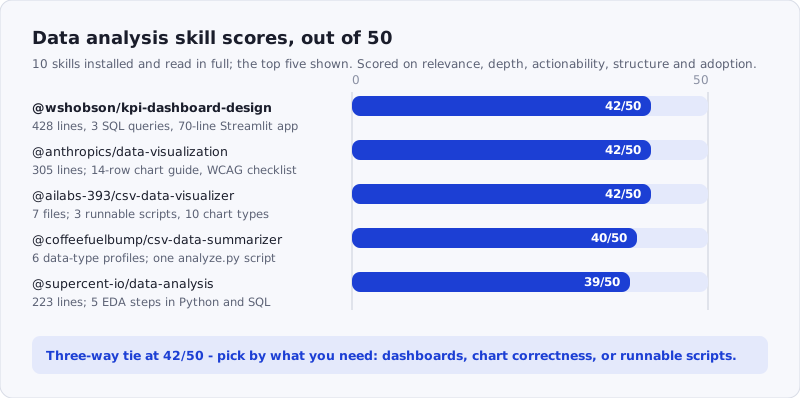
Figure: the five skills that cleared 39/50, with what each one ships. Browse the whole category at /tags/data/.
How We Scored
Each skill was scored out of 50 across five dimensions:
| Dimension | Max | What we looked at |
|---|---|---|
| Relevance | 10 | Does it address real data analysis concerns — EDA, visualization, statistics, data wrangling? |
| Depth | 10 | How much actual content? Specific techniques, not vague advice |
| Actionability | 10 | Can a developer follow the guidance to analyze data effectively? |
| Structure | 10 | Well-organized data analysis workflow? Clear progression? |
| Adoption | 10 | Install count and community traction |
Skills that duplicated official pandas or Matplotlib documentation without adding agent-oriented framing scored lower on depth. Skills under 100 lines were penalized on depth regardless of quality per line. Finance-specific skills (DCF modeling, stock trading) were excluded — this roundup covers general-purpose data analysis for developers.
Which Skill Covers Which Stage
The five skills do not compete: they sit at different points of the same pipeline. Profiling comes first, presentation last, and only two of the five ship code you can execute rather than guidance the agent reads.
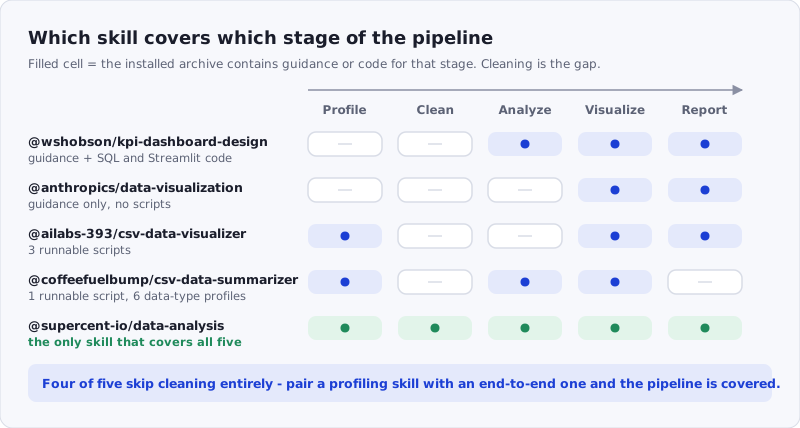
Figure: where each skill acts. Install one from the left half and one from the right half and you have the pipeline covered; check anything you install with the SkillSafe scanner first.
1. @wshobson/kpi-dashboard-design — 42/50
Source: github.com/wshobson/agents · 6,504 installs · 1 verification · Category: productivity
This is the most architecturally complete data analysis skill in the registry. At 428 lines in a single SKILL.md, it covers the full lifecycle of turning raw data into a working dashboard — from selecting the right KPIs to rendering them in Streamlit with Plotly charts. Most data analysis skills stop at “here’s how to make a bar chart.” This one answers the harder question: what should the bar chart show, for whom, and at what refresh frequency?
The KPI framework table is the strongest opening section we saw in any data skill:
| Level           | Focus            | Update Frequency  | Audience   |
| Strategic       | Long-term goals  | Monthly/Quarterly | Executives |
| Tactical        | Department goals | Weekly/Monthly    | Managers   |
| Operational     | Day-to-day       | Real-time/Daily   | Teams      |
The skill provides KPI definitions for four departments (Sales, Marketing, Product, Finance) with specific metrics — not abstract categories. The Sales section lists MRR, ARR, ARPU, win rate, average deal size, and sales cycle length. The Product section covers DAU/MAU stickiness ratio, feature adoption rate, NPS, and CSAT. These are the metrics developers actually get asked to build dashboards for.
The implementation section is where the skill earns its score. It includes three SQL queries for real KPI calculations — MRR with month-over-month growth using LAG(), cohort retention with DATE_TRUNC and age(), and Customer Acquisition Cost with proper NULLIF division. Then it provides a complete 70-line Streamlit dashboard with metric_card() helper, Plotly line chart, Plotly pie chart, and a cohort retention heatmap using go.Heatmap. This is production-ready code, not pseudocode.
The ASCII layout patterns are a genuine innovation for an AI skill. The skill includes three visual mockups — executive summary, SaaS metrics, and real-time operations — rendered as ASCII art that the agent can reference when deciding how to arrange dashboard components. The SaaS metrics pattern shows MRR growth alongside unit economics (CAC, LTV, LTV/CAC ratio, payback period) and a cohort retention bar, which is the exact layout most SaaS teams need and few AI tools generate correctly without guidance.
Where it loses points: The do’s and don’ts section at the end is thin compared to the rest of the skill — five bullet points each, without worked examples of the anti-patterns. “Don’t show vanity metrics” is good advice, but the skill doesn’t define which specific metrics qualify as vanity in each department context. The real-time operations pattern references WebSocket/SSE refresh but doesn’t show the Streamlit auto-refresh implementation (st.experimental_rerun or time.sleep loop).
Score breakdown: Relevance 8/10 · Depth 9/10 · Actionability 9/10 · Structure 9/10 · Adoption 7/10
npx skills add https://api.skillsafe.ai/wshobson/kpi-dashboard-design2. @anthropics/data-visualization — 42/50
Source: github.com/anthropics (Claude Cowork plugins) · 5,608 installs
This is the most principled visualization skill in the registry — the one you install when you want the AI to make correct charts, not just functional ones. At 305 lines, every section serves a specific decision: which chart type fits the data relationship, how to code it in Python, and how to make it accessible.
The chart selection guide is a 14-row decision table that maps data relationships to chart types with alternatives:
| What You're Showing              | Best Chart              | Alternatives                              |
| Trend over time                  | Line chart              | Area chart (if showing cumulative)        |
| Part-to-whole composition        | Stacked bar chart       | Treemap (hierarchical), waffle chart      |
| Distribution                     | Histogram               | Box plot (comparing groups), violin plot  |
| Correlation (many variables)     | Heatmap (correlation)   | Pair plot                                 |
| Performance vs. target           | Bullet chart            | Gauge (single KPI only)                   |
More valuable than the “use” recommendations are the “don’t use” rules. The skill explicitly prohibits pie charts with 6+ categories (“Humans are bad at comparing angles. Use bar charts instead”), 3D charts (“Never. They distort perception and add no information”), and dual-axis charts without clear labeling (“They can mislead by implying correlation”). These are exactly the chart types AI tools default to when left to their own judgment.
The Python code section provides six complete chart patterns — line, bar, histogram, heatmap, small multiples, and interactive Plotly — each with professional styling: plt.style.use('seaborn-v0_8-whitegrid'), custom rcParams for font sizes, hidden top and right spines, and a colorblind-friendly palette ('#4C72B0', '#DD8452', '#55A868'). The number formatting helper is a detail most skills skip entirely — a format_number() function that renders values as $2.4M, $450K, or 12.5% depending on the format type, with a mticker.FuncFormatter integration for axis labels.
The design principles section reads like a compressed version of Edward Tufte’s visualization theory adapted for AI code generation. The rule “Title states the insight: ‘Revenue grew 23% YoY’ beats ‘Revenue by Month’” is the kind of instruction that directly changes AI output quality — most AI-generated charts have descriptive titles, not insight titles.
The accessibility checklist at the end is the most thorough we saw in any visualization skill: colorblind testing, screen reader alt text, pattern fills alongside color, minimum text sizes, and a black-and-white print test. The checklist format (with - [ ] items) makes it easy for the agent to verify compliance before delivering a visualization. It is also the one section in this roundup that maps onto a published standard — WCAG 2.2 Success Criterion 1.4.1, Use of Color:
Color is not used as the only visual means of conveying information, indicating an action, prompting a response, or distinguishing a visual element.
— W3C, Understanding WCAG 2.2, SC 1.4.1 (Level A)
Pattern fills and direct labels are how a chart satisfies that, and this skill is the only one of the ten that asks the agent for them.
Where it loses points: No automated scripts — unlike @ailabs-393/csv-data-visualizer, this is pure guidance without executable tooling. The Plotly section is only 12 lines compared to the 40+ lines each for matplotlib patterns. For teams using Plotly as their primary library, the coverage is thin.
Score breakdown: Relevance 9/10 · Depth 9/10 · Actionability 8/10 · Structure 9/10 · Adoption 7/10
npx skills add https://api.skillsafe.ai/anthropics/data-visualization3. @ailabs-393/csv-data-visualizer — 42/50
Source: ailabs-393 · 9,983 installs · Scan: A+
The most-installed skill in this roundup and the only one that ships executable tooling. The archive contains three Python scripts alongside the SKILL.md and a references/visualization_guide.md, totaling seven files. This is a toolkit, not a guide — you run the scripts directly against your CSV files.
Archive structure:
SKILL.md
scripts/
  visualize_csv.py          ← individual chart generation (10 chart types)
  data_profile.py           ← automatic data quality + stats report
  create_dashboard.py       ← multi-plot dashboard from config or auto-detection
references/
  visualization_guide.md    ← chart selection reference
The visualize_csv.py script supports ten chart types via command-line flags: --histogram, --boxplot, --violin, --scatter, --correlation, --line, --bar, --pie, plus --group-by and --color modifiers. All output is Plotly-based, which means interactive HTML by default with zoom, pan, and hover tooltips. Static exports (PNG, PDF, SVG) require the kaleido package, which the skill documents explicitly.
The data_profile.py script is the most practically useful piece of the archive. It generates a comprehensive data quality report — file info, dataset shape, memory usage, column-by-column analysis (types, missing values, unique counts), statistical summaries (mean, std, quartiles, skewness, kurtosis), categorical frequency counts, and data quality flags (high missing data, duplicate rows, constant columns, high cardinality). The output can be text, HTML, or JSON. This is the script you run before you know what questions to ask of a dataset.
The create_dashboard.py script has two modes: automatic (analyzes column types and generates appropriate visualizations) and custom (reads a JSON config specifying exact plots). The auto mode is the smart default — it detects numeric columns for histograms, categorical columns for bar charts, and paired numerics for scatter plots. The config mode lets you specify exact layouts:
{
  "title": "Sales Analysis Dashboard",
  "plots": [
    {"type": "histogram", "column": "revenue"},
    {"type": "box", "column": "revenue", "group_by": "region"},
    {"type": "scatter", "column": "advertising", "group_by": "revenue"},
    {"type": "correlation"}
  ]
}
The SKILL.md includes a workflow decision tree that tells the agent exactly when to use which script — profile first for unfamiliar datasets, dashboard for overview requests, individual visualizations for specific analysis questions. This agent-routing logic is the difference between a useful skill and a collection of scripts.
Where it loses points: The scripts depend on pandas, plotly, and numpy as external pip dependencies, which adds installation friction compared to pure-guidance skills. The visualization_guide.md reference file overlaps with @anthropics/data-visualization — teams installing both will have redundant chart selection guidance. No statistical testing or correlation significance — the profiler reports descriptive stats but doesn’t flag statistically interesting patterns.
Score breakdown: Relevance 9/10 · Depth 8/10 · Actionability 9/10 · Structure 8/10 · Adoption 8/10
npx skills add https://api.skillsafe.ai/ailabs-393/csv-data-visualizer4. @coffeefuelbump/csv-data-summarizer-claude-skill — 40/50
Source: coffeefuelbump · 8,691 installs · Scan: A+
This skill takes a fundamentally different approach from the others in this roundup: it’s not a reference guide, it’s a behavioral specification. The core design principle — stated in large, bold text — is that the agent should immediately and automatically run a full analysis when given a CSV file, without asking the user what they want.
The behavioral section is the most opinionated agent instruction we read across all 10 skills. It includes explicit forbidden phrases:
NEVER SAY THESE PHRASES:
- "What would you like to do with this data?"
- "Here are some common options:"
- "I can create a comprehensive analysis if you'd like!"
- Any sentence ending with "?" asking for user direction
This matters because most AI tools, when given a CSV file, default to asking what the user wants to do with it. The skill eliminates that prompt-and-wait behavior entirely, which is the correct UX for data exploration — when someone hands you a dataset, the useful response is a complete analysis, not a menu.
Archive structure:
SKILL.md
analyze.py                               ← core analysis script
requirements.txt                         ← pandas, matplotlib, seaborn
examples/
  showcase_financial_pl_data.csv         ← sample P&L data for testing
resources/
  README.md                              ← additional documentation
  sample.csv                             ← basic test dataset
The adaptive analysis logic is the skill’s strongest technical contribution. Rather than running the same analysis on every dataset, the skill defines six data-type profiles and tells the agent which analyses to run for each:
- Sales/E-commerce data (order dates, revenue, products): time-series trends, revenue analysis, product performance
- Customer data (demographics, segments, regions): distribution analysis, segmentation, geographic patterns
- Financial data (transactions, amounts, dates): trend analysis, statistical summaries, correlations
- Operational data (timestamps, metrics, status): time-series, performance metrics, distributions
- Survey data (categorical responses, ratings): frequency analysis, cross-tabulations
- Generic tabular data: adapts based on column types found
The conditional visualization rule is practical: time-series plots only if date columns exist, correlation heatmaps only if multiple numeric columns exist, category distributions only if categorical columns exist. This prevents the agent from generating empty or meaningless charts when the data doesn’t support them.
Where it loses points: The analyze.py script is a single Python file without the modular architecture of the @ailabs-393/csv-data-visualizer toolkit. There’s no dashboard generation, no data profiling as a separate step, and no interactive output — the skill relies on matplotlib/seaborn for static images, not Plotly for interactive exploration. The sample datasets are a nice touch for testing but the showcase_financial_pl_data.csv file is narrow (P&L only), which limits the skill’s own test coverage of its claimed multi-domain adaptability.
Score breakdown: Relevance 9/10 · Depth 7/10 · Actionability 9/10 · Structure 7/10 · Adoption 8/10
npx skills add https://api.skillsafe.ai/coffeefuelbump/csv-data-summarizer-claude-skill5. @supercent-io/data-analysis — 39/50
Source: github.com/supercent-io · 9,370 installs · Scan: A+
The second-most-installed skill in this roundup and the one with the broadest scope. At 223 lines, it covers the complete EDA pipeline in five numbered steps — load, clean, analyze, visualize, derive insights — with both Python (pandas) and SQL code for each step. If you need one skill that handles the full data analysis workflow from raw file to final report, this is the one.
The five-step structure is what makes this skill effective as an agent instruction. Each step has a clear entry and exit:
- Load and explore —
df.info(),df.describe(),df.head(10), plus SQL equivalents (DESCRIBE table_name,SELECT COUNT(*) ...) - Clean — missing value imputation with
fillna(mean), duplicate removal, type conversions, IQR outlier removal - Statistical analysis — grouped aggregation, correlation matrices, pivot tables
- Visualization — histogram, boxplot, heatmap, time series (all matplotlib/seaborn)
- Derive insights — top/bottom analysis with
nlargest/nsmallest, trend analysis withpct_change(), segment analysis with per-segment average order value
The dual Python/SQL coverage is a genuine differentiator. Step 1 includes both df.read_csv() and SELECT * FROM table_name LIMIT 10. Step 3 shows df.groupby().agg() alongside SQL aggregation with COUNT(DISTINCT ...), MIN, MAX, AVG. For developers who work with both notebook environments and database queries, this avoids the context switch of needing separate skills for each.
The output format section provides a complete report template in Markdown:
# Data Analysis Report

## 1. Dataset overview
- Dataset: [name]
- Records: X,XXX
- Columns: XX
- Date range: YYYY-MM-DD ~ YYYY-MM-DD

## 2. Key findings
## 3. Statistical summary
## 4. Recommendations
The best practices section is short but targeted: “Preserve raw data (work on a copy)” and “Do not draw unsupported conclusions” are rules that prevent the two most common AI data analysis mistakes — mutating the source data and over-interpreting noise.
Where it loses points: The visualization section is the weakest of the five steps — four chart types with minimal styling (no custom color palettes, no spine removal, no annotation). Compare this to @anthropics/data-visualization which provides 14 chart types with professional formatting. The IQR outlier removal in step 2 is presented as a default approach without noting that it’s inappropriate for skewed distributions — a more nuanced skill would offer both IQR and z-score methods with guidance on when to use each. The Examples section at the bottom is empty (<!-- Add example content here -->), which is a gap in a skill that otherwise follows a clear pedagogical structure.
Score breakdown: Relevance 8/10 · Depth 7/10 · Actionability 8/10 · Structure 8/10 · Adoption 8/10
npx skills add https://api.skillsafe.ai/supercent-io/data-analysisFrequently Asked Questions
What distinguishes a data analysis skill from a data visualization skill?
Data analysis skills cover the full pipeline: loading data, cleaning it, running statistics, and deriving insights. Visualization skills focus specifically on chart selection, styling, and accessibility. In this roundup, @supercent-io/data-analysis is the broadest end-to-end analysis skill, while @anthropics/data-visualization is the deepest visualization-specific one. @wshobson/kpi-dashboard-design bridges both — it covers which metrics to compute and how to render them. For most projects, installing one analysis skill and one visualization skill gives the best coverage without overlap.
Do these skills require external Python packages?
Three of the five skills reference external dependencies. @ailabs-393/csv-data-visualizer requires pandas, plotly, and numpy (plus kaleido for static image export). @coffeefuelbump/csv-data-summarizer-claude-skill requires pandas, matplotlib, and seaborn. @supercent-io/data-analysis and @anthropics/data-visualization provide code patterns using these same libraries but don’t ship executable scripts — they guide the agent to write the code itself. @wshobson/kpi-dashboard-design references Streamlit and Plotly in its implementation examples. All five skills use libraries that are standard in data science environments; none require unusual or niche packages.
How were these skills selected and scored?
We started with the top data analysis skills by install count from the SkillSafe registry, plus results from searches for “data visualization”, “csv excel data”, and “statistics analytics.” We excluded finance-specific skills (DCF modeling, stock/crypto trading) that don’t serve general-purpose data analysis. We also excluded skills that were near-identical copies — three skills from the same publisher shared 80%+ of their text. The remaining 10 candidates were installed, read in full, and scored across the five dimensions. The top 5 scored 39-42; the next skill scored 37, with the gap driven primarily by depth (fewer than 100 lines) and missing actionable code examples.
Are these data analysis skills free, and do they work outside Claude Code?
All five are free to install and none require a paid account. Installation is one npx skills add command per skill, and the same archive loads in Claude Code, Cursor and Windsurf — the skill format is an open specification published at anthropics/skills. The only cost is Python packages: two of the five ship scripts that need pandas, plotly, numpy, matplotlib or seaborn on your machine.
How do I check a data skill is safe before installing it?
Two of these five skills ship executable Python that runs against your CSV files, so read the scripts before you run them. Every skill page on SkillSafe carries a scan grade — three of the five here hold A+ — and you can run any archive through the SkillSafe scanner yourself. For the threat model behind those grades, see how dual-side verification works.
Conclusion
If you install one skill from this list, install @wshobson/kpi-dashboard-design — 428 lines of dashboard architecture with SQL queries and a complete Streamlit implementation that you can adapt to any dataset. It answers the question most data analysis skills ignore: not just how to analyze data, but how to present it to the people who need to act on it.
For visualization specifically, @anthropics/data-visualization is the skill to reach for — the chart selection guide and accessibility checklist will change how the AI picks chart types, and the colorblind-friendly palette and number formatting helpers are details that matter in production. If you want executable tooling rather than guidance, @ailabs-393/csv-data-visualizer gives you three scripts that turn a CSV into a profiled, visualized dashboard in minutes.
For automated CSV analysis without user prompting, @coffeefuelbump/csv-data-summarizer-claude-skill has the most opinionated agent behavior — it eliminates the “what would you like to do with this data?” prompt entirely. And @supercent-io/data-analysis with its 9,370 installs is the broadest end-to-end skill — five steps from raw data to report, with both Python and SQL at each step.
# Install all five
npx skills add https://api.skillsafe.ai/wshobson/kpi-dashboard-design
npx skills add https://api.skillsafe.ai/anthropics/data-visualization
npx skills add https://api.skillsafe.ai/ailabs-393/csv-data-visualizer
npx skills add https://api.skillsafe.ai/coffeefuelbump/csv-data-summarizer-claude-skill
npx skills add https://api.skillsafe.ai/supercent-io/data-analysis
Related roundups: Top Claude Code skills for Python developers · Best Claude Code skills for API development · Browse all Best Of roundups