Best Claude Code Skills for DevOps and CI/CD [2026]
10 DevOps and CI/CD skills installed and scored out of 50. A 1,004-line Docker hardening playbook leads at 45/50; four more cover pipelines and rollout.
We installed 10 DevOps and CI/CD skills from the SkillSafe registry, read every file, and scored each out of 50. @josiahsiegel/docker-security-guide leads at 45/50 with a 1,004-line container-hardening playbook; @sickn33/docker-expert takes 42/50 for the most complete Compose setup. The other three cover pipelines, deployment strategies and rollback.
Every score comes from the installed archive, not a registry description or a GitHub README. The standards and tools these skills configure are public: the CIS Docker Benchmark, Docker Engine security documentation, the Argo Rollouts canary strategy, Trivy, Syft and docker-bench-security. The pipeline-design skill comes from wshobson/agents (MIT).
Updated September 2026: every tool and standard referenced below was re-checked this month and the ranking is unchanged. Install counts are the figures recorded at review time; they move weekly, so check the skill page for the current number.
Top 5 DevOps and CI/CD Skills at a Glance
| Skill | Score | Key Feature | Tools / Platforms | Installs (at review) |
|---|---|---|---|---|
| @josiahsiegel/docker-security-guide | 45/50 | 1,004-line security playbook with SBOM, seccomp, CIS benchmarks | Docker, Chainguard, Trivy, Falco | 9,063 |
| @sickn33/docker-expert | 42/50 | Full container lifecycle from multi-stage builds to Compose orchestration | Docker, Docker Compose, Buildx | 3,553 |
| @wshobson/deployment-pipeline-design | 41/50 | 4 deployment strategies with Argo Rollouts canary config | GitHub Actions, GitLab CI, Azure Pipelines, Kubernetes | 2,707 |
| @supercent-io/deployment-automation | 40/50 | End-to-end pipeline: Docker to K8s with blue-green switch script | Docker, GitHub Actions, Kubernetes, Vercel | 5,379 |
| @patricio0312rev/github-actions-pipeline-creator | 39/50 | Composite actions, matrix builds, failure diagnostics with PR comments | GitHub Actions, Docker, Vercel | 6,419 |
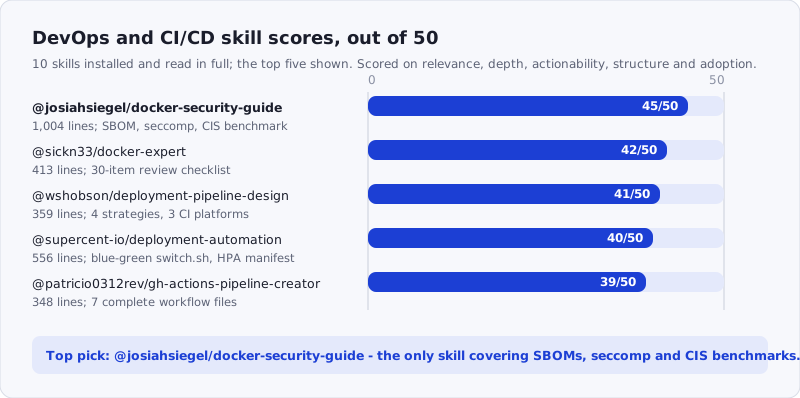
Figure: the five skills that cleared 39/50, with what each one ships. Browse the whole category at /tags/devops/.
How We Scored
Each skill was scored across five dimensions, 0-10 each, for a maximum of 50 points:
| Dimension | Max | What we looked at |
|---|---|---|
| Relevance | 10 | Does it address real DevOps/CI/CD concerns — containers, pipelines, deployment, infrastructure-as-code? |
| Depth | 10 | How much actual content? Specific configs, Dockerfiles, pipeline definitions, not vague advice |
| Actionability | 10 | Can a developer follow the guidance to set up or improve their DevOps workflow? |
| Structure | 10 | Well-organized coverage of the DevOps lifecycle? |
| Adoption | 10 | Install count and stars as a proxy for community validation |
We scored by reading the actual installed skill files — not registry descriptions, not GitHub READMEs.
Where Each Skill Acts in the Pipeline
These five do not overlap much. Each owns a different stage between docker build and a production rollback, which is why installing two or three of them is the normal outcome rather than picking a winner.
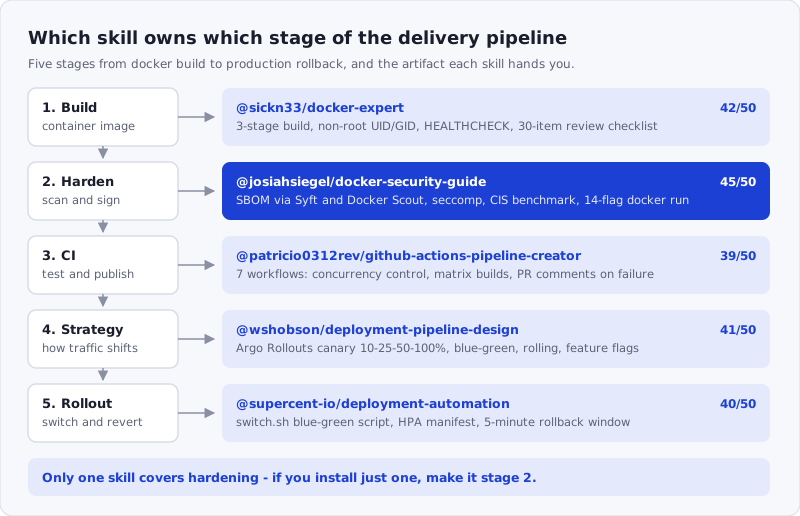
Figure: the stage each skill owns and the artifact it hands you. Scan any skill archive before you install it with the SkillSafe scanner.
1. @josiahsiegel/docker-security-guide — 45/50
Score: 45/50 | Relevance: 10 · Depth: 10 · Actionability: 9 · Structure: 9 · Adoption: 7
At 1,004 lines, this is the largest single-file skill we evaluated in this roundup. It covers Docker security from image selection through runtime hardening, network isolation, secrets management, compliance benchmarking, and monitoring — and every section includes copy-paste configurations rather than abstract advice.
The image security section goes beyond the usual “use Alpine” recommendation. It covers Chainguard/Wolfi images with zero-CVE goals and built-in SBOMs, explains when to choose cgr.dev/chainguard/node:latest over node:20-alpine, and provides a two-stage Dockerfile pattern using Chainguard’s -dev variant for builds and the minimal variant for production. The SBOM section (lines 288-414) is particularly thorough: it covers Docker Scout, Syft, and BuildKit attestations, then explicitly warns that BuildKit attestations are “NOT cryptographically signed” and recommends cosign and Notary for production. That level of nuance is uncommon in container skills.
The BuildKit frontend security section (lines 224-287) addresses a 2025-era threat that no other skill we evaluated mentions: malicious # syntax= directives in Dockerfiles that can execute arbitrary code during builds. It provides a grep-based audit command and a buildkitd.toml configuration to restrict frontend sources.
The runtime security section provides a comprehensive docker run command (line 636) with 14 flags covering non-root user, dropped capabilities, read-only filesystem, tmpfs mounts, seccomp, resource limits, network isolation, and health checks. The Compose equivalents follow immediately, making it straightforward to translate between CLI and orchestration contexts. The CIS Docker Benchmark section includes the docker-bench-security container command and maps the key recommendations to six categories.
That command is not the skill’s invention — it is Docker’s own auditing tool, and the skill is teaching the agent to run it rather than to reimplement its checks:
The Docker Bench for Security is a script that checks for dozens of common best-practices around deploying Docker containers in production. The tests are all automated, and are based on the CIS Docker Benchmark v1.6.0.
— docker/docker-bench-security, README
The CIS Docker Benchmark itself is free to download for non-commercial use, which is what makes this section auditable: you can check the skill’s six categories against the published document instead of trusting the summary.
One flag: the SkillSafe scanner flagged a HIGH issue at line 789 (SS07: privilege escalation via sudo shell) related to the CIS benchmark runner command. The command itself is a reference to Docker’s official security benchmarking tool and runs with --rm, so it is a documentation pattern rather than a runtime risk, but the scan grade is B rather than A+.
npx skills add https://api.skillsafe.ai/josiahsiegel/docker-security-guide2. @sickn33/docker-expert — 42/50
Score: 42/50 | Relevance: 9 · Depth: 9 · Actionability: 9 · Structure: 9 · Adoption: 6
This skill takes a different approach than the security guide above: it covers the complete Docker workflow from environment detection through build optimization, Compose orchestration, and development workflow integration. The 413-line SKILL.md is organized around six expertise areas, each with production-ready code blocks.
The opening workflow is practical: the skill starts by running docker --version, docker info, and find . -name "Dockerfile*" to detect the existing container setup before making recommendations. That environment-aware approach prevents the common problem of skills that generate Node.js Dockerfiles for Python projects.
The multi-stage build section (lines 82-107) provides a three-stage pattern (deps, build, runtime) with non-root user creation, npm ci --only=production, cache cleaning, and a HEALTHCHECK directive. The Compose orchestration section (lines 139-205) is the most complete we found in any skill: it includes service health check conditions (service_healthy), Docker secrets integration via _FILE environment variables, internal backend networks, and resource limits with reservations — a production-ready Compose file rather than a starter template.
The code review checklist (lines 319-365) covers 30 items across six categories: Dockerfile optimization, security hardening, Compose orchestration, image size, development workflow, and networking. Each item is a checkbox with a specific criterion — “Non-root user created with specific UID/GID (not default)” rather than “use non-root user.” The common issue diagnostics section maps symptoms to root causes to solutions for five problem categories.
The 528 stars make this the most community-validated skill in this roundup by a wide margin. The skill cross-references other expert skills (kubernetes-expert, github-actions-expert, devops-expert) and explicitly tells the AI when to hand off, which prevents it from generating Kubernetes configs when a dedicated K8s skill would be more appropriate.
npx skills add https://api.skillsafe.ai/sickn33/docker-expert3. @wshobson/deployment-pipeline-design — 41/50
Score: 41/50 | Relevance: 9 · Depth: 8 · Actionability: 8 · Structure: 9 · Adoption: 7
This is the only skill in the roundup that covers pipeline architecture across three CI/CD platforms. The 359-line SKILL.md provides approval gate patterns for GitHub Actions (environment-based), GitLab CI (time-delayed), and Azure Pipelines (multi-approver with ManualValidation), each as a ready-to-use YAML block. Most CI/CD skills are GitHub Actions-only; the multi-platform coverage matters for teams that use GitLab or Azure DevOps.
The deployment strategies section covers four patterns with real configuration files. The canary deployment section (lines 152-169) provides an Argo Rollouts manifest with progressive weight steps (10% -> 25% -> 50% -> 100%) and 5-minute pause intervals between each. Those setWeight and pause steps are the controller’s own vocabulary, and the reason a canary config has to be written out rather than inferred:
Since there is no agreed upon standard for a canary deployment, the rollouts controller allows users to outline how they want to run their canary deployment.
— Argo Rollouts documentation, Canary Deployment Strategy The blue-green section uses
kubectl labelfor service switching with an explicit rollback command. The rolling deployment section specifiesmaxSurge: 2andmaxUnavailable: 1on a 10-replica deployment. The feature flags section includes a Python code example using Flagsmith.
The multi-stage pipeline example (lines 204-269) ties all the pieces together: build, test with Trivy security scan, staging deploy, E2E integration tests, production deploy with Argo Rollouts promotion, health check verification, and Slack notification. The rollback section provides both automated (health-check-based with kubectl rollout undo) and manual rollback patterns with revision history inspection.
The monitoring integration section (lines 339-352) demonstrates post-deployment verification against Prometheus metrics, automatically failing if the error rate exceeds 1%. The 10 pipeline best practices are concrete rather than aspirational: “fail fast” (run quick tests first), “environment parity” (keep environments consistent), “rollback automation” (auto-rollback on failures).
The skill has 13 stars and 16 verifications, making it the most verified DevOps skill on the registry. It is categorized under devops and tagged for Claude Code, Cursor, and Windsurf.
npx skills add https://api.skillsafe.ai/wshobson/deployment-pipeline-design4. @supercent-io/deployment-automation — 40/50
Score: 40/50 | Relevance: 9 · Depth: 8 · Actionability: 8 · Structure: 8 · Adoption: 7
At 556 lines, this skill covers the broadest surface area: Docker containerization, GitHub Actions CI/CD, Kubernetes deployment with horizontal pod autoscaling, Vercel/Netlify frontend deployment, and zero-downtime deployment strategies. It reads as a sequential tutorial — Step 1 through Step 5 — which makes it well-suited for teams setting up deployment infrastructure from scratch.
The Dockerfile (lines 27-67) is a proper multi-stage build with a non-root user, health check, and .dockerignore. The GitHub Actions workflow (lines 103-199) is a three-job pipeline (test, build, deploy) that includes Docker Buildx, GHCR login, metadata extraction with semantic versioning tags, GHA cache, and SSH-based production deployment. The deploy job uses appleboy/ssh-action for server access, which is a practical pattern for teams not running Kubernetes.
The Kubernetes section (lines 201-333) stands out for including a HorizontalPodAutoscaler manifest (lines 279-304) with CPU and memory scaling targets, something most deployment skills omit. The deployment manifest uses RollingUpdate with maxSurge: 1 and maxUnavailable: 0 for true zero-downtime rollouts, plus both liveness and readiness probes pointing at different endpoints (/health and /ready).
The blue-green deployment section (lines 401-461) includes a complete switch.sh script that checks the current active color, deploys the new version, runs a health check, updates nginx configuration with sed, reloads nginx, and waits 5 minutes before stopping the old environment as a rollback window. That script is a concrete artifact you can modify and use, not a conceptual diagram.
The constraints section (lines 494-519) codifies three required rules (health checks, graceful shutdown with SIGTERM handling, environment variable separation) and three prohibited patterns (committing secrets, debug mode in production, relying solely on the latest tag). The SIGTERM handler code example (lines 505-510) is a small but important detail that many deployment guides skip.
npx skills add https://api.skillsafe.ai/supercent-io/deployment-automation5. @patricio0312rev/github-actions-pipeline-creator — 39/50
Score: 39/50 | Relevance: 8 · Depth: 8 · Actionability: 8 · Structure: 8 · Adoption: 7
This skill focuses exclusively on GitHub Actions and covers it more thoroughly than any other GitHub Actions skill we evaluated. The 348-line SKILL.md provides seven workflow patterns, each as a complete YAML file rather than a snippet.
The basic CI workflow (lines 12-104) includes concurrency control with cancel-in-progress: true — a feature that prevents wasted runner minutes on superseded pushes. The workflow separates lint (ESLint, Prettier, TypeScript type-check), test (with Codecov upload), and build (with artifact upload) into parallel jobs. The matrix strategy section (lines 108-133) demonstrates cross-platform testing with an exclude rule to skip slow combinations (Windows + Node 18), which is a practical optimization that template-oriented skills rarely include.
The advanced caching section (lines 136-158) shows multi-path caching for npm, node_modules, and .next/cache with fallback restore keys. The Docker build and push section (lines 160-198) uses docker/build-push-action@v5 with registry-based caching (type=registry,ref=...) rather than the more common GHA cache, which performs better for large images.
The failure diagnostics section (lines 248-278) is what elevates this skill: it captures test results on failure, uploads them as artifacts with if: always(), posts a PR comment linking to the failed run using actions/github-script, and then fails the job explicitly after the diagnostic steps complete. The composite action pattern (lines 282-309) shows how to extract reusable setup logic into .github/actions/, reducing duplication across workflows.
The deployment workflow (lines 200-244) supports both push-triggered and manual workflow_dispatch deploys with environment selection (staging or production), using Vercel as the deployment target. The eight best practices are quantified where possible: “Cache dependencies: Speeds up 3-5x.”
npx skills add https://api.skillsafe.ai/patricio0312rev/github-actions-pipeline-creatorFrequently Asked Questions
What is the difference between a Docker skill and a deployment skill?
Docker skills like @josiahsiegel/docker-security-guide and @sickn33/docker-expert focus on building, securing, and optimizing container images and Compose configurations. Deployment skills like @wshobson/deployment-pipeline-design and @supercent-io/deployment-automation cover the broader pipeline: CI triggers, test stages, approval gates, deployment strategies (canary, blue-green, rolling), and production monitoring. In practice you want both — a Docker skill to produce secure, optimized images and a deployment skill to get those images into production safely.
Do these skills generate working pipeline files or just provide guidance?
All five skills provide complete, copy-paste YAML configurations. @patricio0312rev/github-actions-pipeline-creator generates full .github/workflows/ files with concurrency control, matrix builds, and artifact uploads. @wshobson/deployment-pipeline-design provides ready-to-use configs for GitHub Actions, GitLab CI, and Azure Pipelines. @supercent-io/deployment-automation includes a working switch.sh blue-green deployment script and complete Kubernetes manifests with HPA. These are not abstract diagrams — they are production-starting-point configs that need your specific image names, secrets, and environment URLs filled in.
Which skill should I install first for a new project?
If you are containerizing an application for the first time, start with @sickn33/docker-expert — its environment detection workflow analyzes your project structure before recommending a Dockerfile pattern, and the 30-item code review checklist catches common mistakes. Once your container builds are working, add @josiahsiegel/docker-security-guide to harden your images with non-root users, dropped capabilities, and SBOM generation. For the pipeline itself, @supercent-io/deployment-automation provides the broadest end-to-end coverage from Docker through Kubernetes to Vercel.
Do any of these skills generate an SBOM for my images?
Only @josiahsiegel/docker-security-guide, and it covers three routes: Docker Scout, Syft, and BuildKit attestations. The skill is explicit that BuildKit attestations are “NOT cryptographically signed” and recommends cosign or Notary for production, which is the right distinction — an unsigned SBOM records what was in the image, it does not prove who built it. Pair it with Trivy in CI for vulnerability scanning.
Is it safe to let an AI agent generate my deployment pipeline?
Treat generated YAML as a draft, not a merge. These five skills produce configs that reference your secrets, registries and production hosts, and the security guide’s own archive triggered a HIGH finding in the SkillSafe scanner (SS07, privilege escalation via a sudo shell) for a documentation command. Run every skill through the SkillSafe scanner before installing and read what the scan grades mean.
Conclusion
The five skills above cover three layers of the DevOps workflow: container building and security (@josiahsiegel/docker-security-guide, @sickn33/docker-expert), pipeline architecture and deployment strategies (@wshobson/deployment-pipeline-design), end-to-end automation (@supercent-io/deployment-automation), and CI/CD implementation (@patricio0312rev/github-actions-pipeline-creator). They complement each other because each addresses a different stage of the deployment lifecycle.
@josiahsiegel/docker-security-guide earns the top score on depth alone — 1,004 lines covering SBOM generation, BuildKit frontend security, Chainguard images, CIS benchmarks, and seccomp profiles is a level of container security coverage that no other skill matches. For the broadest Docker workflow coverage, @sickn33/docker-expert and its 528 community stars remain the most validated choice.
All five skills are free to install, work across Claude Code, Cursor, and Windsurf, and are verified on the SkillSafe registry:
npx skills add https://api.skillsafe.ai/josiahsiegel/docker-security-guide
npx skills add https://api.skillsafe.ai/sickn33/docker-expert
npx skills add https://api.skillsafe.ai/wshobson/deployment-pipeline-design
npx skills add https://api.skillsafe.ai/supercent-io/deployment-automation
npx skills add https://api.skillsafe.ai/patricio0312rev/github-actions-pipeline-creator
Related roundups: Best Claude Code skills for API development · Top Claude Code skills for Python developers · Browse all Best Of roundups