Best Claude Code Skills for Git Workflows [2026]
We scored 8 git workflow skills out of 50. Five deliver: rebase playbooks, safety-gated branch cleanup, changelog pipelines. Winner: git-advanced-workflows.
We installed 8 git workflow skills, read every file, and scored them out of 50. Five carry real git knowledge. @wshobson/git-advanced-workflows wins at 43/50 — 396 lines on interactive rebase, bisect, worktrees and reflog recovery, from wshobson/agents (39,750 stars).
Updated September 2026: every source repository and star count below was re-verified against the GitHub API on 17 September 2026. The five picks and their scores are unchanged; supercent-io/skills-template is no longer a public repository.
The Five Skills, Scored
| Skill | Score | Key Feature | Tools / Workflows | Installs (Apr 2026) |
|---|---|---|---|---|
| @wshobson/git-advanced-workflows | 43/50 | Rebase, bisect, worktrees, reflog recovery | Git, git-worktree, git-bisect, git-reflog | 8,800 |
| @trailofbits/git-cleanup | 41/50 | Branch cleanup with 2-gate safety workflow | Git, GitHub, branch management | 7,706 |
| @wshobson/changelog-automation | 40/50 | 6 changelog methods + conventional commits | Conventional Commits, Keep a Changelog | 2,260 |
| @jezweb/git-workflow | 40/50 | PR preparation + conflict resolution playbook | Git, GitHub PRs, merge/rebase | 9,617 |
| @supercent-io/git-workflow | 38/50 | Full git lifecycle from branching to cleanup | Git, GitHub Flow, Gitflow | 7,826 |
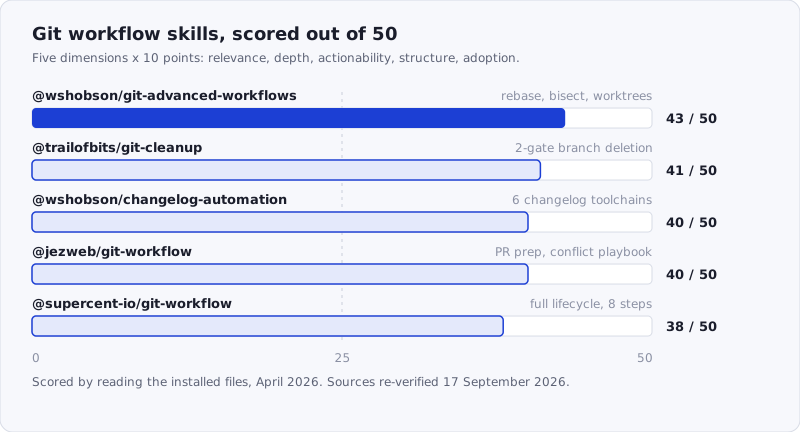
Figure: The top five git workflow skills, scored out of 50. The 5-point spread between first and fifth is narrow — every skill here is usable; the differences are in scope and safety, not quality.
Where These Skills Come From
Every skill in this roundup is a directory inside a public repository. Read the source before you install — that is the whole point of a portable SKILL.md format. Figures below were pulled from the GitHub API on 17 September 2026.
| Skill | Source repository | Repo stars | Installs (SkillSafe / skills.sh) |
|---|---|---|---|
| @wshobson/git-advanced-workflows | wshobson/agents | 39,750 | 33,228 / 181 |
| @trailofbits/git-cleanup | trailofbits/skills | 7,125 | 4,401 / 0 |
| @wshobson/changelog-automation | wshobson/agents | 39,750 | 66,456 / 92 |
| @jezweb/git-workflow | jezweb/claude-skills | 1,012 | 2,818 / 0 |
| @supercent-io/git-workflow | supercent-io — skills-template is no longer public | n/a | 254 / 11,057 |
The install counts in the score table are the April 2026 snapshot we scored against. The registry now counts SkillSafe installs and skills.sh installs separately, which is why the two tables disagree — @supercent-io/git-workflow in particular gets almost all of its traffic from skills.sh.
How We Scored
Each skill was scored across five dimensions, 0-10 each, for a maximum of 50 points:
- Relevance — Does it address real git workflow concerns (branching, commits, PRs, rebasing)?
- Depth — How much actual content? Specific git strategies and commands, not vague advice.
- Actionability — Can a developer follow the guidance to improve their git workflow?
- Structure — Well-organized with clear git workflow coverage and edge case handling?
- Adoption — Install count and stars as a proxy for real-world validation.
We scored by reading the installed skill files — not registry descriptions, not GitHub READMEs.
The category is smaller than code review or testing — git workflows are specific enough that fewer authors have attempted them, and several candidates turned out to be mislabeled. One skill described as “git-workflow” was actually about Cloudflare and React. Another titled “pr-workflow” was 46 lines of bullet points with no real workflow logic.
What Separates a Deep Git Skill From a Thin One
The 46-line “pr-workflow” file and the 396-line git-advanced-workflows file both claim the same scope. The difference shows up in four places, and it is the same four places in every category we score.
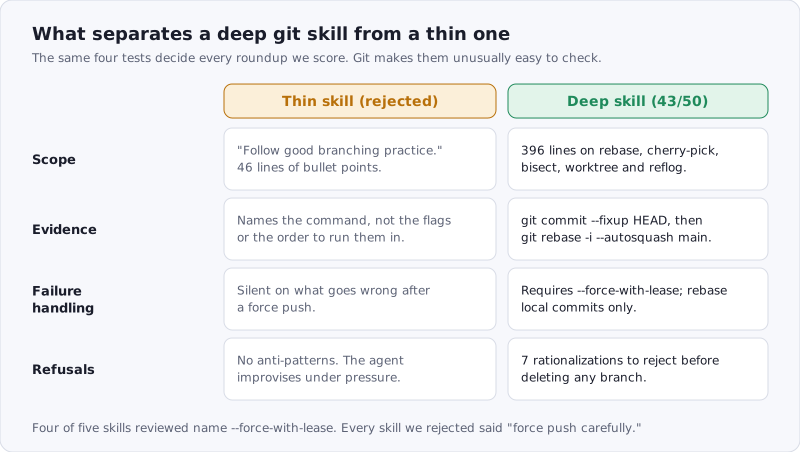
Figure: A thin skill restates what git does. A deep skill encodes the decision — which command, which flag, and what to refuse to do.
The clearest single test is whether the skill knows about --force-with-lease. The git-push documentation explains why it exists:
If somebody else built on top of your original history while you are rebasing, the tip of the branch at the remote may advance with their commit, and blindly pushing with
--forcewill lose their work.
Four of the five skills below name --force-with-lease explicitly. Every skill we rejected said “force push carefully.”
1. @wshobson/git-advanced-workflows — 43/50
Score: 43/50 | Relevance: 9 - Depth: 9 - Actionability: 9 - Structure: 8 - Adoption: 8
One file, 396 lines, and the most thorough treatment of advanced git operations in the registry. This skill covers five core areas — interactive rebase, cherry-picking, bisect, worktrees, and reflog — with command examples and practical workflows for each.
The interactive rebase section is not just a command reference. It walks through all six rebase operations (pick, reword, edit, squash, fixup, drop) and then shows the autosquash workflow: git commit --fixup HEAD followed by git rebase -i --autosquash main. That workflow is how experienced developers actually clean up feature branches before PR review, and most git guides skip it entirely.
The practical workflows section is where the skill earns its top score. Workflow 1 covers cleaning up a feature branch before PR with the critical --force-with-lease push at the end. Workflow 2 shows applying a hotfix across multiple release branches via cherry-pick. Workflow 4 demonstrates multi-branch development using worktrees — creating a hotfix worktree in a separate directory while continuing work on the main project without stashing.
The “Split Commit” technique is particularly valuable: marking a commit with edit in interactive rebase, doing git reset HEAD^, then staging and committing in logical chunks. This is the kind of operation developers search Stack Overflow for repeatedly, and having it encoded in a skill means the AI can walk you through it step by step.
Best practices include seven concrete rules, the most important being “Always Use —force-with-lease” and “Rebase Only Local Commits.” The common pitfalls section covers the mistakes that actually happen — rebasing public branches, force pushing without lease, and forgetting worktree cleanup.
Source: github.com/wshobson/agents, directory plugins/developer-essentials/skills/git-advanced-workflows. The repository carries 39,750 stars and 33,228 SkillSafe installs as of 17 September 2026.
npx skills add https://api.skillsafe.ai/wshobson/git-advanced-workflows2. @trailofbits/git-cleanup — 41/50
Score: 41/50 | Relevance: 8 - Depth: 8 - Actionability: 9 - Structure: 9 - Adoption: 7
One file, 364 lines, and the most safety-conscious git skill in the registry. This skill does exactly one thing — clean up local branches and worktrees — and does it with a level of caution that reflects its origin at Trail of Bits, a security research firm.
The workflow uses two confirmation gates before any deletion. Phase 1 gathers all information: branch tracking status, merge history, remote state, and unique commits per branch. Phase 2 groups related branches by shared prefix before categorizing them individually. Phase 3 runs a decision tree that classifies each branch as SAFE_TO_DELETE, SQUASH_MERGED, SUPERSEDED, REMOTE_GONE, UNPUSHED_WORK, LOCAL_WORK, or SYNCED_WITH_REMOTE. Only after the user reviews this analysis (Gate 1) and confirms the exact commands to run (Gate 2) does anything get deleted.
The squash-merge handling is worth highlighting. Most cleanup scripts use git branch --merged and call it done, but squash-merged branches never show as merged because git cannot detect that the work was incorporated. This skill explicitly addresses that: it checks the main branch’s PR merge history, correlates it with branch names, and uses git branch -D (force delete) for squash-merged branches rather than failing silently with -d.
The “Rationalizations to Reject” table at the end is unusual and excellent. It lists seven common justifications for deleting branches unsafely — “The branch is old, it’s probably safe to delete”, “I can recover from reflog if needed”, “The user seems to want everything deleted” — and explains why each is wrong. This kind of explicit anti-pattern documentation prevents the AI from taking shortcuts under ambiguous instructions.
The skill also checks for dirty state across all worktrees before cleanup and displays prominent warnings about uncommitted changes that would be lost.
Source: github.com/trailofbits/skills, directory plugins/git-cleanup/skills/git-cleanup. 7,125 stars, CC-BY-SA-4.0, last pushed 16 September 2026.
npx skills add https://api.skillsafe.ai/trailofbits/git-cleanup3. @wshobson/changelog-automation — 40/50
Score: 40/50 | Relevance: 7 - Depth: 9 - Actionability: 9 - Structure: 9 - Adoption: 6
One file, 572 lines, and the most comprehensive guide to automating changelogs and release notes we found. While not a pure “git workflow” skill, changelog generation sits at the intersection of commit conventions and release processes, and the commit hygiene it enforces improves every other git workflow downstream.
The skill covers six implementation methods — conventional-changelog with commitlint, standard-version, semantic-release, GitHub Actions workflows, git-cliff (Rust-based), and Python’s commitizen. Each method gets full configuration files, not just install commands. The standard-version section includes a complete .versionrc.js with type mappings, URL format templates, and lifecycle scripts. The git-cliff section has a full cliff.toml with commit parsers and Tera template syntax for the changelog body. The commitizen section includes pyproject.toml configuration with custom bump maps and schema patterns.
The Conventional Commits reference table maps each commit type to its Keep a Changelog section: feat maps to Added, fix to Fixed, revert to Removed, while docs, style, test, chore, ci, and build are hidden by default. That mapping is the kind of decision that teams debate for weeks — having it encoded saves real time.
The commit message examples section goes beyond the basics. It shows multi-paragraph commit bodies with context for why a change was made (not just what changed), breaking change footers with migration guides, and proper issue references with Closes #123 syntax.
The GitHub Actions workflow is production-ready: it handles both automatic semantic-release on push to main and manual standard-version releases via workflow_dispatch with a release-type dropdown. The permissions block, git configuration, and NPM token handling are all included.
From the same github.com/wshobson/agents collection, directory plugins/documentation-generation/skills/changelog-automation. 66,456 SkillSafe installs and 1 dual-side verification as of 17 September 2026.
npx skills add https://api.skillsafe.ai/wshobson/changelog-automation4. @jezweb/git-workflow — 40/50
Score: 40/50 | Relevance: 9 - Depth: 6 - Actionability: 9 - Structure: 8 - Adoption: 8
One file, 152 lines. The shortest skill in this roundup but also the most opinionated about what matters. Where other skills try to cover all of git, this one focuses on four workflows: PR preparation, branch cleanup, merge conflict resolution, and monorepo release tagging.
The PR preparation workflow is the strongest section. It starts with context gathering (git log main..HEAD --oneline, git diff main...HEAD --stat, git status), moves to drafting the PR title and body using the commit history as source material, and finishes with gh pr create using a properly structured heredoc for the body. The instruction to “use the commit history to write the summary — don’t rely on memory” is a smart constraint that prevents the AI from hallucinating PR descriptions.
The merge conflict resolution section provides a decision tree that most git skills skip. Step 1 assesses the scope of conflicts by listing conflicted files. Step 2 distinguishes between different-area conflicts (keep both) and architectural conflicts (prefer main’s approach, re-apply PR’s intent). Steps 3 and 4 address the rebase-vs-merge decision during conflict resolution: if few commits and no shared history, rebase is cleaner; if many conflicts with architectural divergence, abort and apply changes manually to main.
The monorepo release tags section solves a specific pain point: git tag v2.1.0 is ambiguous in a monorepo. The skill enforces the pattern {package-name}-v{semver}, which is the convention used by most major monorepo tools.
The .gitignore-first init section is minor but practical: always create .gitignore before the first git add, with a recovery command for when node_modules/ is already tracked.
Source: github.com/jezweb/claude-skills, directory plugins/dev-tools/skills/git-workflow, 1,012 stars. The conciseness is likely part of its appeal — it gives you exactly what you need for the four most common git operations without the overhead of a 500-line reference guide.
npx skills add https://api.skillsafe.ai/jezweb/git-workflow5. @supercent-io/git-workflow — 38/50
Score: 38/50 | Relevance: 8 - Depth: 7 - Actionability: 8 - Structure: 8 - Adoption: 7
Two files (524-line SKILL.md plus a SKILL.toon companion), covering the full git lifecycle from branch creation through cleanup. This skill takes a more encyclopedic approach than the others in this list — eight sequential steps covering branch management, staging, committing, pushing, pulling, merging, conflict resolution, and cleanup.
The commit conventions section follows conventional commits format with type-scope-subject structure and shows a multi-line commit example with a body list and issue reference. The seven commit types (feat, fix, docs, style, refactor, test, chore) are listed with descriptions. The example commit — feat(auth): add JWT authentication with itemized changes and Closes #42 — is the kind of template developers can copy directly.
The advanced workflows section covers interactive rebase, stashing (including named stashes with git stash save and applying specific stashes by index), cherry-picking, and bisect. The stashing coverage is more thorough than in other skills: it shows git stash apply vs git stash pop, specific stash references with stash@{2}, and git stash clear.
The troubleshooting section handles four common recovery scenarios: accidentally committed to the wrong branch, undoing a merge (both before and after push), recovering a deleted branch via reflog, and syncing a fork with upstream. The fork sync pattern — git remote add upstream followed by git fetch upstream and git merge upstream/main — is a workflow that open-source contributors use daily.
The ten best practices are standard but well-stated, and the git configuration section covers aliases (co, br, ci, st, lg) and editor setup.
A caveat as of September 2026: the upstream repository supercent-io/skills-template is no longer public, so you cannot currently read the source on GitHub — only the publisher’s org page resolves. The archived version on SkillSafe still installs and still carries a clean A+ security scan, and you can read every file through the skill page before installing. It does not have the focused depth of @wshobson/git-advanced-workflows or the safety consciousness of @trailofbits/git-cleanup, but it covers more ground than either.
npx skills add https://api.skillsafe.ai/supercent-io/git-workflowHonorable Mention: Depth Without a Clean Scan
We also evaluated @ancoleman/managing-git-workflows — a 12-file, 3,882-line skill with the most comprehensive coverage in the category. It includes reference guides for branching strategies (559 lines), code review workflows (624 lines), conventional commits (743 lines), git hooks (766 lines), and monorepo patterns (847 lines). The main SKILL.md alone covers trunk-based development, GitHub Flow, GitFlow, merge-vs-rebase decisions, and PR templates.
However, SkillSafe’s scanner flagged 58 critical issues across the three shell scripts (check-branch-name.sh, setup-hooks.sh, validate-commit-msg.sh) — all SS09 reverse shell pattern detections. These are likely false positives triggered by shell patterns in hook setup scripts, but a Grade F scan result means we cannot recommend installing it without manually reviewing those scripts first. The skill also has only 414 installs, suggesting limited real-world adoption. If the scan issues are resolved in a future version, this could be the top skill in the category. You can re-run the check yourself on SkillSafe’s security scanner.
Frequently Asked Questions
What are the best Claude Code skills for git on GitHub?
The four highest-scoring git skills all live in public GitHub repositories you can read before installing: wshobson/agents (39,750 stars) ships git-advanced-workflows and changelog-automation, trailofbits/skills (7,125 stars) ships git-cleanup, and jezweb/claude-skills (1,012 stars) ships git-workflow. Repository stars are a weak signal on their own — a monorepo’s stars are inherited by every skill inside it.
What’s the difference between a git workflow skill and just knowing git?
The difference is consistency under pressure. Most developers know how to rebase, cherry-pick, and resolve conflicts in isolation. The problem is remembering the right sequence when you’re in the middle of a messy merge, or knowing when to use --force-with-lease instead of --force, or catching that a squash-merged branch won’t show up in git branch --merged. Skills encode these decisions so the AI follows the correct procedure every time.
Should I install one comprehensive skill or several specialized ones?
Install @wshobson/git-advanced-workflows as a baseline — it covers the advanced operations (rebase, bisect, worktrees, reflog) that most developers need occasionally but don’t use often enough to remember the syntax. Then add specialized skills: @trailofbits/git-cleanup if branch accumulation is a recurring problem, @wshobson/changelog-automation if you’re setting up automated releases, or @jezweb/git-workflow for a concise PR playbook.
Do these skills work with Claude Code, Cursor, and Windsurf?
All five skills use the SKILL.md format supported by Claude Code, Cursor, and Windsurf. @trailofbits/git-cleanup declares compatibility: claude-code-only in its frontmatter and uses allowed-tools (Bash, Read, Grep, AskUserQuestion) which may not be supported in all runtimes. The other four are runtime-agnostic. Install once with npx skills add and the files are symlinked to every detected agent tool directory.
How do I check a git skill is safe before installing it?
Read the shell scripts. Git skills are one of the few categories that routinely ship executable hooks — setup-hooks.sh, validate-commit-msg.sh — and those run on your machine, not in a sandbox. SkillSafe scans every version and publishes the report on the skill page; @ancoleman/managing-git-workflows scored a Grade F with 58 critical findings for exactly this reason, even though they are probably false positives.
Conclusion
If you install one skill from this list, start with @wshobson/git-advanced-workflows — the interactive rebase workflows, autosquash pattern, and commit-splitting technique cover the operations that trip up even experienced developers. If branch cleanup is a recurring pain point, pair it with @trailofbits/git-cleanup for a safety-gated approach that handles squash-merged branches correctly.
For teams standardizing their release process, @wshobson/changelog-automation provides production-ready configurations for six different changelog tools. For a lightweight PR-focused workflow, @jezweb/git-workflow packs the most practical value into the fewest lines.
npx skills add https://api.skillsafe.ai/wshobson/git-advanced-workflows
npx skills add https://api.skillsafe.ai/trailofbits/git-cleanup
Related roundups: Browse all Best Of roundups