Best Claude Code Skills for AI/ML Development [2026]
11 AI/ML skills installed and scored out of 50. @wshobson/rag-implementation leads at 44/50 with five advanced retrieval patterns, including hybrid search.
We installed 11 AI/ML development skills from the SkillSafe registry, read every file, and scored each out of 50. @wshobson/rag-implementation leads at 44/50 with five advanced retrieval patterns in 542 lines; @wshobson/prompt-engineering-patterns takes 43/50 across nine files. The other three cover LLM debugging, agent frameworks and Metal kernels.
Every score comes from the installed archive, not a description or a README summary. The techniques these skills encode are published work: Retrieval-Augmented Generation for Knowledge-Intensive NLP Tasks (Lewis et al.), Precise Zero-Shot Dense Retrieval without Relevance Labels — the HyDE paper — Anthropic’s prompt caching documentation, the LangGraph docs, Mastra and PyTorch’s MPS backend notes. Two of the five skills come from wshobson/agents (MIT).
Updated September 2026: every paper and vendor doc referenced below was re-checked this month and the ranking is unchanged. Install counts are the figures recorded at review time; they move weekly, so check the skill page for the current number.
Top 5 AI/ML Skills at a Glance
| Skill | Score | Key Feature | Frameworks / Tools | Installs (at review) |
|---|---|---|---|---|
| @wshobson/rag-implementation | 44/50 | 5 advanced RAG patterns + eval metrics | LangChain, Pinecone, Chroma, pgvector | 441 |
| @wshobson/prompt-engineering-patterns | 43/50 | 6 production patterns + 9-file skill | Anthropic SDK, LangChain, Pydantic | 7,812 |
| @patricio0312rev/llm-debugger | 39/50 | Failure taxonomy + root cause analysis | Framework-agnostic Python | 6,785 |
| @mastra-ai/skills | 38/50 | Full agent framework guide + 13 files | Mastra, TypeScript, OpenAI, Anthropic | 643 |
| @pytorch/metal-kernel | 37/50 | Metal/MPS kernel writing for Apple Silicon | PyTorch, Metal Shading Language | 9,414 |
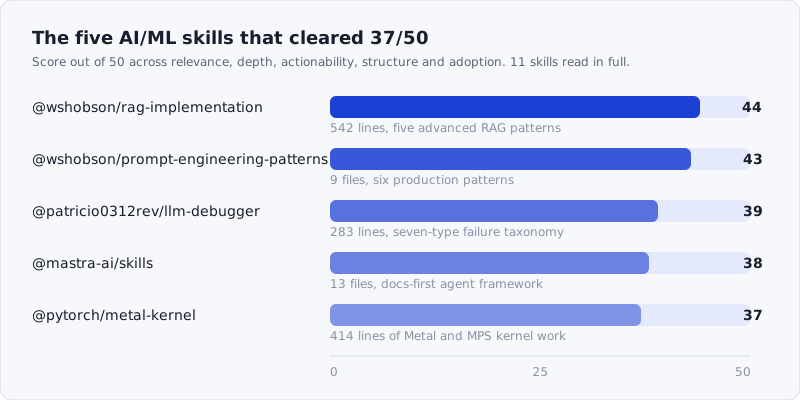
Figure: the five skills that cleared 37/50, with what each one ships. Browse the whole category at /tags/ai-ml/.
How We Scored
Each skill was scored across five dimensions, 0-10 each, for a maximum of 50 points:
| Dimension | Max | What we looked at |
|---|---|---|
| Relevance | 10 | Does it address real AI/ML concerns — model integration, RAG, prompting, training? |
| Depth | 10 | How much actual content is in the skill files? Specific patterns and architectures, not vague advice |
| Actionability | 10 | Can a developer follow the guidance to build better AI/ML applications? |
| Structure | 10 | Well-organized, with clear AI/ML workflow coverage? |
| Adoption | 10 | Install count and stars as a proxy for real-world validation |
We scored by reading the actual skill files — not descriptions, not README summaries.
1. @wshobson/rag-implementation — 44/50
Score: 44/50 | Relevance: 10 | Depth: 9 | Actionability: 9 | Structure: 9 | Adoption: 7
One file, 542 lines, and the most complete RAG guide in the registry. This is not a “what is RAG?” explainer — it’s a build manual.
The skill opens with a component catalog that makes real decisions: six vector databases compared by use case (Pinecone for managed serverless, Chroma for local dev, pgvector for SQL integration), six embedding models with dimension counts and recommended pairings (voyage-3-large for Claude apps, text-embedding-3-large for OpenAI), and four retrieval strategies with explanations of when each applies. That catalog alone saves a developer from having to piece together the same information from six different documentation sites.
The five advanced patterns are where this skill earns its score. Pattern 1 is hybrid search with Reciprocal Rank Fusion, combining BM25 keyword matching at 30% weight with dense semantic retrieval at 70%. Pattern 2 is multi-query retrieval that generates multiple query variations for better recall. Pattern 3 is contextual compression that extracts only relevant portions from retrieved documents. Pattern 4 is the parent-document retriever — small chunks for precise retrieval, large chunks (2,000 characters) for context. Pattern 5 is HyDE (Hypothetical Document Embeddings), which generates a hypothetical answer document and uses that for retrieval instead of the original query.
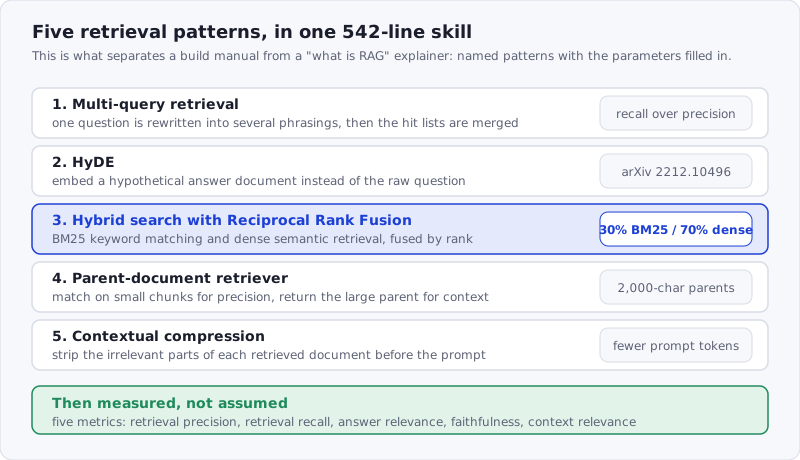
Figure: each pattern arrives with its parameters filled in, which is what makes this a build manual rather than an explainer.
The Quick Start uses LangGraph with a proper StateGraph and typed state — not a toy example but a production-ready skeleton. The chunking section covers four strategies: recursive character, token-based, semantic chunking with percentile breakpoints, and markdown header splitting.
The evaluation section at the end defines five metrics (retrieval_precision, retrieval_recall, answer_relevance, faithfulness, context_relevance) with a working evaluation function. That’s the part most RAG tutorials skip entirely.
387 stars — the highest star count of any skill in this roundup. The install count of 441 is low relative to the quality, likely because RAG-focused developers are a narrower audience than general prompt engineers.
npx skills add https://api.skillsafe.ai/wshobson/rag-implementation2. @wshobson/prompt-engineering-patterns — 43/50
Score: 43/50 | Relevance: 9 | Depth: 9 | Actionability: 9 | Structure: 9 | Adoption: 7
Nine files totaling over 700 lines, making this the largest prompt engineering skill in the registry by file count. The SKILL.md alone is 473 lines, and the references/ directory adds five focused guides on chain-of-thought, few-shot learning, prompt optimization, prompt templates, and system prompts. There’s also a scripts/optimize-prompt.py utility and an assets/ directory with a few-shot example library and a prompt template collection.
The six core patterns are concrete and runnable. Pattern 1 is structured output with Pydantic — a sentiment analysis function that returns typed SentimentAnalysis objects with confidence scores and key phrases. Pattern 2 is chain-of-thought with self-verification, adding a verification step after the reasoning to check the answer against the original problem. Pattern 3 is few-shot learning with dynamic example selection using SemanticSimilarityExampleSelector and Chroma for embedding-based example retrieval. Pattern 4 is progressive disclosure — four levels of prompt complexity from direct instruction to few-shot, letting developers start simple and escalate. Pattern 5 is error recovery with Pydantic validation fallback. Pattern 6 is role-based system prompts with three fully written templates (analyst, assistant, code reviewer).
The performance optimization section addresses prompt caching with Anthropic’s cache_control API and token efficiency with before/after prompt comparisons showing how to reduce from 150+ tokens to 30 while maintaining quality.
The best practices and pitfalls sections are unusually specific. “Over-engineering: Starting with complex prompts before trying simple ones” is the kind of guidance that only comes from running prompts in production. The success metrics section lists six KPIs (accuracy, consistency, latency at P50/P95/P99, token usage, success rate, user satisfaction) that form a monitoring checklist for any LLM application.
94 stars and 7,812 installs. From the same wshobson/agents repository as the RAG skill above — both skills share a consistent quality standard.
npx skills add https://api.skillsafe.ai/wshobson/prompt-engineering-patterns3. @patricio0312rev/llm-debugger — 39/50
Score: 39/50 | Relevance: 9 | Depth: 8 | Actionability: 8 | Structure: 8 | Adoption: 6
One file, 283 lines, and a genuinely unique angle: this skill is about debugging LLM output, not generating it. When your prompt returns hallucinations, broken JSON, or violated constraints, this skill provides a systematic framework for diagnosing and fixing the issue.
The failure taxonomy is the foundation: seven failure types as a Python enum — HALLUCINATION, FORMAT_VIOLATION, CONSTRAINT_BREAK, REASONING_ERROR, TOOL_MISUSE, REFUSAL, and INCOMPLETE. Each type maps to a specific diagnosis function and a corresponding prompt fix. The diagnose_failure function checks format validity, required fields, length constraints, and hallucination markers in a single pass.
The prompt fix dictionary is practical: format violations get strict JSON instructions with schema examples; hallucinations get grounding instructions (“Base your response ONLY on the provided context”); constraint breaks get explicit boundary statements; reasoning errors get step-by-step decomposition templates. These aren’t theoretical — they’re the fixes that actually work when LLM output goes wrong.
The test case generation is notable. When a failure is diagnosed, the skill generates regression tests from the failure — including the original failing input, edge cases based on the failure type, and similar inputs that might trigger the same issue. This creates a feedback loop: every failure makes future failures easier to catch.
The debugging workflow ties it together: diagnose, generate fixes, create test cases, verify the fix works, and produce recommendations. The interactive debugging mode provides a REPL-style session for prompt debugging.
At 6,785 installs, this is well-adopted for a specialized tool. The description says it’s part of a “comprehensive library of +100 production-ready development skills,” but this particular skill stands on its own as the best LLM debugging skill in the registry.
npx skills add https://api.skillsafe.ai/patricio0312rev/llm-debugger4. @mastra-ai/skills — 38/50
Score: 38/50 | Relevance: 8 | Depth: 8 | Actionability: 8 | Structure: 8 | Adoption: 6
Thirteen files including a 204-line SKILL.md, five reference guides, a provider registry script, and supporting configuration files. This is the official skill for the Mastra AI framework — a TypeScript-first toolkit for building AI agents and workflows.
The skill’s design philosophy is unusual and worth understanding: it explicitly tells the AI not to trust its own training data. The opening section states “Everything you know about Mastra is likely outdated or wrong. Never rely on memory.” This is followed by a three-tier documentation lookup strategy: embedded docs from node_modules first (matches exact installed version), source code second, remote docs from mastra.ai/llms.txt third. For a rapidly-evolving framework, this is the right approach — and it’s the kind of guidance that prevents the AI from hallucinating deprecated API signatures.
The core concepts section distinguishes agents (autonomous, decision-making) from workflows (structured sequences) with clear use-case guidance. Key components covered: tools for extending agent capabilities, memory with four types (message history, working memory, semantic recall, observational memory), RAG with vector stores and graph relationships, and persistent storage across Postgres, LibSQL, and MongoDB.
The references/common-errors.md (10,455 bytes) is one of the larger error reference files we’ve seen in any skill. references/create-mastra.md covers project setup from CLI through manual configuration. The scripts/provider-registry.mjs script lets you look up current model providers and names — running node scripts/provider-registry.mjs --provider anthropic returns the current model strings instead of guessing.
The TypeScript requirements section is specific: ES2022 modules required, CommonJS will fail. Model strings must use the "provider/model-name" format. These are the details that save hours of debugging when setting up a new Mastra project.
643 installs reflect the narrower audience of framework-specific skills. For teams building on Mastra, this is essential. For teams not on Mastra, the documentation-first approach and agent/workflow patterns are still instructive.
npx skills add https://api.skillsafe.ai/mastra-ai/skills5. @pytorch/metal-kernel — 37/50
Score: 37/50 | Relevance: 7 | Depth: 9 | Actionability: 8 | Structure: 8 | Adoption: 5
One file, 414 lines, and the most specialized skill in this roundup. This skill guides you through implementing Metal kernels for PyTorch operators on Apple Silicon — porting CUDA ops to MPS, writing native Metal shaders, and connecting them to PyTorch’s dispatch system.
The three-step workflow is precise: update dispatch in native_functions.yaml, write the Metal kernel in aten/src/ATen/native/mps/kernels/, and implement the host-side stub in aten/src/ATen/native/mps/operations/. Each step includes exact file paths, YAML syntax for dispatch registration, and Metal Shading Language code patterns.
The kernel patterns cover unary, binary, alpha-parameter, and type-specialized functors with Metal-specific considerations like precise::atan2 for float precision and float2/half2 for complex number representation. The binary kernel registration macros section documents four macro families (REGISTER_FLOAT_BINARY_OP, REGISTER_INT2FLOAT_BINARY_OP, REGISTER_INTEGER_BINARY_OP, REGISTER_OPMATH_FLOAT_BINARY_OP) with guidance on which to use for math functions versus comparison operators versus arithmetic.
The torch.mps.compile_shader debugging section is particularly valuable. It shows how to JIT-compile and test individual Metal kernels in isolation, verify outputs against NumPy references, and debug multi-kernel pipelines by testing each stage independently. The dispatch semantics note — threads is total threads, not threadgroups — is the kind of detail that saves a developer from a confusing silent failure.
The testing section covers removing expected failures from common_mps.py and OpInfo decorators, which is PyTorch contributor workflow knowledge that isn’t documented this clearly anywhere else we’ve seen.
9,414 installs — the highest in this roundup by raw count. The audience is narrow (PyTorch contributors working on Apple Silicon support) but within that audience, this skill is clearly the reference material of choice.
npx skills add https://api.skillsafe.ai/pytorch/metal-kernelFrequently Asked Questions
What types of AI/ML skills are available in the registry?
The registry covers the full AI/ML development lifecycle. Prompt engineering skills help you design and optimize LLM interactions. RAG skills cover retrieval architectures, vector databases, and chunking strategies. LLM debugging skills provide frameworks for diagnosing hallucinations and output failures. Framework-specific skills like Mastra guide agent and workflow development. Low-level skills like the PyTorch Metal kernel guide cover GPU operator implementation. We also evaluated general-purpose skills (deep learning guidelines, Python coding patterns, API automation wrappers) but found they lacked the specificity needed to score well in this roundup.
Do these skills require specific AI/ML frameworks?
It depends on the skill. @wshobson/rag-implementation and @wshobson/prompt-engineering-patterns use LangChain and the Anthropic SDK in their examples but teach patterns that apply to any framework. @patricio0312rev/llm-debugger is framework-agnostic Python. @mastra-ai/skills is specifically for the Mastra TypeScript framework. @pytorch/metal-kernel requires the PyTorch codebase and Metal Shading Language. All five work with Claude Code, Cursor, and Windsurf — install once with npx skills add and the skill is available across tools.
How were skills that are just API wrappers handled?
We excluded them from the top five. Several skills we evaluated — including @composiohq/ai-ml-api-automation (91 lines, MCP wrapper) and @shubhamsaboo/python-expert (178 lines, general Python advice) — provided little beyond what the underlying SDK documentation already offers. A good AI/ML skill should teach methodology, not just relay API calls. The skills that scored well contain patterns, decision frameworks, debugging strategies, and architectural guidance that a developer can internalize and apply across projects.
Conclusion
If you’re building RAG systems, start with @wshobson/rag-implementation — the five advanced patterns (hybrid search, multi-query, contextual compression, parent-document retrieval, HyDE) cover the architectures that actually matter in production. For prompt engineering, the same author’s @wshobson/prompt-engineering-patterns is the most complete skill in the registry with nine files of runnable patterns.
For teams debugging LLM output quality, @patricio0312rev/llm-debugger provides the only structured failure taxonomy and fix framework we found. For Mastra framework users, the official @mastra-ai/skills is essential. And for PyTorch contributors working on Apple Silicon, @pytorch/metal-kernel is the definitive guide.
npx skills add https://api.skillsafe.ai/wshobson/rag-implementation
npx skills add https://api.skillsafe.ai/wshobson/prompt-engineering-patterns
Three of these five ship executable scripts — scripts/optimize-prompt.py, scripts/provider-registry.mjs, the Metal compile helpers — so scan before you install. The SkillSafe scanner takes a repository URL and returns a severity-rated report on shell execution, credential reads and remote instruction fetches. If you are building the app layer on top of these patterns, the Python roundup covers the async and FastAPI skills that usually sit underneath a RAG service.
Related roundups: Browse all Best Of roundups