Best Claude Code Skills for React [2026]
Five of 17 React skills scored 42/50 or better. @vercel-labs/next-best-practices leads at 46/50 with 20 reference files. Here is what each one fixes.
We installed 17 React skills from the SkillSafe registry, read every file in every archive, and scored each out of 50. Five cleared 42: next-best-practices (46), next-cache-components (45), vercel-composition-patterns (44), shadcn-ui (43) and react-state-management (42). The sixth scored 37.
Updated September 2026: scores and install counts are unchanged since the April review. Three of the five track Next.js 16 and React 19, which is where the version-specific value sits.
All five work with Claude Code, Cursor and Windsurf. They install with npx skills add and are plain Markdown archives with no tool-specific dependencies.
The Five Skills, Scored
| Skill | Score | Installs | Library / Feature |
|---|---|---|---|
| @vercel-labs/next-best-practices | 46/50 | 6,255 | Next.js 15+, RSC, Suspense, App Router, PPR |
| @vercel-labs/next-cache-components | 45/50 | 5,822 | use cache, cacheLife, cacheTag, updateTag, PPR |
| @vercel-labs/vercel-composition-patterns | 44/50 | 4,081 | React 19, ref as prop, use(), CVA, compound components |
| @giuseppe-trisciuoglio/shadcn-ui | 43/50 | 9,397 | shadcn/ui, Radix UI, Tailwind v4, CVA, cn() |
| @wshobson/react-state-management | 42/50 | 6,547 | Zustand, Redux Toolkit, Jotai, React Query, nuqs |
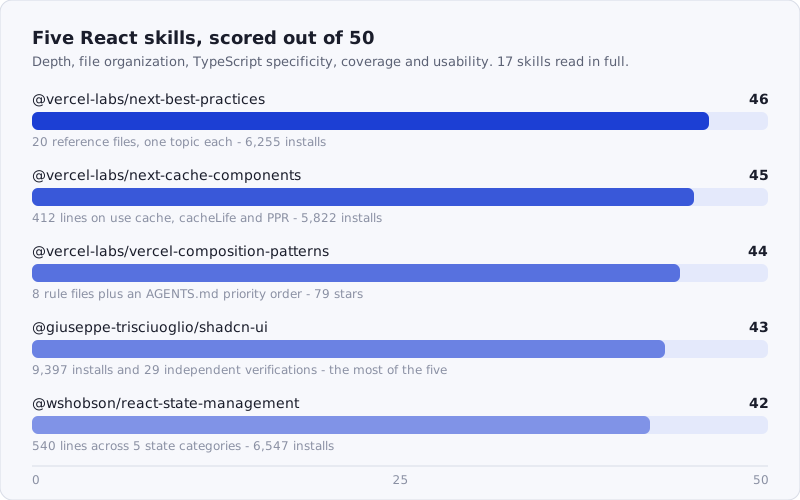
Figure: the five React skills that cleared 42/50, out of 17 installed and read in full.
Browse the full React catalog: /tags/react/
How We Scored
Each skill was scored out of 50 across five dimensions:
| Dimension | Max | What we looked at |
|---|---|---|
| Instruction depth | 12 | Specificity of patterns, avoidance of platitudes, version accuracy |
| File organization | 10 | Directory structure, navigability, use of hub files vs. monoliths |
| TypeScript specificity | 10 | Typed examples, generic constraints, inference patterns |
| Coverage breadth | 10 | Topics addressed relative to the skill’s stated scope |
| Practical usability | 8 | Install friction, example quality, cross-tool compatibility |
Skills without TypeScript examples scored lower on dimension 3 even if their JavaScript patterns were strong. Skills that duplicated the official Next.js documentation without adding agent-oriented framing scored lower on instruction depth.
Three of the five come from Vercel’s own skill repositories — vercel-labs/agent-skills and its next-skills sibling — which is why their version coverage is ahead of the general field. The remaining two are community archives.
Which Skill Solves Which Problem
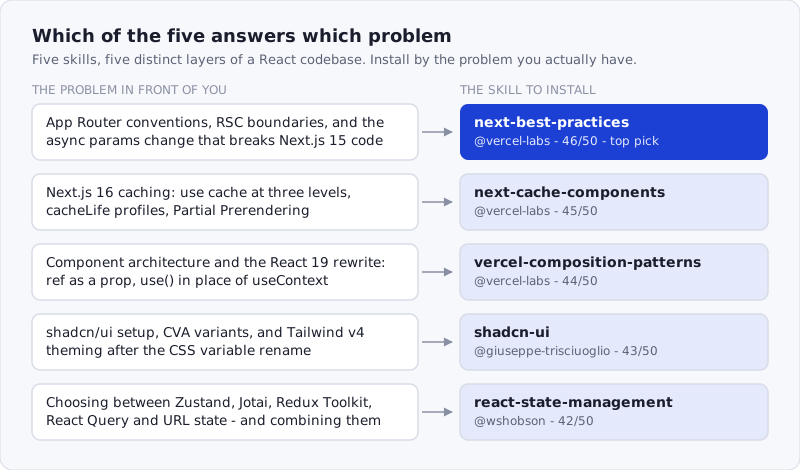
Figure: the five skills cover five non-overlapping layers, so installing more than one is additive rather than redundant.
1. @vercel-labs/next-best-practices — 46/50
Source: github.com/vercel-labs/next-skills · 6,255 installs · 9 stars
This is the most thorough Next.js skill in the registry, and it earns that position through sheer specificity. Most Next.js skills cover the same five things: use client, use server, fetch caching, Image, and route conventions. This one covers 20 dedicated topics, each in its own reference file.
Archive structure:
SKILL.md                         ← hub file, links to all 20 references
references/
  file-conventions.md
  rsc-boundaries.md
  async-patterns.md
  directives.md
  data-patterns.md
  error-handling.md
  route-handlers.md
  metadata-og.md
  image-font-optimization.md
  bundling.md
  scripts.md
  hydration-errors.md
  suspense-boundaries.md
  parallel-routes.md
  intercepting-routes.md
  self-hosting-docker.md
  runtime-selection.md
  debug-tricks.md
  nextjs16-features.md
  middleware-proxy.md
The hub SKILL.md reads like an index — it doesn’t repeat the content of each file, it signals when the agent should reach for which reference. That’s a meaningful design choice. A monolith with 20 topics crammed together loses coherence past a few hundred lines; this structure lets the agent load hydration-errors.md when it’s debugging an Error: Hydration failed and parallel-routes.md when it’s scaffolding a dashboard shell.
The Next.js 15+ async patterns file is the strongest in the archive. It addresses the change that breaks the most AI-generated code. Vercel’s own upgrade guide states it plainly:
Previously synchronous Request-time APIs that rely on request information are now asynchronous.
— Next.js, How to upgrade to version 15
That covers cookies, headers, draftMode, params in layout.js/page.js/route.js, and searchParams in page.js — five API families, one breaking change. Most AI tools without this skill still generate synchronous access:
// What AI tools generate without this skill (broken in Next.js 15)
export default function Page({ params }: { params: { slug: string } }) {
  return <h1>{params.slug}</h1>
}

// What the skill teaches
export default async function Page({
  params,
}: {
  params: Promise<{ slug: string }>
}) {
  const { slug } = await params
  return <h1>{slug}</h1>
}
The nextjs16-features.md file covers the middleware-to-proxy rename and the MCP debug endpoint (/__next/mcp), which is new enough that almost no training data covers it correctly.
Where it loses points: The runtime-selection.md file reads closer to official docs than agent instruction. It lists the options (edge, nodejs) but doesn’t give the agent a decision rule for which to choose. That’s a gap — agents need heuristics, not menus.
Score breakdown: Instruction depth 11/12 · File organization 10/10 · TypeScript specificity 9/10 · Coverage breadth 9/10 · Practical usability 7/8
npx skills add https://api.skillsafe.ai/vercel-labs/next-best-practices2. @vercel-labs/next-cache-components — 45/50
Source: github.com/vercel-labs/next-skills · 5,822 installs
This is a single-file skill, 412 lines, and every line earns its place. It covers exactly one topic — Next.js 16 Cache Components and Partial Prerendering — and it covers it completely.
Cache Components are the biggest architectural shift in Next.js 16. The use cache directive can appear at three levels (file, component, function), and the semantics differ at each level. The skill explains the difference:
// File-level: entire module is cached
'use cache'

export async function getCachedData() {
  return await db.query(...)
}

// Component-level: component output is cached at render time
export async function UserCard({ id }: { id: string }) {
  'use cache'
  const user = await getUser(id)
  return <div>{user.name}</div>
}

// Function-level: specific async function is cached
export async function ExpensiveComponent() {
  async function loadData() {
    'use cache'
    return await expensiveQuery()
  }
  const data = await loadData()
  return <Result data={data} />
}
The cacheLife section is detailed in a way that most skills skip. It documents the built-in profiles (seconds, minutes, hours, days, weeks, max) and inline config:
import { unstable_cacheLife as cacheLife } from 'next/cache'

export async function DashboardMetrics() {
  'use cache'
  cacheLife('minutes')  // built-in profile
  // or inline:
  cacheLife({ stale: 60, revalidate: 120, expire: 300 })
  const metrics = await fetchMetrics()
  return <Metrics data={metrics} />
}
The migration table is the most practically useful section in the archive. It maps every pre-16 caching pattern to its Cache Components equivalent: unstable_cache → function-level use cache; fetch with revalidate: N → component-level use cache with cacheLife; experimental.ppr → now stable PPR with no config flag needed.
Where it loses points: It’s scoped tightly to one feature, which is a strength for depth but a limitation for teams who need a broader Next.js reference alongside it. The updateTag vs revalidateTag distinction could use a worked example with a cache invalidation flow end-to-end.
Score breakdown: Instruction depth 12/12 · File organization 8/10 · TypeScript specificity 10/10 · Coverage breadth 8/10 · Practical usability 7/8
npx skills add https://api.skillsafe.ai/vercel-labs/next-cache-components3. @vercel-labs/vercel-composition-patterns — 44/50
Source: github.com/vercel-labs/agent-skills · 4,081 installs · 79 stars
The most-starred skill in this roundup and the one with the clearest priority ordering. The archive has an AGENTS.md file (unusual — most skills only have SKILL.md) that tells the AI explicitly which pattern file to consult first:
Priority order:
1. Component Architecture (rules/component-architecture.md)
2. State Management (rules/state-management.md)
3. Implementation Patterns (rules/implementation-patterns.md)
4. React 19 APIs (rules/react-19-apis.md)
Archive structure:
SKILL.md
AGENTS.md                        ← explicit priority ordering for the AI
rules/
  component-architecture.md
  state-management.md
  implementation-patterns.md
  react-19-apis.md
  compound-components.md
  context-interfaces.md
  anti-boolean-props.md
  composition-helpers.md
The anti-boolean-prop file is the most opinionated in the archive, and it’s right to be. Boolean props for variant selection are one of the most common AI code smells:
// The pattern this skill prohibits
<Button primary large disabled loading />

// The architecture it teaches
type ButtonVariant = 'primary' | 'secondary' | 'ghost' | 'destructive'
type ButtonSize = 'sm' | 'md' | 'lg'

interface ButtonProps {
  variant: ButtonVariant
  size?: ButtonSize
  isLoading?: boolean
  isDisabled?: boolean
}
The React 19 APIs file covers the two changes that break the most existing code. The first is refs. The React 19 release notes put it this way:
Starting in React 19, you can now access
refas a prop for function components.— React team, React v19
forwardRef still works — React says it will be deprecated and removed in a future version — but new components should not use it. The second change is context: use reads context and can be called conditionally, which useContext never could.
// React 18 (pre-19)
const Input = forwardRef<HTMLInputElement, InputProps>((props, ref) => {
  return <input {...props} ref={ref} />
})

// React 19
function Input({ ref, ...props }: InputProps & { ref?: React.Ref<HTMLInputElement> }) {
  return <input {...props} ref={ref} />
}

// Context: useContext → use()
// Before
const theme = useContext(ThemeContext)
// After
const theme = use(ThemeContext)
The compound components file covers the Context + Children pattern thoroughly, with a Tabs component walkthrough that shows state, context provision, and consumer components as a complete unit — the kind of worked example that makes the pattern clickable rather than abstract.
Where it loses points: The state-management.md file in the rules directory is thinner than the standalone @wshobson/react-state-management skill (#5 in this roundup). It covers the basic Zustand pattern but skips Jotai, Redux Toolkit thunks, and the combined client-server state pattern. It’s scoped to composition decisions, not state library selection.
Score breakdown: Instruction depth 11/12 · File organization 10/10 · TypeScript specificity 9/10 · Coverage breadth 8/10 · Practical usability 6/8
npx skills add https://api.skillsafe.ai/vercel-labs/vercel-composition-patterns4. @giuseppe-trisciuoglio/shadcn-ui — 43/50
Source: github.com/giuseppe-trisciuoglio/developer-kit · 9,397 installs · 70 stars · 29 verifications
The most-installed skill in this roundup and the one with the most verifications — 29 independent consumers have scanned this archive and confirmed it matches what the publisher claims. That’s a meaningful trust signal for a skill that modifies your component library setup. (How that check works: dual-side verification.)
Archive structure:
SKILL.md
resources/
  components.md
  theming.md
  cva-variants.md
  radix-primitives.md
  base-ui-primitives.md
  blocks.md
troubleshooting/
  import-errors.md
  style-conflicts.md
  missing-deps.md
examples/
  calendar-block.md
  dashboard-block.md
  sidebar-block.md
The skill covers the full shadcn/ui workflow end-to-end, from init to production. The init section is precise about what npx shadcn@latest init actually does to your project — it creates components/ui/, adds the cn() utility to lib/utils.ts, and writes CSS variables to your global stylesheet. AI tools without this skill often try to install components before init, or skip the cn() utility and write raw clsx calls instead.
The CVA variants section is the most technically dense in the archive:
import { cva, type VariantProps } from 'class-variance-authority'

const buttonVariants = cva(
  'inline-flex items-center justify-center rounded-md text-sm font-medium',
  {
    variants: {
      variant: {
        default: 'bg-primary text-primary-foreground hover:bg-primary/90',
        destructive: 'bg-destructive text-destructive-foreground hover:bg-destructive/90',
        outline: 'border border-input bg-background hover:bg-accent',
        ghost: 'hover:bg-accent hover:text-accent-foreground',
      },
      size: {
        default: 'h-9 px-4 py-2',
        sm: 'h-8 rounded-md px-3 text-xs',
        lg: 'h-10 rounded-md px-8',
      },
    },
    defaultVariants: {
      variant: 'default',
      size: 'default',
    },
  }
)

interface ButtonProps
  extends React.ButtonHTMLAttributes<HTMLButtonElement>,
    VariantProps<typeof buttonVariants> {}
The CSS variables section covers theming with Tailwind v4, where the variable convention changed, and the skill documents the migration path explicitly. The troubleshooting directory is the most underrated part of the archive: import-errors.md covers the @/components/ui alias setup that breaks in projects without path resolution configured, and style-conflicts.md covers the Tailwind content config that causes utility classes to purge incorrectly when shadcn components live outside src/. The Radix UI primitives file matters for the same reason — shadcn components are Radix underneath, and agents that don’t know that write the wrong escape hatches.
Where it loses points: The blocks section (calendar, dashboard, sidebar) reads as a feature list rather than an implementation guide. The examples in examples/ show the block output but not the key decisions — when to use the sidebar block versus rolling a custom sidebar, how to integrate the dashboard block with real data fetching.
Score breakdown: Instruction depth 10/12 · File organization 10/10 · TypeScript specificity 9/10 · Coverage breadth 9/10 · Practical usability 5/8
npx skills add https://api.skillsafe.ai/giuseppe-trisciuoglio/shadcn-ui5. @wshobson/react-state-management — 42/50
Source: github.com/wshobson/agents · 6,547 installs · 10 stars
A single file, approximately 540 lines, covering five state categories with complete TypeScript implementations for each. This is a skill where the single-file format works — state management is a decision tree, and having it in one place makes it easier for the agent to compare options side by side.
The skill organizes state into five categories with concrete decision criteria:
- Local state —
useStatefor isolated UI state,useReducerfor state machines - Global state — Zustand or Redux Toolkit for shared application state
- Server state — React Query for remote data, caching, and background sync
- URL state —
nuqsor search params for shareable, bookmarkable state - Form state — React Hook Form with Zod schema validation
The Zustand section includes both basic store setup and the slice architecture pattern for larger apps:
// Basic Zustand store
interface BearState {
  bears: number
  increase: () => void
  reset: () => void
}

const useBearStore = create<BearState>()((set) => ({
  bears: 0,
  increase: () => set((state) => ({ bears: state.bears + 1 })),
  reset: () => set({ bears: 0 }),
}))

// Slice architecture for larger apps
type StoreState = BearSlice & FishSlice

const useBoundStore = create<StoreState>()((...a) => ({
  ...createBearSlice(...a),
  ...createFishSlice(...a),
}))
The Jotai section covers atoms, derived atoms, async atoms, and write-only atoms — a more complete treatment than most state management skills that stop at basic atom() usage:
// Derived atom
const doubledCountAtom = atom((get) => get(countAtom) * 2)

// Async atom
const userAtom = atom(async (get) => {
  const id = get(userIdAtom)
  return await fetchUser(id)
})

// Write-only atom (for actions without local state)
const incrementAtom = atom(null, (get, set) => {
  set(countAtom, get(countAtom) + 1)
})
The Redux Toolkit section covers typed store setup and async thunks with proper TypeScript — including the AppDispatch and RootState types that AI tools consistently get wrong when left to infer them:
export type RootState = ReturnType<typeof store.getState>
export type AppDispatch = typeof store.dispatch

// Typed hooks (not the generic ones)
export const useAppDispatch = useDispatch.withTypes<AppDispatch>()
export const useAppSelector = useSelector.withTypes<RootState>()
The combined client+server pattern — Zustand for UI state, React Query for server state, with a documented contract for how they interact — is the most distinctive section in the archive. Most state management skills treat these as alternatives; this one shows how to run them alongside each other without the stores diverging.
The legacy Redux-to-RTK migration guide rounds out the file. It’s opinionated about which Redux patterns to migrate first (action creators and reducers, before middleware) and which to leave alone if the codebase is stable.
Where it loses points: URL state (nuqs) gets only a short section relative to its importance in 2026 applications — shareable filter state, paginated routes, and multi-step forms all lean on URL state heavily, and the skill treats it as a footnote. No tanstack/router coverage, which is an omission for teams not using Next.js.
Score breakdown: Instruction depth 11/12 · File organization 7/10 · TypeScript specificity 10/10 · Coverage breadth 8/10 · Practical usability 6/8
npx skills add https://api.skillsafe.ai/wshobson/react-state-managementFrequently Asked Questions
What makes a good AI React skill?
Specificity and agent-orientation. A good skill doesn’t restate the React docs — it encodes the decision rules, anti-patterns, and version-specific behaviors that experienced engineers carry in their heads. The best skills here tell the agent when to reach for a pattern, give explicit TypeScript implementations rather than pseudocode, and organize content so the agent can navigate to the relevant section without reading everything. Skills that score low are thin wrappers around official documentation.
Do these skills cover both React and Next.js?
Three of the five are primarily Next.js: @vercel-labs/next-best-practices (file conventions, RSC, async APIs), @vercel-labs/next-cache-components (Cache Components and PPR in Next.js 16), and @vercel-labs/vercel-composition-patterns (component architecture with React 19 patterns that apply anywhere but are contextualized for the App Router). The remaining two — @giuseppe-trisciuoglio/shadcn-ui and @wshobson/react-state-management — apply to any React project, including Vite and Remix.
Do any of these work for React Native?
Not directly. All five target React DOM: the Next.js three assume the App Router, shadcn-ui assumes Tailwind and Radix web primitives, and the state management skill’s URL-state section assumes browser search params. The one part that transfers cleanly is @wshobson/react-state-management’s treatment of Zustand, Jotai and React Query, all of which run unchanged in React Native. Everything else needs a native-specific skill.
How do I install a Claude Code skill for React?
Every SkillSafe skill is cloneable over git, so Vercel’s skills CLI installs one in a line: npx skills add https://api.skillsafe.ai/vercel-labs/next-best-practices. The SkillSafe desktop app does the same from a View in SkillSafe app button on any skill page. Both pull the exact scanned version and re-scan it on download.
How were these skills scored?
We scored 17 React skills across five dimensions (instruction depth, file organization, TypeScript specificity, coverage breadth, practical usability) for a maximum of 50 points. Skills were read in full — every file in every archive. Scoring penalized skills that restated official documentation without agent-oriented framing, skills with no TypeScript examples, and skills where the stated scope outran the actual content. The five here scored 42–46; the next one scored 37.
Conclusion
If you install one skill from this list, install @vercel-labs/next-best-practices — 20 reference files, 6,255 installs, and the most thorough coverage of Next.js 15+ patterns in the registry. If you’re building on Next.js 16 with Cache Components, add @vercel-labs/next-cache-components alongside it; the two are complementary and come from the same source repo.
For component architecture, @vercel-labs/vercel-composition-patterns is the one to reach for — 79 stars and an explicit priority ordering that tells the agent which pattern file to consult first. @giuseppe-trisciuoglio/shadcn-ui with its 29 verifications earns its 9,397 installs: the troubleshooting directory alone justifies the install. And @wshobson/react-state-management is the skill for working across Zustand, Jotai, RTK and React Query in one codebase.
# Install all five
npx skills add https://api.skillsafe.ai/vercel-labs/next-best-practices
npx skills add https://api.skillsafe.ai/vercel-labs/next-cache-components
npx skills add https://api.skillsafe.ai/vercel-labs/vercel-composition-patterns
npx skills add https://api.skillsafe.ai/giuseppe-trisciuoglio/shadcn-ui
npx skills add https://api.skillsafe.ai/wshobson/react-state-management
Scan anything before you install it — the SkillSafe scanner takes a repository URL and returns a severity-rated report. For deeper Next.js coverage see the Next.js roundup; for the type-level skills these pair with, see the TypeScript roundup.
Related roundups: Browse all Best Of roundups