Introducing SkillSafe: Why AI Coding Skills Need a Verified Registry
Koi Security found 341 malicious skills in 2,857 listings. SkillSafe scans before sharing, re-scans on install, and blocks archives that changed in between.
Koi Security’s first audit of ClawHub found 341 malicious skills among 2,857 listings, 12% of the registry, most delivering Atomic Stealer. SkillSafe is a skill registry built so that cannot happen quietly: every shared skill is scanned before distribution, then re-scanned and hash-checked on the machine that installs it.
Updated September 2026: the install paths are now the AI SkillSafe desktop app and npx skills add, which replaced the MCP-based setup and the legacy skillsafe CLI described in the original February 2026 version. The threat has not gone away — Unit 42 documented five more malicious ClawHub skills found between February and May 2026, after the registry’s post-incident controls were in place.
Those skills looked legitimate. They were functional, professionally documented, and they passed no security scan because there was none to pass. Antiy CERT’s historical tally for the same campaign reached 1,184 malicious packages from 12 author IDs; we covered the full timeline in the ClawHavoc post-mortem.
Key figures
| Figure | What it measures | Source |
|---|---|---|
| 341 | Malicious skills in the first full audit of a major skill registry | Koi Security, via The Hacker News |
| 2,857 | Listings audited, making 12% of that registry malicious | The Hacker News |
| 1,184 | Malicious packages catalogued across the campaign, from 12 author IDs | Antiy CERT |
| 3,984 | Skills Snyk analysed, of which 36.82% carried at least one security issue | Snyk ToxicSkills |
| 91% | Confirmed malicious skills that paired executable code with prompt injection | Snyk ToxicSkills |
| 5 | Scanner passes SkillSafe runs over every file in an archive | Security model |
| 3 | Verdicts returned by dual-side verification: verified, divergent, critical | Security model |
Skills have a supply chain problem
AI agents like Claude Code, Cursor, Windsurf, Codex, Gemini, and OpenCode are becoming the primary way developers write software. Skills extend these tools with specialized capabilities — deployment workflows, code review checklists, framework scaffolding, API integrations. The packaging convention is now documented as a standard: a folder with a SKILL.md and its supporting files. That folder is not an MCP server and not a plugin — the three formats do different jobs, and a serious setup uses all three.
But the way skills get shared looks a lot like the early days of npm, before lockfiles and audit existed. Authors publish to open registries or share raw GitHub URLs. Consumers install with no scanning, no integrity verification, and no way to confirm that what they downloaded matches what the author actually published.
The surface area is real. A skill can contain arbitrary code that runs inside your development environment — the same environment that has access to your source code, credentials, and file system. A malicious skill doesn’t need a sophisticated exploit. It just needs subprocess.run() and a URL. Snyk’s write-up puts the floor at three lines of markdown between a skill file and shell access, and the OWASP Agentic Skills Top 10 now treats malicious skills as a first-class risk category rather than a subcase of prompt injection.
What SkillSafe does
SkillSafe is a skill registry with verification built into the protocol, not bolted on after the fact.
The core mechanism is dual-side verification:
- The publisher scans their skill locally before sharing. The scanner runs AST-based static analysis and produces a structured report along with a SHA-256 tree hash of the entire archive.
- The consumer downloads the skill and independently re-scans it. This produces a second report and tree hash from their side.
- The server compares both reports. If the tree hashes don’t match — meaning even a single byte was changed between publish and install — the verdict is critical and the desktop app blocks the installation automatically.
This isn’t trust-the-publisher verification. Both sides scan independently, and the server validates that they agree.
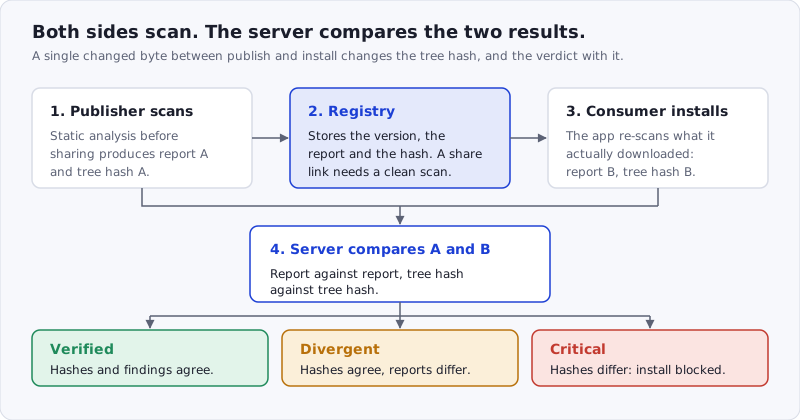
Figure: the comparison, not the publisher’s report, is what produces the verdict. A compromised registry would have to defeat a scan that runs on the consumer’s machine.
How it works
There are two ways to install, and neither requires any setup:
- AI SkillSafe desktop app (macOS / Windows / Linux) — click View in AI SkillSafe app on any skill page. The app downloads the skill, re-scans it locally, verifies it against the publisher’s report, and writes the files into your tool’s skill directory. We covered it in the desktop app launch post.
- Command line — every SkillSafe skill is cloneable via git, so Vercel’s skills CLI works natively:
npx skills add https://api.skillsafe.ai/{ns}/{name}(For programmatic and agent access, the legacy MCP endpoint at api.skillsafe.ai/mcp still exists, but it’s no longer the recommended install path. The separate scanner for MCP server configs is documented under MCP security.)
From there, the workflow is straightforward:
- Scan — paste any GitHub-hosted skill URL into the web scanner (no account needed), or let the desktop app scan a local skill directory.
- Save — save a skill privately to the registry from the desktop app or via the API. No scan required for private skills.
- Share — create a revocable share link from the desktop app or API. Sharing requires email verification and a scan report.
- Install —
npx skills add …for a plain install, or the desktop app for install with automatic verification.
Every install through the desktop app triggers a full re-scan on the consumer’s machine. The app submits its independent report to the server, which compares it against the publisher’s. You get one of three verdicts:
- Verified — tree hashes match, findings are consistent. Safe to use.
- Divergent — tree hashes match but findings differ (e.g., scanner version mismatch). Surfaced as a warning and logged.
- Critical — tree hashes don’t match. The archive was tampered with. The desktop app blocks the installation.
What makes this different
Dual-side verification, not trust-the-publisher. Most registries scan once at upload and then trust the result forever. SkillSafe makes the consumer an independent verifier. If the archive changes between publish and install — whether from a compromised server, a man-in-the-middle, or a malicious update — the consumer’s scan catches it.
Save-first, share-second. Skills are private by default. You can save unlimited versions to the registry with no email verification and no scan report required. Sharing is a separate, opt-in step that creates revocable, expirable links. This keeps the adoption friction near zero while enforcing security gates where they matter — at the point of distribution.
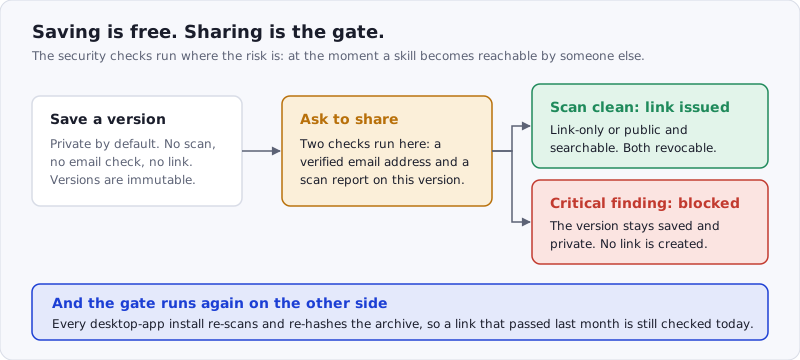
Figure: nothing gates a private save. Everything gates the moment a skill becomes reachable by someone else — and the same check runs again at install time.
Install where you already work. The SkillSafe desktop app (macOS / Windows / Linux) handles install via a one-click skillsafe://install?ns=…&name=…&version=… deep link from any skill page. Prefer the command line? Every SkillSafe skill is cloneable via git, so Vercel’s skills CLI works natively: npx skills add https://api.skillsafe.ai/{ns}/{name} auto-detects Claude Code, Cursor, Windsurf, and Codex.
Immutable version history. Once a version is saved, it can’t be overwritten. New content requires a new version number. This gives every skill a complete, auditable history — you can always trace back to what was published and when.
What we scan for
The scanner runs 5 passes over every file in a skill archive:
- Command injection — AST parsing for
subprocess,os.system,eval,exec,child_process, and shell execution patterns - Data exfiltration — outbound HTTP requests, DNS lookups, environment variable access that sends data externally
- Obfuscation — base64-encoded payloads, encoded strings that decode to executable code, suspicious entropy patterns
- Secrets — hardcoded AWS keys, GitHub tokens, private keys, and other credentials detected via pattern and entropy analysis
- Prompt injection — heuristic pattern matching in Markdown files for jailbreak attempts and instruction override patterns
Each finding is rated at 1 of 5 severities (critical, high, medium, low, info) and included in the structured scan report that feeds into the verification comparison. That last pass matters more than it sounds: 91% of the confirmed malicious skills in Snyk’s study combined executable code with prompt-injection text, so a scanner that reads only the code half misses the technique that made the campaign work.
Get started
Browse the registry and click View in AI SkillSafe app on any skill — the desktop app re-scans locally, dual-verifies against the publisher’s scan, and writes files into your tool’s skill directory.
Or install from the command line:
npx skills add https://api.skillsafe.ai/{ns}/{name}Vercel’s skills CLI auto-detects your tool (Claude Code, Cursor, Windsurf, Codex) and writes files to the correct location. From there you can scan additional skills, save your own to the registry, and optionally share them with revocable links.
Frequently Asked Questions
What is an AI skill registry?
A skill registry distributes the instruction packages — a SKILL.md plus its supporting files — that agents like Claude Code, Cursor and Windsurf load to gain a capability. The format is documented by Anthropic. A registry adds discovery, versioning and, on SkillSafe, a scan report and tree hash attached to every shared version.
How do I scan a Claude Code skill for malware?
Paste any GitHub-hosted skill URL into the SkillSafe web scanner; no account is required. It runs 5 passes — command injection, exfiltration, obfuscation, secrets and prompt injection — and rates each finding at 1 of 5 severities. Installing through the desktop app runs the same scan locally on the bytes you actually downloaded.
What does dual-side verification actually compare?
Two things, both independently produced: the publisher’s scan report against the consumer’s, and the publisher’s SHA-256 tree hash of the archive against the consumer’s. Matching hashes with consistent findings return verified; matching hashes with differing findings return divergent; a hash mismatch returns critical and the install is blocked.
Do I need an account to save or share a skill?
Saving is private and needs no email verification and no scan report. Sharing is the gated step: it requires a verified email address and a scan report on that exact version, and the resulting links are revocable and expirable. Revoking every public link on a skill returns it to private.
Can I install SkillSafe skills without the desktop app?
Yes. Every skill is a git repository, so npx skills add https://api.skillsafe.ai/{ns}/{name} works with Vercel’s skills CLI and auto-detects Claude Code, Cursor, Windsurf and Codex. That path skips the local re-scan, so run the skill through the web scanner first if you did not write it.
Read the full documentation for API details, or check out the security model for a deeper look at how verification works under the hood. More on this class of attack is collected under the supply-chain tag.