Self-Improving Skills: How SkillSafe Skills Get Better With Use
Skills can rewrite themselves from real usage: a forked sub-agent runs, the main agent observes, edits the file, and saves a new immutable version.
A skill can rewrite itself from real usage. It runs in a forked sub-agent, the main agent watches the user’s reaction from outside that context, edits the SKILL.md or its scripts when the feedback warrants it, and saves a new immutable version. It is off by default; 2 frontmatter fields turn it on.
That loop is not an invention. It is the manual workflow Anthropic documents in Skill authoring best practices, where one Claude instance refines the skill (“Claude A”) while another uses it on real work (“Claude B”):
Continue this observe-refine-test cycle as you encounter new scenarios. Each iteration improves the Skill based on real agent behavior, not assumptions.
— Anthropic, Skill authoring best practices
Anthropic’s engineering write-up, Equipping agents for the real world with Agent Skills, tells authors to “ask Claude to capture its successful approaches and common mistakes into reusable context and code within a skill,” and names the next step as an aspiration rather than a shipped feature: “we hope to enable agents to create, edit, and evaluate Skills on their own.” The gap that guidance leaves is the hand-off — a human has to notice the failure, remember it, open the skill, edit it, and re-share it. Self-improving skills close that gap by giving the observer agent write access to the file and a save endpoint, with a version and a scan report on every write.
Editor’s note (July 2026): The CLI workflow shown in the original version of this post referred to a retired SkillSafe client. The flow below is described with current tooling — the AI SkillSafe desktop app and
npx skills add— but the observe-improve-save loop itself is unchanged.
Key figures
| Figure | What it measures | Source |
|---|---|---|
| 5 | steps in the observe-improve-save loop | this post |
| 3 | feedback signals the observer watches for | this post |
| 1 | improvement save per skill per conversation | SkillSafe rate limit |
| 4 | changelog prefixes in the version history | this post |
| 64 characters | maximum length of the SKILL.md name field | Anthropic docs |
| 1,024 characters | maximum length of the description field | Anthropic docs |
| 500 lines | recommended ceiling for the SKILL.md body | Anthropic best practices |
| 100 tokens | context cost of a skill’s metadata at startup | Anthropic docs |
| 3 | evaluations Anthropic’s checklist asks for before sharing | Anthropic best practices |
Those last four are the reason an automated loop has to be conservative. Every token an improvement adds is paid at load time by every user of the skill, so “add an example” must not become “append everything that happened.”
The Problem With Static Skills
Most AI coding skills are write-once artifacts. An author publishes a skill, users install it, and that’s where the story ends. If a command fails on macOS because the skill was written on Linux, the user has to debug it themselves. If the output format isn’t quite right, they work around it. The skill never learns.
SkillSafe changes this. Skills installed from the registry can improve themselves based on how they’re actually used — fixing broken commands, adding examples from successful runs, and clarifying instructions when users get confused.
How It Works
The self-improvement loop has 5 steps.
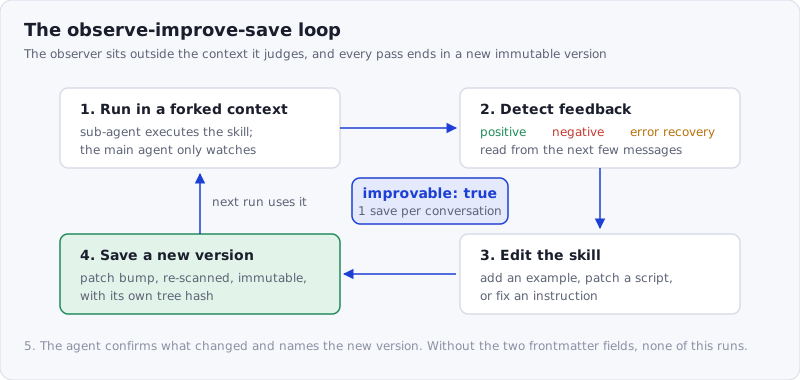
Figure: the observer sits outside the skill’s context, which is what makes the judgment about the result independent of the run that produced it.
1. Execute in a Forked Context
When an improvable skill runs, it executes in a sub-agent — a separate context from the main agent. This is the key design decision. The main agent acts as an observer, watching the skill’s execution and the user’s reaction from outside the skill’s context.
name: my-skill
context: fork
improvable: true
registry: "@myname/my-skill"
The context: fork field tells the host tool (Claude Code, Cursor, etc.) to spawn a sub-agent. Without it, the main agent would be inside the skill’s execution and couldn’t observe the result objectively.
2. Detect Feedback
After the skill completes, the main agent watches the user’s next few messages for 3 signals:
- Positive — the user says “thanks” or proceeds without corrections. The skill worked as intended.
- Negative — the user says “wrong” or manually corrects the output. Something needs fixing.
- Error recovery — the sub-agent hit a tool error (like
jq: command not found) and used a workaround. The skill should learn the workaround.
These map onto the observations Anthropic’s guidance tells a human author to make by hand: where the agent “struggles, succeeds, or makes unexpected choices.”
3. Edit the Skill
When feedback warrants a change, the main agent edits the skill’s files directly. There are 3 types of edit:
- Add examples — append a successful input/output pair to a
## Examplessection so the skill handles similar requests better next time - Patch scripts — replace a command that failed with one that works (e.g., swap
jqforpython3 -cwhen jq isn’t installed) - Fix instructions — rewrite a confusing section of the SKILL.md based on what the user actually meant
4. Save a New Version
The main agent saves the improved skill back to the registry — through the AI SkillSafe desktop app or the SkillSafe API — with a short changelog entry such as [patch] replaced jq with python3 fallback.
No version number needed — the patch version is auto-incremented, the third of semantic versioning’s 3 segments. If the content hasn’t actually changed, the save is skipped.
5. Confirm
The main agent tells the user what was improved and the new version number. The improved skill is ready for the next invocation.
Opting In to Self-Improvement
Self-improvement is disabled by default. First install the skill:
npx skills add https://api.skillsafe.ai/publisher/some-skillThen opt in by adding improvable: true and registry: "@publisher/some-skill" to the installed skill’s SKILL.md frontmatter. With those 2 fields present, the main agent observes how the skill performs in real use, proposes edits when feedback warrants them, and saves the result back as a new version. Without them, the skill behaves like any other static install — nothing is observed and nothing is changed.
The default matters for a second reason. An installed skill already has whatever access the agent has; Anthropic’s own security note warns that “a malicious Skill can direct Claude to invoke tools or execute code in ways that don’t match the Skill’s stated purpose.” A skill that can also edit itself is a larger surface, so it has to be something you switch on per skill, not a registry-wide behavior. Scan anything before you install it — the SkillSafe scanner takes a repository URL and returns a severity-rated report.
Guiding the Improvement
Skill authors can include 2 optional sections to steer how improvements are made.
Feedback Signals
Define what positive and negative feedback looks like for your specific skill:
## Feedback Signals

### Positive
- User accepts the generated output without edits
- Tests pass after the skill's changes

### Negative
- User reverts the skill's changes
- Tests fail after the skill's changes
Improvement Guide
Tell the main agent what kinds of edits to make in different failure modes:
## Improvement Guide

### When a command fails
Add platform detection and fallback commands.

### When output format is wrong
Add a concrete example showing the correct format.

### When instructions are misunderstood
Add DO and DO NOT lists to clarify edge cases.
Without these sections, the main agent uses its own judgment. With them, improvements are more targeted. This is the same lever Anthropic describes when it suggests rewriting a rule as “MUST filter” instead of “always filter” after watching an agent skip it.
Rate Limiting
Self-improvement is conservative by design:
- Improvements only happen after explicit user feedback, not on every error
- Maximum 1 improvement save per skill per conversation — no rapid-fire version bumps
- If a skill fails again after an improvement, the agent asks the user before making another edit
Changelog Convention
Each improvement uses 1 of 4 bracketed prefixes so the version history is easy to scan:
[example]— added a concrete example of correct behavior[patch]— fixed a script or command[instruction]— clarified or corrected instructions[bugfix]— fixed a bug in the skill’s logic
The skill’s registry page (and the AI SkillSafe desktop app) shows the full version history with changelogs.
Versioning Keeps You Safe
Every improvement creates a new immutable version with a SHA-256 tree hash, a 64-character digest over the file manifest. Nothing is overwritten. If an improvement makes things worse, you can always roll back — open the skill in the AI SkillSafe desktop app and install any earlier version from its version history.
Combined with dual-side verification and the published scanner ruleset, this means self-improvement doesn’t compromise security. Each new version goes through the same scan-and-verify pipeline as any other published skill: the publisher-side scan runs before the version can be shared, and the consumer’s install re-computes the hash. An improvement that introduces a critical finding cannot be shared — the gate is the same one every other version passes through.
Frequently Asked Questions
Do Claude Code skills learn from feedback automatically?
Not by default. A skill is a static file; Anthropic’s authoring guidance describes improvement as a manual “observe-refine-test cycle” a human runs between 2 Claude instances. A SkillSafe skill automates that cycle only when its frontmatter carries improvable: true and a registry reference, and only after explicit user feedback.
How do I turn on self-improvement for a skill?
Add 2 fields to the installed SKILL.md frontmatter: improvable: true and registry: "@publisher/skill-name". Add context: fork as well so the skill runs in a sub-agent and the main agent can observe it from outside. Without the fork, the observer is inside the execution it is supposed to judge.
What stops a skill from rewriting itself badly?
Three limits: improvements fire only after explicit feedback, a maximum of 1 save per skill per conversation, and a second failure after an improvement prompts the agent to ask before editing again. Every save is also re-scanned, and Anthropic’s 500-line guidance for the SKILL.md body is the reason edits are appended surgically rather than in bulk.
Can I roll back a skill improvement?
Yes. Every version is immutable and keeps its own SHA-256 tree hash and scan report, so nothing is overwritten. Open the skill in the desktop app, read the changelog — each entry carries 1 of 4 prefixes such as [patch] or [instruction] — and install the earlier version you want.
Is a self-improving skill safe to share?
Sharing is a separate, deliberate step and requires a scan report on the version being shared, so an improvement that introduces a critical finding cannot reach anyone else. See how dual-side verification works for the publisher-side and consumer-side checks a shared version passes.
Get Started
Install any skill from the registry and start using it. If something doesn’t work right, just say so — the skill will learn.
Grab a skill with the SkillSafe desktop app, or add it from the command line:
npx skills add https://api.skillsafe.ai/owner/skill-nameBrowse the 30,423 skills on the Skills page, read the documentation for the full API reference, or see how to run the same skill on every machine you own.