Best Claude Code Skills for Documentation [2026]
We read 11 documentation skills and scored five out of 50. Anthropic's doc co-authoring and React's 885-line reference style guide tie at 43/50.
We installed 11 documentation skills from the SkillSafe registry, read every file, and scored five out of 50. Anthropic’s doc co-authoring workflow and React’s 885-line reference style guide tie at 43/50; the README skill takes 41/50. All five run in Claude Code, Cursor and Windsurf.
Updated September 2026: scores, install counts and upstream repositories re-verified. The distinction the two top skills enforce is older than any of them — it is the Diataxis split between reference material and tutorials, and it has not moved.
The Five Skills, Scored
| Skill | Score | Key Feature | Formats / Tools | Installs |
|---|---|---|---|---|
| @anthropics/doc-coauthoring | 43/50 | 3-stage co-authoring with reader testing | Markdown, RFCs, ADRs, design docs | 9,145 |
| @reactjs/docs-writer-reference | 43/50 | 885-line template system with 6 page types | MDX, React docs, API reference | 8,034 |
| @softaworks/crafting-effective-readmes | 41/50 | 14 files with 4 project-type templates | Markdown, README, GitHub | 5,494 |
| @anthropics/docx | 38/50 | 61-file skill with XML editing and validation | Word (.docx), python-docx, XML | 5,976 |
| @supercent-io/api-documentation | 36/50 | Full OpenAPI spec template + Swagger setup | OpenAPI 3.0, Swagger UI, curl | 4,256 |
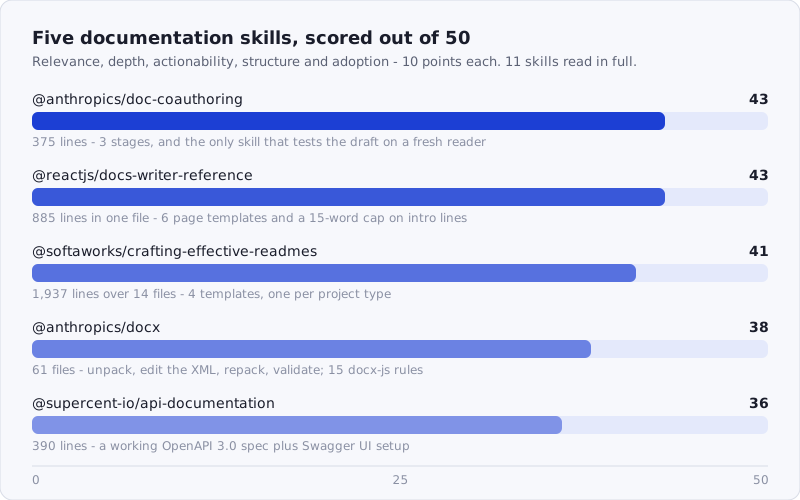
Figure: the five documentation skills that cleared the bar, scored on relevance, depth, actionability, structure and adoption.
Browse the full documentation catalog: /tags/documentation/
How We Scored
Each skill was scored across five dimensions, 0-10 each, for a maximum of 50 points:
- Relevance — Does it address real documentation needs (code docs, API docs, README, technical writing)?
- Depth — How much actual content is in the skill files? Templates, style guides, specific formatting rules?
- Actionability — Can a developer follow the output and produce better docs?
- Structure — Is the workflow well-organized? Does it handle different doc types?
- Adoption — Install count and stars as a proxy for real-world validation.
We scored by reading the actual installed skill files — not descriptions, not registry summaries. Most of the 11 candidates fell into two failure modes: either they were too generic (“write clear and concise documentation”) or too narrow (PyTorch-only Sphinx workflows, Vite build tool configs). The five below cover the actual breadth of what developers document — proposals, API references, React component docs, README files, and Word documents — with enough depth that the AI produces meaningfully better output than it would on its own.
Match the Skill to the Document
Documentation is not one job. A proposal, an API reference page, a README and a Word deliverable have different readers, different structures, and in two cases a different file format entirely — which is why the useful question is not “which documentation skill is best” but “what am I writing today.”
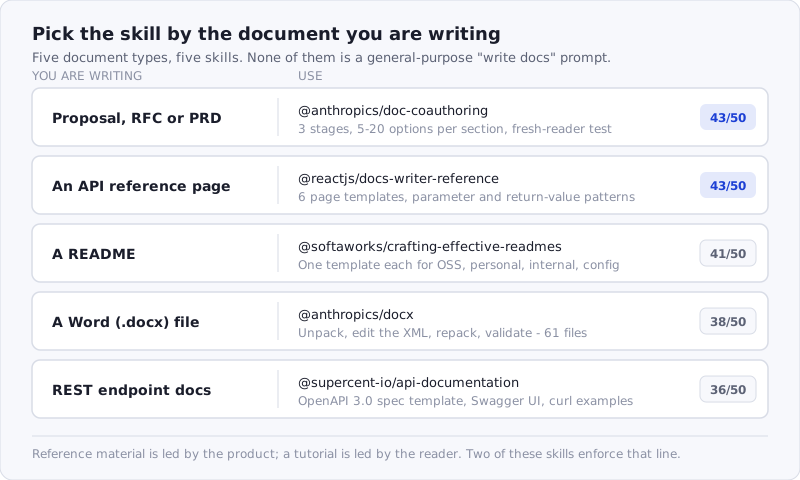
Figure: five document types, five skills. The two top scorers both enforce the reference-versus-tutorial line.
1. @anthropics/doc-coauthoring — 43/50
Score: 43/50 | Relevance: 9 · Depth: 8 · Actionability: 9 · Structure: 9 · Adoption: 8
Source: github.com/anthropics/skills · 9,145 installs
One file, 375 lines, and the most thoughtful documentation workflow in the registry. This skill does not generate documentation for you. It guides you through a three-stage process for co-authoring it: Context Gathering, Refinement and Structure, and Reader Testing. The distinction matters.
Stage 1 (Context Gathering) starts with five meta-questions — document type, audience, desired impact, template constraints, and other context — then transitions into an open-ended info dump phase. The skill explicitly tells the AI to ask 5-10 numbered clarifying questions once the initial dump is complete, and to let the user answer in shorthand (“1: yes, 2: see #channel, 3: no because backwards compat”). This is a small detail that makes a large difference: it removes the friction of writing formal answers to every question.
Stage 2 (Refinement and Structure) is where the section-by-section brainstorming happens. For each section, the skill prescribes a five-step loop: clarifying questions, brainstorm 5-20 options, user curation, gap check, then drafting. The instruction to brainstorm 5-20 options and let the user pick is the core design insight — it shifts the AI from drafter to idea generator and the user from passive reviewer to active curator. After three consecutive iterations with no changes, the skill prompts: “Can anything be removed without losing important information?” This anti-bloat check is rare in writing skills.
Stage 3 (Reader Testing) is the feature that separates this from generic “write a doc” prompts. In Claude Code, the skill invokes a sub-agent with no conversation context, gives it only the document, and asks it to answer predicted reader questions. In the web interface, it provides step-by-step instructions for the user to do this manually. The idea — testing documentation against a fresh reader with zero context — catches blind spots that the author and their co-authoring AI will never find because they share too much context.
The skill supports technical specs, PRDs, decision docs, RFCs, and proposals. It handles both artifact-based and file-based workflows. It comes from Anthropic’s official skills repository.
npx skills add https://api.skillsafe.ai/anthropics/doc-coauthoring2. @reactjs/docs-writer-reference — 43/50
Score: 43/50 | Relevance: 9 · Depth: 10 · Actionability: 9 · Structure: 9 · Adoption: 6
Source: github.com/reactjs/react.dev · 8,034 installs
At 885 lines in a single SKILL.md, this is the densest documentation skill we reviewed. It is a complete style guide for writing React-style API reference pages, extracted from the React documentation repository, and it is applicable well beyond React itself — the live pages it was derived from are the ones at react.dev/reference.
The skill defines six page templates, selected via a decision tree: Hook/Function (Type A), Component (Type B), Configuration (Type C), Directive (Type D), ESLint Rule (Type E), and Index/Category (Type F). Each template specifies the exact frontmatter, section order, heading format, and ID conventions. For example, Type A (Hook/Function) prescribes this structure: Intro (one sentence, 15 words max), InlineToc, Reference (with Parameters, Returns, Caveats), Usage (with Sandpack examples), and Troubleshooting.
The writing patterns section is where this skill earns its depth score. It provides exact templates for six types of opening lines, four parameter documentation patterns (simple, optional, callback with sub-parameters, nested options object), five return value patterns (single value, array with numbered list, object with bulleted list, Promise, wrapped function), and four caveat patterns. Each pattern includes inline examples from actual React docs.
Specific rules worth highlighting: intro sentences must be under 15 words and state what the API does, not how it works. Troubleshooting headings use first-person problem statements (“I’ve updated the state, but logging gives me the old value”). Code comments use specific emoji conventions for wrong/right patterns. Consecutive Pitfall or Note callouts are prohibited — they must be combined or separated by prose.
The section on content principles draws a clear line between Reference pages and Learn pages: “Don’t mix teaching with reference (that’s Learn’s job).” That is the Diataxis distinction, stated in the documentation community’s canonical form as:
Whereas the content of tutorials and how-to guides are led by needs of the user, reference material is led by the product it describes.
Most documentation skills ignore that line entirely. This one also handles deprecated APIs, canary features, and server component annotations with specific placement rules. Even if you never write React docs, the patterns here — structured parameter documentation, return value templates, severity-based caveat ordering — transfer directly to any API reference documentation.
npx skills add https://api.skillsafe.ai/reactjs/docs-writer-reference3. @softaworks/crafting-effective-readmes — 41/50
Score: 41/50 | Relevance: 9 · Depth: 9 · Actionability: 9 · Structure: 8 · Adoption: 6
Fourteen files, 1,937 total lines, and the most comprehensive README-specific skill in the registry. Where most documentation skills treat READMEs as a generic writing task, this one recognizes that a README for an open-source library, a personal project, an internal tool, and a dotfiles config folder are fundamentally different documents with different audiences.
The SKILL.md (79 lines) defines a four-step workflow: identify the task type (creating, adding, updating, reviewing), ask task-specific questions, draft using the appropriate template, and confirm with the user. It routes to one of four templates based on project type: templates/oss.md for open-source projects, templates/personal.md for portfolio projects, templates/internal.md for team tools, and templates/xdg-config.md for configuration directories.
The section-checklist.md is a concise matrix showing which sections to include by project type. Open-source projects need badges, contributing guidelines, and a license. Internal projects need architecture docs and runbooks. Config folders need “What’s Here,” “How to Extend,” and “Gotchas.” Personal projects need a tech stack section and learnings. This matrix alone prevents the most common README mistake: applying OSS conventions to projects that are not open source.
The references directory contains five files drawn from established README standards. standard-readme-spec.md and its companion examples (minimal and maximal) reproduce the Standard Readme specification, which fixes both the required sections and their order. art-of-readme.md covers the philosophy of good README writing. make-a-readme.md provides a practical guide. The using-references.md file explains when to consult each reference — not all at once, but based on the specific question.
The style-guide.md is short (14 lines) but pointed: no install steps is a mistake, no examples is a mistake, walls of text are a mistake, stale content is a mistake. It references a separate writing-clearly-and-concisely skill for general prose quality.
The approach of task-specific questions before drafting is well-designed. For a new README, it asks four questions: project type, one-sentence problem statement, quickest path to “it works,” and anything notable. For an update, it asks what changed, then reads the current README to identify stale sections. For a review, it checks the README against the actual project state (package.json, main files) and flags outdated sections.
npx skills add https://api.skillsafe.ai/softaworks/crafting-effective-readmes4. @anthropics/docx — 38/50
Score: 38/50 | Relevance: 7 · Depth: 9 · Actionability: 8 · Structure: 8 · Adoption: 6
Source: github.com/anthropics/skills · 5,976 installs
Sixty-one files and 590 lines in SKILL.md alone. This is not a writing skill — it is an engineering skill for producing and editing Word documents programmatically. It ships with Python scripts for unpacking, packing, and validating .docx files, Office Open XML schemas for validation, and JavaScript templates for creating documents from scratch using the docx-js library.
The SKILL.md is structured as a technical reference manual. It opens with a quick-reference table routing tasks to approaches: read/analyze with pandoc or XML unpacking, create new with docx-js, edit existing via unpack-edit-repack. The creation section covers page sizes (with a DXA conversion table), styles (including the critical note that docx-js defaults to A4, not US Letter), lists (with an explicit prohibition on unicode bullet characters), tables (with the dual-width requirement for cross-platform rendering), images, page breaks, hyperlinks, footnotes, tab stops, multi-column layouts, and table of contents generation.
The editing section is where the depth shows. The three-step unpack-edit-repack workflow uses provided Python scripts: unpack.py extracts and pretty-prints XML with smart quote conversion, pack.py validates and reassembles with auto-repair for common issues like invalid durableId values and missing xml:space="preserve" attributes. The XML reference covers tracked changes (insertions, deletions, rejecting another author’s changes, restoring deletions), comments (with a comment.py helper for managing the boilerplate across multiple XML files), and image insertion with relationship management.
The 15 “Critical Rules for docx-js” at the end of the creation section are worth the install alone. Rules like “never use WidthType.PERCENTAGE (breaks in Google Docs),” “never use tables as dividers (cells have minimum height),” and “landscape: pass portrait dimensions (docx-js swaps internally)” represent hard-won knowledge that would take hours of debugging to discover independently.
The security scan flagged 10 issues (subprocess calls and composite patterns in the Python scripts), which is expected for a skill that shells out to LibreOffice and pandoc. The scan score is 0/100, but the flagged patterns are all legitimate tool invocations, not exfiltration risks. Read the scan report yourself before installing this one — a 0/100 you have not looked at is not an informed decision.
npx skills add https://api.skillsafe.ai/anthropics/docx5. @supercent-io/api-documentation — 36/50
Score: 36/50 | Relevance: 8 · Depth: 8 · Actionability: 8 · Structure: 7 · Adoption: 5
Two files (SKILL.md at 390 lines, plus a SKILL.toon companion), and a practical template for API documentation built around OpenAPI 3.0. The skill follows a four-step workflow: write the OpenAPI spec, generate documentation from code annotations, set up interactive docs, and write examples and guides.
The OpenAPI spec template in Step 1 is production-ready rather than illustrative. It includes a User Management API with GET /users (with pagination parameters, page and limit with defaults and maximums), POST /users (with request body validation including minLength and maxLength), proper $ref schema composition, reusable error responses (Unauthorized, BadRequest), and JWT bearer security scheme configuration. The schemas define User, CreateUserRequest, and Pagination with correct types and format annotations. This is specific enough that a developer could adapt it to their own API in minutes rather than starting from the spec documentation.
Step 2 shows Express + TypeScript JSDoc/Swagger annotations for generating docs from code. Step 3 provides Swagger UI setup with swagger-ui-express, including custom CSS and site title configuration. Step 4 delivers a complete API documentation example covering authentication (getting and using JWT tokens with curl examples), resource creation with success and error response examples, rate limiting headers, pagination query parameters, and a standard error code table (400 through 500).
The output format section prescribes a directory structure: docs/README.md, getting-started.md, authentication.md, per-resource API reference files, guides for pagination/error-handling/rate-limiting, per-language examples, and the OpenAPI spec file. The constraints section enforces working code examples, documented error cases, no real API keys in examples, and no vague descriptions.
The skill loses points on structure — the four steps are sequential but there is no branching logic for different API types (REST vs GraphQL, despite mentioning GraphQL in the description), no handling of versioned APIs, and no guidance on when to use autosummary versus per-endpoint documentation. The adoption count (4,256 installs, 0 stars) is the lowest in this list. But for REST API documentation specifically, the OpenAPI template and curl examples are immediately useful. If you are designing the API as well as documenting it, the API development roundup covers the skills that sit upstream of this one.
npx skills add https://api.skillsafe.ai/supercent-io/api-documentationFrequently Asked Questions
What makes a good AI documentation skill?
Specificity. The best skills we reviewed contain templates, style rules, and decision trees — not generic instructions to “write clearly.” A good documentation skill should answer: what type of document am I writing, who is reading it, what sections does it need, and what does each section look like? Skills that answer those questions with concrete examples — @reactjs/docs-writer-reference carries 6 page templates in 885 lines — produce better output than skills that tell the AI to be thorough.
What is the best Claude Code skill for writing a README?
@softaworks/crafting-effective-readmes at 41/50, with 5,494 installs. It is the only skill in the registry that treats project type as a routing decision, with 4 separate templates (open source, personal, internal, config directory) across 14 files, plus a reproduction of the Standard Readme spec as a reference file rather than a paraphrase.
Do these skills work with Claude Code, Cursor, and Windsurf?
All five skills install as SKILL.md files that any AI agent can read. @anthropics/doc-coauthoring and @anthropics/docx are tagged for Claude Code, Cursor, Windsurf, and Codex CLI. The other three use the standard skill format that is compatible across tools. @anthropics/docx additionally requires pandoc and LibreOffice for some operations (format conversion, tracked change acceptance), which are external dependencies not bundled with the skill.
Can AI write API documentation from my code?
Partly, and the split matters. @supercent-io/api-documentation (36/50) generates reference material from JSDoc/Swagger annotations, which works because the source of truth is the code. What it cannot derive is the guide layer — authentication walkthroughs, pagination conventions, error-handling advice — so the skill supplies templates for those instead. Expect to write the 4 guide documents yourself.
How were these skills scored?
We installed each skill locally using npx skills add, then read every file in the installed skill directory. Scoring was based entirely on the content of the installed files — not descriptions, not README summaries, not marketing copy. Each skill was scored on five dimensions (Relevance, Depth, Actionability, Structure, Adoption), 0-10 each, for a maximum of 50. The Adoption dimension used install count and star count as proxies for community validation, which means a less-installed skill with exceptional content can still score well overall.
Conclusion
@anthropics/doc-coauthoring (43/50) and @reactjs/docs-writer-reference (43/50) share the top score but serve different purposes. Use doc-coauthoring when you need to write a proposal, spec, or decision doc from scratch — the three-stage workflow with reader testing catches blind spots before human reviewers do. Use docs-writer-reference when you are writing API reference documentation and want consistent structure across every page.
For README files specifically, @softaworks/crafting-effective-readmes (41/50) is the clear choice — it is the only skill that differentiates between project types and provides templates for each.
npx skills add https://api.skillsafe.ai/anthropics/doc-coauthoring
npx skills add https://api.skillsafe.ai/reactjs/docs-writer-reference
npx skills add https://api.skillsafe.ai/softaworks/crafting-effective-readmes
npx skills add https://api.skillsafe.ai/anthropics/docx
npx skills add https://api.skillsafe.ai/supercent-io/api-documentation
Related roundups: Browse all Best Of roundups