Best Claude Code Skills for Performance Optimization [2026]
We scored 11 performance skills out of 50. Vercel's 64-rule react-best-practices wins at 47/50; Callstack's 6,388-line React Native guide takes 45/50.
We installed 11 performance skills from the SkillSafe registry, read every file, and scored five out of 50. Vercel’s react-best-practices wins at 47/50 with 64 rule files across 8 impact tiers. Callstack’s React Native guide takes 45/50 with 6,388 lines. All five run in Claude Code, Cursor and Windsurf.
Updated September 2026: scores, install counts and source repositories re-verified. The Core Web Vitals numbers below still match Google’s current thresholds — LCP 2.5s, INP 200ms, CLS 0.1, measured at the 75th percentile of page loads.
The Five Skills, Scored
| Skill | Score | Key Feature | Frameworks / Tools | Installs |
|---|---|---|---|---|
| @vercel-labs/vercel-react-best-practices | 47/50 | 64 rules across 8 priority tiers | React, Next.js, Vercel | 5,478 |
| @callstackincubator/react-native-best-practices | 45/50 | FPS, TTI, bundle, memory across JS + native | React Native, Hermes, Reanimated | 9,313 |
| @wshobson/python-performance-optimization | 42/50 | 20 profiling and optimization patterns | Python, cProfile, asyncio, NumPy | 8,668 |
| @wshobson/sql-optimization-patterns | 42/50 | EXPLAIN analysis + 5 query optimization patterns | PostgreSQL, MySQL, SQL Server | 3,370 |
| @addyosmani/core-web-vitals | 41/50 | LCP, INP, CLS with framework-specific fixes | Chrome DevTools, Lighthouse, Web APIs | 4,358 |
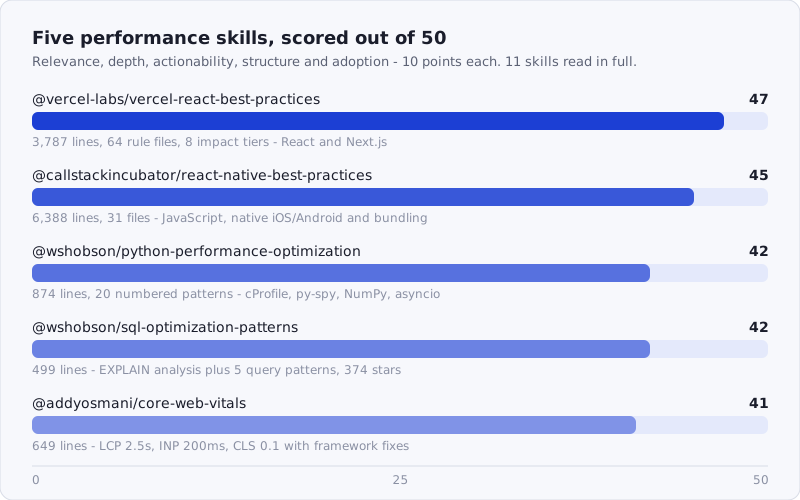
Figure: the five skills that cleared the bar, scored across relevance, depth, actionability, structure and adoption.
Browse the full performance catalog: /tags/performance/
How We Scored
Each skill was scored across five dimensions, 0-10 each, for a maximum of 50 points:
- Relevance — Does it address real performance concerns (profiling, bottleneck identification, optimization patterns, benchmarking)?
- Depth — How much actual content? Specific optimization patterns, profiling techniques, not vague advice.
- Actionability — Can a developer follow the guidance to measurably improve performance?
- Structure — Well-organized with clear coverage areas (CPU, memory, network, rendering)?
- Adoption — Install count + stars as proxy for real-world validation.
We scored by reading the installed skill files — not descriptions, not README summaries. Performance is a sprawling topic: it spans Python profiling, React render cycles, database query plans, mobile frame rates and browser paint metrics, so we cast a wide net across all 11 candidates. Most fell into predictable traps — generic checklists that say “measure first” without showing you how, or broad “best practices” skills where performance is one bullet among twenty topics.
Which Layer Are You Optimizing?
Performance skills do not generalize. The skill that fixes a layout shift cannot read your query plan, and the skill that reads your query plan has nothing to say about Hermes bytecode. Pick by the layer where your bottleneck actually lives.
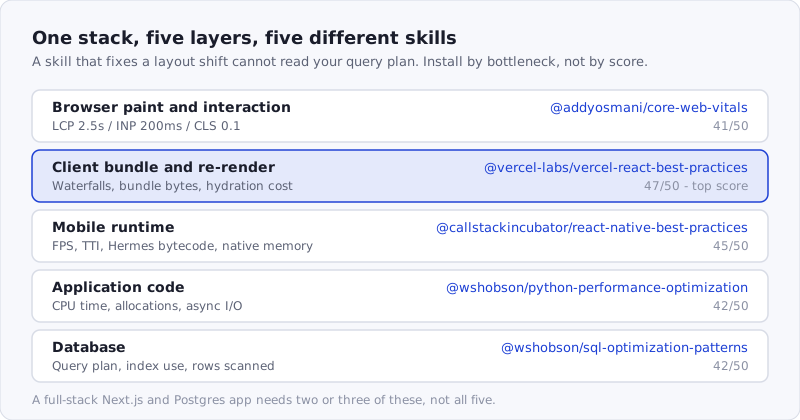
Figure: each skill owns one layer of the stack and its own metrics. A full-stack Next.js and Postgres app needs two or three of them, not all five.
1. @vercel-labs/vercel-react-best-practices — 47/50
Score: 47/50 | Relevance: 9 | Depth: 10 | Actionability: 10 | Structure: 10 | Adoption: 8
Source: github.com/vercel-labs/agent-skills · 5,478 installs · 84 stars
The most densely structured performance skill in the registry. Seventy files totaling 3,787 lines, organized into 64 individual rule files across 8 categories ranked by impact: Eliminating Waterfalls (critical), Bundle Size Optimization (critical), Server-Side Performance (high), Client-Side Data Fetching (medium-high), Re-render Optimization (medium), Rendering Performance (medium), JavaScript Performance (low-medium), and Advanced Patterns (low). The 84-star count and 5 verifications make it the most community-validated performance skill we tested.
Each rule file follows an identical format: impact rating with expected improvement, incorrect code example, correct code example, and context. The async-parallel.md rule states its impact upfront — “2-10x improvement” — then shows the sequential three-await pattern and the Promise.all() replacement. The bundle-barrel-imports.md rule explains exactly why barrel files defeat tree shaking and provides the direct import alternative. Every rule is a pattern the AI can match against code it is reviewing or generating.
The priority ordering is what makes this skill work in practice. An AI agent reviewing a slow Next.js page will encounter the waterfall-elimination rules first, bundle rules second, and re-render rules later. That matches real performance debugging: network waterfalls and bundle bloat cause larger regressions than unnecessary re-renders. The server-parallel-fetching.md rule restructures React Server Components to parallelize data fetches — a pattern specific to the RSC architecture that generic performance skills miss entirely. The rendering-content-visibility.md rule addresses CSS content-visibility for long lists, and js-set-map-lookups.md handles algorithmic complexity at the JS level.
The breadth across all layers of a React/Next.js application — async data loading, bundle composition, server rendering, client hydration, re-render prevention, DOM rendering, raw JS performance — means the AI has a performance rule for almost any optimization scenario it encounters. If you work in Next.js specifically, pair it with the skills in our Next.js roundup.
npx skills add https://api.skillsafe.ai/vercel-labs/vercel-react-best-practices2. @callstackincubator/react-native-best-practices — 45/50
Score: 45/50 | Relevance: 9 | Depth: 10 | Actionability: 9 | Structure: 10 | Adoption: 7
Source: Callstack, “The Ultimate Guide to React Native Optimization” · 9,313 installs
Thirty-one files totaling 6,388 lines — the largest skill by raw content in this roundup. It covers three layers: JavaScript/React (9 references), Native iOS/Android (11 references), and Bundling (9 references). Every reference uses a hybrid format: Quick Pattern with incorrect/correct code pairs for immediate matching, Quick Command with shell commands for measurement, and a Deep Dive with prerequisites, step-by-step instructions, and common pitfalls.
The skill opens with a problem-to-reference mapping table that directs the AI immediately: “App feels slow/janky” leads to js-measure-fps.md then js-profile-react.md. “Slow startup (TTI)” leads to native-measure-tti.md then bundle-analyze-js.md. “Memory growing” leads to js-memory-leaks.md or native-memory-leaks.md. This is not a wall of advice — it is a diagnostic workflow.
The measurement-first approach is embedded in the skill structure. The js-measure-fps.md reference shows how to open React Native DevTools and capture FPS baselines. The bundle-analyze-js.md reference provides the exact bundle and source-map-explorer commands to visualize what is in the JS bundle, then a follow-up section showing how to verify improvement after optimization (record baseline size, apply fixes, re-bundle, compare). The native-measure-tti.md reference explains why only cold starts should be measured and how to set up react-native-performance markers.
The native layer coverage sets this apart from web-only performance skills. The native-turbo-modules.md reference covers building fast native modules with the new architecture. The native-threading-model.md explains the JS, UI, and background threads and when to offload work. The native-memory-patterns.md covers C++, Swift, and Kotlin memory management for native modules. The bundle-hermes-mmap.md reference explains how disabling JS bundle compression on Android enables Hermes to memory-map the bytecode directly, reducing TTI.
The impact ratings (CRITICAL, HIGH, MEDIUM) on every reference file mean the AI can triage. Barrel export elimination and JS bundle analysis are CRITICAL. Code splitting and library size evaluation are MEDIUM. That ordering prevents the AI from spending context on micro-optimizations when macro problems exist.
npx skills add https://api.skillsafe.ai/callstackincubator/react-native-best-practices3. @wshobson/python-performance-optimization — 42/50
Score: 42/50 | Relevance: 10 | Depth: 8 | Actionability: 9 | Structure: 8 | Adoption: 7
Source: github.com/wshobson/agents · 8,668 installs · 16 stars
A single 874-line SKILL.md containing 20 numbered optimization patterns, each with benchmarking code that produces measurable output. This is the most installed Python performance skill in the registry.
The skill starts where performance work should start: profiling. Patterns 1 through 4 cover cProfile (with pstats.Stats sorted by cumulative time), line_profiler (both decorator and manual LineProfiler usage), memory_profiler (decorator-based memory tracking per line), and py-spy (production profiling via py-spy record -o profile.svg --pid 12345). These are not descriptions of tools — they are complete, runnable code blocks. The cProfile pattern saves results to a .prof file for later analysis, and the command-line variant shows the pstats interactive mode.
Patterns 5 through 10 cover Python-specific micro-optimizations with timeit benchmarks that print speedup factors: list comprehensions versus loops (Pattern 5), generator expressions for memory (Pattern 6), string concatenation with join versus += (Pattern 7), dictionary lookups versus list searches (Pattern 8), local versus global variable access (Pattern 9), and function call overhead in tight loops (Pattern 10). Each prints a concrete “Speedup: Nx” result so the AI can explain the tradeoff to the developer.
The advanced section (Patterns 11-15) scales up: NumPy vectorized operations (Pattern 11), functools.lru_cache with cache_info inspection (Pattern 12), __slots__ for memory-efficient classes (Pattern 13), multiprocessing for CPU-bound work (Pattern 14), and asyncio with aiohttp for I/O-bound work (Pattern 15). Patterns 16-17 cover database batch operations and query optimization with EXPLAIN. Patterns 18-20 handle memory leak detection with tracemalloc, iterator-based file processing, and weakref.WeakValueDictionary for garbage-collectible caches.
The “Performance Checklist” at the end gives the AI a verification loop: profiled code, appropriate data structures, caching, optimized queries, generators, multiprocessing, async I/O, minimized call overhead, memory leak checks, and before/after benchmarks. It is a complete profiling-to-optimization pipeline in one file. For everything else Python, see our Python skills roundup.
npx skills add https://api.skillsafe.ai/wshobson/python-performance-optimization4. @wshobson/sql-optimization-patterns — 42/50
Score: 42/50 | Relevance: 8 | Depth: 9 | Actionability: 9 | Structure: 8 | Adoption: 8
Source: github.com/wshobson/agents · 3,370 installs · 374 stars
A single 499-line SKILL.md with the highest star count of any performance-adjacent skill in the registry. While we covered this skill in our SQL roundup, it earns a place here because database queries are the most common performance bottleneck in production applications, and this skill treats query optimization as a performance engineering discipline rather than a DBA checklist.
The skill opens with EXPLAIN analysis — not just EXPLAIN SELECT, but EXPLAIN (ANALYZE, BUFFERS, VERBOSE) with a breakdown of what each scan type means: Seq Scan (full table scan, usually slow), Index Scan (using index), Index Only Scan (best case, no table access), and join types (Nested Loop for small sets, Hash Join for larger sets, Merge Join for sorted data). That vocabulary maps directly onto PostgreSQL’s own EXPLAIN documentation, which is what lets the AI reason about a query plan rather than blindly adding indexes.
Five optimization patterns form the core. Pattern 1 (N+1 queries) shows the Python anti-pattern alongside both JOIN and batch-loading solutions. Pattern 2 (pagination) demonstrates why OFFSET 100000 degrades to seconds and provides cursor-based pagination with composite sorting and the exact index to support it. Pattern 3 (aggregation) shows pg_class.reltuples for approximate counts instead of scanning the entire table. Pattern 4 (subqueries) transforms correlated subqueries into JOINs and window functions. Pattern 5 (batch operations) covers multi-row INSERT, batch UPDATE via temporary tables, and COPY for bulk loading.
The advanced section adds materialized views with concurrent refresh, range partitioning by date, and query hints. The monitoring queries against pg_stat_statements (slow queries by mean time), pg_stat_user_tables (missing indexes by sequential read count), and pg_stat_user_indexes (unused indexes wasting write overhead) are production-ready diagnostic tools the AI can run immediately.
npx skills add https://api.skillsafe.ai/wshobson/sql-optimization-patterns5. @addyosmani/core-web-vitals — 41/50
Score: 41/50 | Relevance: 9 | Depth: 8 | Actionability: 9 | Structure: 9 | Adoption: 6
Source: github.com/addyosmani/web-quality-skills · 4,358 installs
Two files totaling 649 lines, focused exclusively on the three Core Web Vitals metrics that affect Google Search ranking: LCP (Largest Contentful Paint), INP (Interaction to Next Paint), and CLS (Cumulative Layout Shift). This skill trades breadth for precision — it does one thing and does it thoroughly.
Each metric gets its own section with thresholds, common causes with incorrect/correct code pairs, an optimization checklist, and a JavaScript debugging snippet using PerformanceObserver. The thresholds match Google’s published guidance exactly:
To ensure you’re hitting the recommended target for these metrics for most of your users, a good threshold to measure is the 75th percentile of page loads, segmented across mobile and desktop devices.
The LCP section covers four causes: slow TTFB (fix with CDN/caching), render-blocking resources (inline critical CSS, defer the rest), slow resource load times (preload with fetchpriority="high"), and client-side rendering delays (use SSR/SSG). The INP section breaks the 200ms budget into three phases — Input Delay (target under 50ms), Processing Time (target under 100ms), Presentation Delay (target under 50ms) — and provides solutions for each: break long tasks into chunks with setTimeout(r, 0) yielding, prioritize visual feedback with requestAnimationFrame, and defer analytics with requestIdleCallback.
The CLS section is where the specificity pays off. It covers five causes with detailed fixes: images without dimensions (add width/height or aspect-ratio), ads and embeds without reserved space (min-height containers), dynamically injected content above the viewport (insert below or use transform animation), web fonts causing layout shift (font-display: optional or size-adjust matching), and CSS animations on layout properties (use transform instead of height/width).
The framework quick-fixes section at the end provides ready-to-paste code for Next.js (next/image with priority, dynamic for code splitting), React (useTransition for INP, fetchpriority for LCP), and Vue/Nuxt (NuxtImg with preload, async components). The web-vitals library integration snippet sends all three metrics to analytics in six lines.
The adoption count (4,358) is lower than others in this roundup, but this skill covers a topic that every web application needs and few skills address with this level of metric-by-metric detail.
npx skills add https://api.skillsafe.ai/addyosmani/core-web-vitalsFrequently Asked Questions
What is the best Claude Code skill for performance optimization?
For React and Next.js work, @vercel-labs/vercel-react-best-practices at 47/50 — 64 rule files ordered by impact, so the agent fixes waterfalls and bundle size before it touches re-renders. For a Python service, @wshobson/python-performance-optimization at 42/50 leads with profiling, not guesses. Install the one that matches your bottleneck’s layer.
Do these performance skills work in Cursor and Windsurf?
Yes. All five ship as SKILL.md files, the format Claude Code, Cursor, Windsurf and other compatible runtimes read. One npx skills add makes the skill available to every tool on that machine. Nothing in these five depends on a Claude-specific API; the Vercel rules and the Callstack references are plain Markdown with code pairs.
What types of performance does this roundup cover?
We intentionally cast a wide net across 11 candidates. The five winners span Python CPU and memory profiling, React/Next.js rendering and bundle size, React Native FPS and TTI, SQL query plan analysis, and browser Core Web Vitals. Performance is domain-specific: a Python profiling skill will not help with a 0.25 CLS score, and a bundle analyzer will not fix a sequential scan. Match the skill to the layer.
Why did some high-install skills not make the list?
Several high-install candidates were too generic to score on depth. The @supercent-io/performance-optimization skill (4,067 installs) covers React, databases and measurement in 300 lines but leaves placeholder example sections empty. @patricio0312rev/cost-latency-optimizer (9,933 installs) and @patricio0312rev/monorepo-ci-optimizer (8,811 installs) share one description and appear to be a bulk upload. @squirrelscan/audit-website (3,341 installs, 305 stars) is a site auditing tool requiring its own CLI, not an optimization guide.
How do these skills compare to just reading the documentation?
The difference is activation cost. You can read the React docs on useMemo or PostgreSQL’s EXPLAIN page, but an agent with the skill installed applies those patterns during generation and review without being asked. The 64 rule files in the Vercel skill are 64 patterns matched automatically; the Python skill ships runnable benchmarking code the agent inserts to measure before and after. Documentation teaches concepts; skills embed them in behaviour.
Conclusion
Performance optimization is one of the areas where AI skills add the most value because the patterns are well-defined, the diagnostics are systematic, and the fixes are measurable. The five skills above cover distinct domains — React rendering, React Native mobile, Python profiling, SQL query planning, and browser metrics — so they complement rather than overlap each other. If your stack touches any of these, the corresponding skill gives your AI agent a structured approach to finding and fixing bottlenecks rather than guessing.
Before you install any of them, run the repository through the SkillSafe scanner — it takes a URL and returns a severity-rated report before anything reaches your agent.
Related roundups: Browse all Best Of roundups