Best Claude Code Skills for Refactoring [2026]
We scored 14 refactoring skills out of 50. GitHub's 10-smell refactor skill wins at 43/50; Dify's complexity-scoring React skill takes 42/50.
We installed 14 refactoring skills from the SkillSafe registry, read every file, and scored five out of 50. GitHub’s refactor skill wins at 43/50 with a 10-smell catalog in 645 lines. Langgenius takes 42/50 with 1,695 lines and an automated complexity score. All five run in Claude Code, Cursor and Windsurf.
Updated September 2026: scores, install counts and upstream repositories re-verified. The underlying discipline is unchanged — every skill here is a restatement of Martin Fowler’s refactoring catalog, which names 60-plus transformations and the mechanics of each.
The Five Skills, Scored
| Skill | Score | Key Feature | Languages / Frameworks | Installs |
|---|---|---|---|---|
| @github/refactor | 43/50 | 10 code smells + design patterns | TypeScript, language-agnostic | 8,045 |
| @langgenius/component-refactoring | 42/50 | Complexity scoring + 4-file reference system | React, TypeScript, Dify | 4,856 |
| @thebushidocollective/refactor | 40/50 | 4 refactoring strategies + safety checklists | Language-agnostic | 3,937 |
| @supercent-io/code-refactoring | 39/50 | SOLID walkthrough + behavior validation | Language-agnostic, multi-agent | 2,909 |
| @mattpocock/request-refactor-plan | 37/50 | Interview-driven refactor planning | Language-agnostic, GitHub Issues | 9,396 |
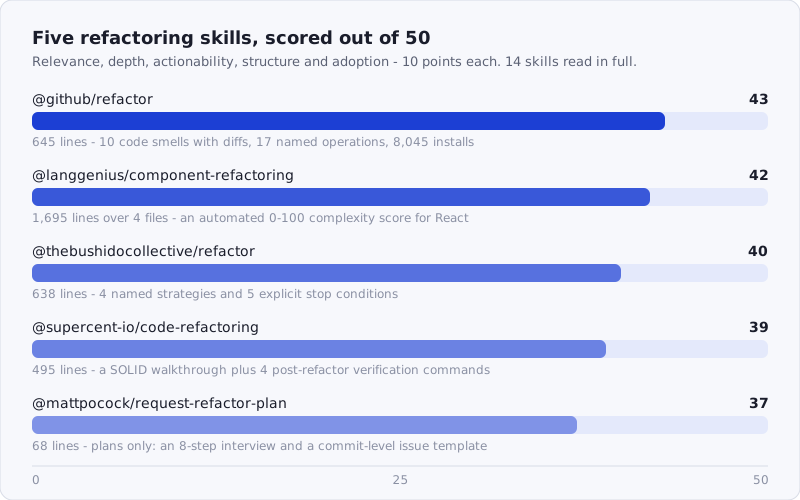
Figure: the five refactoring skills that cleared the bar, scored across relevance, depth, actionability, structure and adoption.
Browse the full refactoring catalog: /tags/refactoring/
How We Scored
Each skill was scored across five dimensions, 0–10 each, for a maximum of 50 points:
- Relevance — Does it address real refactoring concerns (code smells, safe transformations, pattern application)?
- Depth — How much actual content? Specific refactoring recipes, not just “clean up the code.”
- Actionability — Can a developer follow structured refactoring steps?
- Structure — Well-organized workflow? Does it handle risk assessment and testing during refactoring?
- Adoption — Install count as a proxy for real-world validation.
We scored by reading the actual installed skill files — not descriptions, not README summaries. Most of the 14 candidates had the same basic advice: “extract method, rename variable, run tests.” True, but not useful — that is what any developer already knows. The five below go further: structured workflows, concrete smell catalogs, complexity scoring, and refactoring-specific risk assessment.
The Loop All Five Encode
Refactoring skills are not really pattern libraries. They are guardrails against the one failure mode AI agents reliably hit: making twenty changes at once and discovering at the end that behavior moved. Every skill in this roundup enforces some part of the same loop, and the gate at the front — tests exist and pass — is the step that decides whether the rest of it is safe.
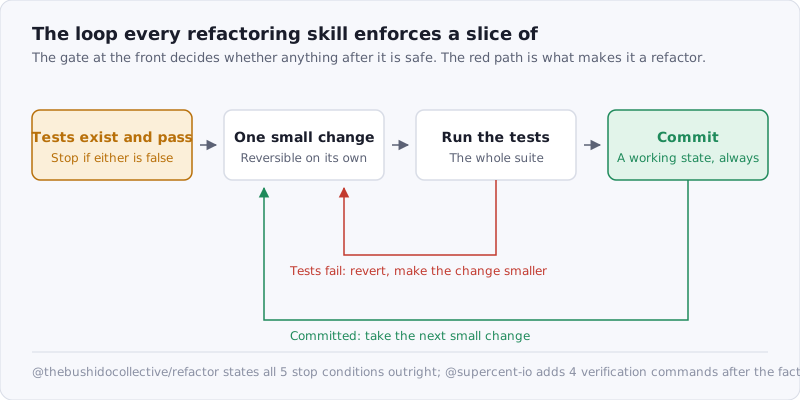
Figure: the loop each skill enforces a slice of. The red path — revert and go smaller — is what separates a refactor from a rewrite.
The discipline predates the skills by a decade. Fowler’s opportunistic refactoring essay is where the “always leave the code better than you found it” rule that three of these skills quote comes from, and the preparatory-refactoring case for doing it before a feature lands is Kent Beck’s:
for each desired change, make the change easy (warning: this may be hard), then make the easy change
— Kent Beck, quoted in Martin Fowler, “An example of preparatory refactoring”
1. @github/refactor — 43/50
Score: 43/50 | Relevance: 9 · Depth: 9 · Actionability: 9 · Structure: 8 · Adoption: 8
Source: github.com/github/awesome-copilot · 8,045 installs
One file, 645 lines, and the most comprehensive general-purpose refactoring skill in the registry. It covers ten code smells with diff-style before/after examples, two design patterns applied as refactoring techniques, a type safety transformation walkthrough, and a structured five-step refactoring process.
The code smell catalog is what earns the depth score. Each of the ten smells — Long Method, Duplicated Code, Large Class, Long Parameter List, Feature Envy, Primitive Obsession, Magic Numbers, Nested Conditionals, Dead Code, and Inappropriate Intimacy — gets a concrete diff showing both the problem and the fix. The Nested Conditionals section is particularly useful: it shows three levels of improvement, from the raw arrow code to guard clauses to a Result-type functional pipeline. That progression matters because it gives the AI options calibrated to the codebase’s style rather than forcing one approach.
The design pattern section goes beyond standard refactoring catalogs. The Strategy pattern example refactors a shipping cost calculation from a conditional chain into interchangeable strategy objects. The Chain of Responsibility example refactors nested validation into composable validators. Both are complete, typed TypeScript implementations — not pseudocode.
The skill also includes a type safety transformation section that walks through converting an untyped function to a fully typed one with domain types, error handling, and structured return values. This is genuinely useful for codebases migrating from JavaScript to TypeScript, which is one of the most common refactoring scenarios in 2026.
The refactoring checklist at the bottom covers code quality, structure, type safety, and testing — four dimensions, 16 checkpoints. The operations table at the end provides a quick reference of 17 standard refactoring operations, from Extract Method to Replace Inheritance with Delegation, all of which map onto named entries in Fowler’s catalog.
npx skills add https://api.skillsafe.ai/github/refactor2. @langgenius/component-refactoring — 42/50
Score: 42/50 | Relevance: 7 · Depth: 10 · Actionability: 9 · Structure: 9 · Adoption: 7
Source: github.com/langgenius/dify · 4,856 installs
Four files totaling 1,695 lines: a 442-line SKILL.md, a 493-line complexity-patterns.md, a 477-line component-splitting.md, and a 283-line hook-extraction.md. This is the deepest refactoring skill we evaluated — and the most specialized. It targets React component refactoring specifically, built for the Dify frontend codebase.
The standout feature is the complexity scoring system. The skill integrates with pnpm analyze-component, which runs SonarJS cognitive complexity analysis and outputs a normalized 0–100 score. Components scoring above 50 trigger a refactoring recommendation; above 75 triggers a “must refactor” directive. The SKILL.md includes a table mapping complexity ranges to action levels, and the complexity-patterns.md reference file documents exactly what increases the score: each if/else adds +1, each nesting level adds +1, &&/|| chains add +1 per operator, and so on. That scoring is not the skill’s invention — it is SonarSource’s published metric, which is what makes the numbers comparable to whatever your CI already reports.
The reference files are where the real value lives. complexity-patterns.md provides eight reduction patterns, each with before/after code and the specific complexity score change. Pattern 1 (Replace Conditionals with Lookup Tables) takes a complexity-15 switch/case block down to complexity-3 using a record map. Pattern 7 (Reduce Boolean Logic Complexity) turns a six-condition boolean expression into three named predicate functions. Every pattern includes target metrics: total complexity below 50, max function complexity below 30, nesting depth at most 3 levels.
component-splitting.md covers four splitting strategies (section-based, conditional block extraction, modal extraction, list item extraction) with full directory structure examples following Dify’s existing conventions. hook-extraction.md documents the step-by-step process: identify state groups, find related effects, create the hook, update the component. It includes testing patterns for extracted hooks using renderHook and act.
This skill is React-specific, which limits its relevance for backend developers. But for frontend teams working with complex React components — especially anyone dealing with components over 300 lines — the combination of automated complexity analysis and structured reduction patterns is more actionable than any general-purpose refactoring skill.
npx skills add https://api.skillsafe.ai/langgenius/component-refactoring3. @thebushidocollective/refactor — 40/50
Score: 40/50 | Relevance: 9 · Depth: 8 · Actionability: 8 · Structure: 9 · Adoption: 6
One file, 638 lines, 3,937 installs, and the most process-oriented refactoring skill in the registry. Where other skills focus on what to refactor, this one focuses on how to refactor safely — with a five-step cycle, four named strategies, and explicit gate checks at each stage.
The core cycle is: Ensure tests exist and pass, Make ONE small change, Run tests, Commit, Repeat. That sounds obvious until you notice the explicit stop condition: “Each step must be reversible. If tests fail, revert and try smaller change.” This is a direct application of Martin Fowler’s refactoring philosophy, and it is the kind of guardrail that prevents AI agents from making large, untestable changes in a single pass.
The four refactoring strategies are what give this skill its structural score. The Boy Scout Rule (“leave code better than you found it”) applies to incidental improvements during other work. Preparatory Refactoring restructures code before adding a feature — the skill quotes “Make the change easy, then make the easy change.” Opportunistic Refactoring covers improvements noticed while reading code. Planned Refactoring is for dedicated tech debt work. This taxonomy matters because it helps the AI decide the appropriate scope: a Boy Scout change is a renamed variable, while a Planned Refactoring is a class decomposition.
The Pre-Refactoring Checklist is explicit about when NOT to proceed. The skill says “STOP if any of these are false” and lists five conditions: tests exist, tests pass, you understand the code, behavior will not change, and you have time. The “have time” condition is unusual and practical — it prevents the AI from starting a refactoring pass that will be abandoned halfway due to scope.
The classic refactorings section covers Extract Function, Extract Variable, Inline Function, Rename, Replace Magic Number, Remove Duplication, Simplify Conditional, and Replace Conditional with Polymorphism. Each gets a TypeScript before/after example. The Simplify Conditional section shows two approaches: early returns and a lookup-table pattern — giving the AI a choice based on how many conditions exist.
The Common Pitfalls section addresses five failure modes: Refactoring Without Tests, Too Many Changes at Once, Changing Behavior, Over-Engineering, and Refactoring Under Pressure. Each gets a risk description and a concrete solution. If your test suite is thin enough that the first gate fails, fix that first — the skills in our testing and QA roundup are the prerequisite for this one.
npx skills add https://api.skillsafe.ai/thebushidocollective/refactor4. @supercent-io/code-refactoring — 39/50
Score: 39/50 | Relevance: 9 · Depth: 8 · Actionability: 8 · Structure: 8 · Adoption: 6
Two files (SKILL.md at 495 lines plus a SKILL.toon summary), 2,909 installs. This skill has the most complete SOLID principles walkthrough of any refactoring skill we evaluated, and it is the only one that includes a multi-agent workflow for validation.
The five-step refactoring process is standard — Extract Method, Remove Duplication, Replace Conditional with Polymorphism, Introduce Parameter Object, Apply SOLID Principles — but each step gets a full before/after code example in TypeScript. The Replace Conditional with Polymorphism example is the most detailed: it transforms a PaymentProcessor class from a method-level if/else chain into a Map<string, PaymentMethod> with three concrete implementations. The PaymentProcessor.process() method drops from 15 lines to 5.
What distinguishes this skill is the Behavior Validation section, which it describes as “Code Simplifier Integration.” Before refactoring, the skill instructs the agent to produce a structured analysis of inputs, outputs, invariants, and dependencies. After refactoring, it specifies four verification commands: npm test -- --coverage, npx tsc --noEmit, npm run lint, and npm test -- --updateSnapshot. That post-refactoring validation sequence is specific enough to catch type regressions, linting violations, and snapshot drift — not just test failures.
The multi-agent workflow at the end is the most unusual feature. It defines three agent roles: an Orchestrator that validates the behavior preservation checklist, an Analyst that runs complexity and duplication analysis, and an Executor that verifies via tests or static analysis. The workflow section also includes a cross-tool example: using Gemini for codebase-wide complexity analysis, Claude for the refactoring plan and execution, and Codex for verification. Whether you actually use three agents or not, the separation of concerns (plan, execute, verify) is a useful mental model.
The refactoring checklist is compact but pointed: function does one thing, function name describes what it does, 20 lines or fewer, 3 or fewer parameters, no duplicate code, if-nesting at most 2 levels, no magic numbers, understandable without comments.
npx skills add https://api.skillsafe.ai/supercent-io/code-refactoring5. @mattpocock/request-refactor-plan — 37/50
Score: 37/50 | Relevance: 8 · Depth: 5 · Actionability: 8 · Structure: 7 · Adoption: 9
One file, 68 lines, and a completely different take on what a refactoring skill should do. This skill does not refactor code. It plans refactors — through a structured interview, scope negotiation, and a GitHub issue template that captures the decisions made.
The eight-step workflow goes: get the user’s problem description, explore the repo to verify assertions, ask about alternative approaches, interview the user on implementation details, define the exact scope (what changes and what does not), check test coverage and ask about testing plans, break the implementation into tiny commits, and create a GitHub issue with the full plan.
Step 7 is the core value: “Break the implementation into a plan of tiny commits. Remember Martin Fowler’s advice to make each refactoring step as small as possible, so that you can always see the program working.” The skill explicitly instructs the AI to produce a commit-level plan where each commit leaves the codebase in a working state. That constraint is what separates a refactoring plan from a feature plan — and it is the constraint most AI agents violate when they attempt large refactors in a single pass.
The GitHub issue template has six sections: Problem Statement, Solution, Commits (the detailed plan), Decision Document, Testing Decisions, and Out of Scope. The Decision Document section captures architectural decisions, schema changes, API contracts, and module interfaces — but explicitly excludes file paths and code snippets because “they may end up being outdated very quickly.” The Out of Scope section is worth highlighting: it forces the agent to name what will NOT be changed, which prevents scope creep.
At 9,396 installs, this is the highest-adoption skill in this roundup. Matt Pocock’s influence in the TypeScript community likely accounts for part of that number. But the skill’s value is language-agnostic: any team that has tried to coordinate a large refactor and watched it spiral will appreciate the planning-first approach. The skill is intentionally minimal — 68 lines — because it is a process skill, not a pattern catalog.
For best results, pair this with one of the execution-focused skills above. Use @mattpocock/request-refactor-plan to define what you are doing and why, then use @github/refactor or @thebushidocollective/refactor to execute the plan.
npx skills add https://api.skillsafe.ai/mattpocock/request-refactor-planFrequently Asked Questions
What is the best Claude Code skill for refactoring?
@github/refactor at 43/50 — 645 lines, ten code smells with diff-style before/after examples, 17 named operations and a 16-point checklist, from github/awesome-copilot. If your work is React components rather than general code, @langgenius/component-refactoring at 42/50 adds an automated 0–100 complexity score that nothing else here has.
What makes a good AI refactoring skill?
Safety-awareness and specificity. The worst skills tell the AI to “improve the code,” which produces changes that break behavior or invent abstractions. The best encode constraints: test before and after, one small change at a time, commit frequently, stop if tests fail. Beyond safety, they carry concrete smell catalogs with before/after examples — not category names. All five make decisions the AI would otherwise improvise.
Is it safe to let an AI agent refactor my code?
Only behind the gate. Every skill here front-loads the same precondition: tests must exist and pass before the first edit, and each step must be individually revertible. @thebushidocollective/refactor states five stop conditions outright; @supercent-io/code-refactoring adds four verification commands after the fact, including npx tsc --noEmit. Without a suite to fail, an agent refactor is an unverified rewrite.
Do these skills work with Claude Code, Cursor, and Windsurf?
Yes. All five use the SKILL.md format, which Claude Code, Cursor, Windsurf and other compatible runtimes read. Install once with npx skills add and the skill is available across tools. The multi-agent workflow in @supercent-io/code-refactoring names Claude, Gemini and Codex, but its patterns work under any of them. The pnpm analyze-component integration in @langgenius/component-refactoring needs the Dify toolchain; the reference files do not.
Should I use a planning skill or an execution skill?
Both, for different stages. @mattpocock/request-refactor-plan (9,396 installs) is for before you start: scope, decisions, and a commit-level plan. The other four are for execution: identifying smells, applying transformations, verifying behavior. Run the planner first to produce a GitHub issue, then an execution skill against each step. That separation prevents the most common AI refactoring failure — too many changes at once with no way to verify each.
Conclusion
If you install one skill from this list, start with @github/refactor — the 10-smell catalog with diff-style examples and the design pattern section cover the most common refactoring scenarios. If you work primarily with React components and want automated complexity analysis, @langgenius/component-refactoring has more depth in that domain than anything else in the registry.
For teams that want a process-first approach with explicit safety gates, @thebushidocollective/refactor is the most disciplined option. And if your refactors keep spiraling in scope, start with @mattpocock/request-refactor-plan to define what you are changing and what you are not before writing any code.
npx skills add https://api.skillsafe.ai/github/refactor
npx skills add https://api.skillsafe.ai/mattpocock/request-refactor-plan
Refactoring skills read and rewrite the whole repository, so install them the way you would install any dependency with that reach: run the source through the SkillSafe scanner first, and read the report. Related reading: our code review roundup covers the skills that catch the problems before they need refactoring.
Related roundups: Browse all Best Of roundups