Show, Don't Just Ship: Why Every Skill Needs a Demo
A demo is a replayable agent session pinned to one skill version. 2,625 exist across 30,433 SkillSafe skills. How to record, upload and pin one.
A SkillSafe demo is a recorded agent session — every message, every tool call, the model that ran it — attached to one version of a skill and replayed on its page. Uploading one is a single POST. As of 17 September 2026 the registry holds 2,625 demos against 30,433 skills, so most skills still install sight-unseen.
Updated September 2026: the counts below were read from the live /v1/stats endpoint on 17 September 2026, and every limit in the upload section was re-checked against the shipping API the same day.
Anthropic’s own skill authoring best practices put testing on the same line as structure:
Good Skills are concise, well-structured, and tested with real usage.
A demo is the only artifact that shows the real usage to someone who has not installed the skill yet.
Key figures
| Figure | What it measures | Source |
|---|---|---|
| 2,625 | Demos published on SkillSafe | GET /v1/stats, 17 Sep 2026 |
| 30,433 | Skills in the registry the same day | GET /v1/stats |
| 8.6% | Upper bound on skills carrying a demo (2,625 / 30,433) | Derived |
| 5 MB | Maximum size of one demo payload | SkillSafe demo API |
| 1,000 | Maximum messages in one demo | SkillSafe demo API |
| 10 | Skills one demo may credit (1 primary + 9 extra) | SkillSafe demo API |
| 7 | Optional metadata fields stored per demo | SkillSafe demo API |
| 36.82% | Audited agent skills with at least one security flaw | Snyk, ToxicSkills |
| 76 | Confirmed malicious skills in that 3,984-skill corpus | Snyk, ToxicSkills |
| 393 | GitHub repositories whose READMEs were hand-annotated | Prana et al., 2018 |
| 4,226 | README sections labelled in that study | Prana et al., 2018 |
| 500 | Line ceiling Anthropic recommends for a SKILL.md body | Anthropic best practices |
| 3 | Evaluations Anthropic’s pre-share checklist asks for | Anthropic best practices |
You’ve written a skill. You’ve scanned it, saved it, and shared it. The registry page is live. Most authors stop there — not because the skill isn’t good, but because nobody can tell it’s good. A description tells users what a skill does. A demo shows them how it behaves, with real prompts, real tool calls, and real output.
The trust gap in AI skills
Installing a skill is an act of trust. The user is handing an AI agent new instructions — instructions that will run autonomously, call tools, read files, write code, and potentially execute commands. Agent Skills are folders of Markdown and scripts that the agent loads into its own context, which is exactly why a README can promise anything.
The ecosystem has already been measured. Snyk’s ToxicSkills audit scanned 3,984 public skills in February 2026 and found 36.82% with at least one security flaw, 534 with a critical-severity issue, and 76 carrying confirmed malicious payloads — backdoors, credential stealers, exfiltration logic written straight into the instruction files. We covered the full breakdown in what the first large-scale skill audit found.
That is the room your skill is published into. When a user lands on a skill page, they’re asking three questions:
- Does it work? Not in theory — actually, on real tasks.
- Does it work the way I expect? The skill might do something, but is that something what I need?
- Is it safe to run in my environment? Will it touch things it shouldn’t?
No single artifact answers all three. A scan report is the strongest evidence on the third question and says nothing about the first two. A demo is the strongest evidence on the first two and only partial evidence on the third — it shows what the skill did on one run, not what it could do on every run. Publish both.
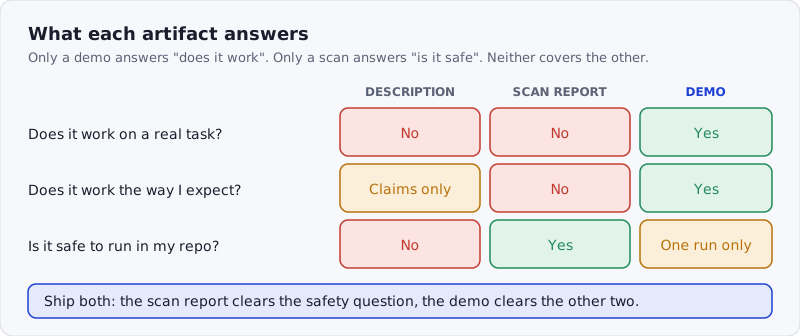
Figure: The description, the scan report and the demo answer different questions. Shipping one of the three leaves a gap the user has to guess at.
What a demo actually is
A SkillSafe demo is the complete transcript of a skill running on a real task. The payload declares "schema": "skillsafe-demo/1" and carries a non-empty messages array; each message is a {role, content} pair, and tool results arrive as their own message, which the player pairs with the call above it. Alongside the transcript the API stores 7 optional metadata fields — model, agent_tool, task_type, outcome, duration_s, tokens_used and notes — so a reader can see which model and tool produced the run, and how long it took, before they watch a single message.
outcome accepts exactly 3 values: success, partial, fail. A demo is allowed to say it failed.
It’s not a screen recording. It’s not a marketing video. It’s the raw session, faithfully replayed — closer to an asciinema cast than to a product trailer. That’s what makes it credible.
Why demos convert
Documentation research says the same thing from the other direction. Prana and colleagues hand-annotated 4,226 README sections from 393 GitHub repositories and found that content describing what a project is and how to use it is very common, while information about a project’s purpose and current status is frequently missing. READMEs are good at claims and bad at state. A recorded run is nothing but state.
AI skills raise the stakes. The decision to install a skill isn’t “does this look useful” — it’s “do I trust this enough to run it in my agent.” Trust requires evidence, and a demo is evidence you cannot fake the way you can fake a good README.
The pattern shows up in our own traffic. The five most-watched demos on SkillSafe today all sit on first-party Anthropic skills — @anthropics/brand-guidelines at 58 views, @anthropics/frontend-design at 56, @anthropics/doc-coauthoring at 50, @anthropics/slack-gif-creator at 48 — publishers who ship proof by default. Skills with a demo draw installs from people who watched it decide; skills without one collect “maybe later.”
What makes a good demo
Use a real task, not a toy example. A code-review skill running on hello_world.py tells you almost nothing. The same skill running on a 200-line TypeScript module with edge cases tells you everything. Show the skill doing the hard part of its job. Anthropic’s checklist makes the same demand of authors before they share anything: at least 3 evaluations, tested with real usage scenarios, across every model you expect people to run it on.
Let it fail gracefully. If the skill hits a wall and recovers, show that. If it asks a clarifying question, show that. Users don’t expect perfection — they expect honesty. Mark the run partial and say why in notes; that field holds up to 500 characters.
Keep it short. The ideal demo is long enough to be meaningful (usually 3–8 minutes of session time) and short enough that users actually watch it. The hard ceiling is 1,000 messages, but the top demos on the registry run 4 to 8 messages. If your skill has multiple modes, record separate demos for each rather than one long one.
Record in a realistic environment. If your skill is for Python projects, run it in a Python project. If it’s for monorepos, run it in a monorepo. The closer the demo environment is to the user’s environment, the more credible the demo is.
How to record and upload
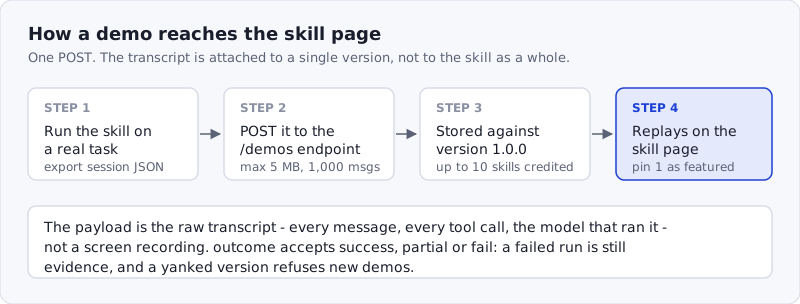
Figure: A demo travels from a real session to the skill page in four steps. The transcript is attached to one version, not to the skill as a whole.
-
Pick the task before you record. Choose the job a prospective user is most likely to have. Everything else in the demo is set dressing.
-
Run the skill and keep the session JSON. Any agent that can export a transcript works. Shape it as
{"schema": "skillsafe-demo/1", "title": "...", "messages": [...]}with at least one message and no more than 1,000. -
POST it to the version. The endpoint is per-version, and authentication is a normal API key:
curl -X POST \
  https://api.skillsafe.ai/v1/skills/@myname/my-skill/versions/1.0.0/demos \
  -H "Authorization: Bearer $SKILLSAFE_TOKEN" \
  -H "Content-Type: application/json" \
  -d '{"demo": {"schema":"skillsafe-demo/1","messages":[...]},
       "title": "Refactors a 200-line auth module and keeps the tests green",
       "model": "claude-sonnet-4-6", "agent_tool": "claude-code",
"outcome": "success", "duration_s": 94}'-
Fill in the metadata.
titleis required and capped at 200 characters;outcomemust be one of the 3 allowed values;duration_sandtokens_usedmust be non-negative integers. The full request format is in the demos section of the docs. -
Credit the other skills in the run.
extra_skillstakes up to 9 more{namespace, name, version}entries, so a demo of a workflow that chains skills shows up on all 10 skill pages. -
Pin the one that sells the skill.
POST /v1/skills/@{ns}/{name}/pin-demomarks a single demo as featured; it renders first on the page.
Three failures are worth knowing before you start: a payload over 5 MB is rejected with a 413, a missing or wrong schema value is a 400, and a yanked version refuses new demos outright. Or skip the plumbing entirely and ask your AI agent to record and upload a demo for your skill — the API is 1 POST, which is well within what an agent can drive from a prompt.
Demos are versioned
Each demo is attached to a specific version of your skill, by version_id, not just to the skill name. When you ship 2.0.0 with improved prompts, record a new demo and attach it to that version. Users can see demos across all versions, which gives your release history a story — not just a changelog, but evidence of improvement.
This matters when something changes significantly. A diff in a SKILL.md file is hard to interpret. A new demo showing the skill handle a task it used to fumble is instantly legible. It also composes with the rest of the trust stack: the version carries its own scan report and its own dual-side verification verdict, so the demo, the scan and the tree hash all point at the same bytes.
A signal of quality, not just content
Here’s the subtle reason demos matter beyond their literal content: publishing a demo signals that you tested the skill before you shipped it. That’s a higher bar than saving and sharing a file. Users can see from the demo that you ran it, that you watched what it did, and that you thought it was worth showing. It is the artifact version of what Anthropic describes as iterating with one Claude that writes the skill and another that uses it on real work.
Skills without demos feel unfinished, even when they aren’t. Skills with demos feel owned — like someone is standing behind the work.
The bar for trust in AI tooling is still being set. With demos on at most 8.6% of the registry, the authors who clear that bar now will define what “a good skill” looks like. Browse what the bar looks like today across /skills/ and the Claude Code tag.
Frequently Asked Questions
What is an agent skill demo?
A demo is a recorded agent session attached to one version of a skill: the messages, the tool calls, the model, and the outcome, replayed on the skill page. On SkillSafe it is a JSON payload conforming to the skillsafe-demo/1 schema, up to 5 MB and 1,000 messages, stored against that exact version rather than the skill in general.
How do I record a demo for a Claude Code skill?
Run the skill on a real task in Claude Code, export the session transcript, wrap it as {"schema": "skillsafe-demo/1", "messages": [...]} and POST it to /v1/skills/@{ns}/{name}/versions/{version}/demos with a Bearer API key. Add model, agent_tool and outcome so readers can filter. Then pin it with POST /v1/skills/@{ns}/{name}/pin-demo.
Does a demo replace a security scan?
No. A demo shows one run; a scan reads every file for the patterns Snyk found in 36.82% of the 3,984 skills it audited. A demo cannot prove the absence of a payload that only triggers on another input. Publish both: the scan report answers “is this safe to install,” the demo answers “does this do what I need.”
How long should a demo be?
Long enough to show the hard part, short enough to watch: roughly 3–8 minutes of session time. The API caps a demo at 1,000 messages, but the most-watched demos on SkillSafe run 4 to 8 messages. If a skill has several modes, record one demo per mode instead of a single long session.
Where can I find skills that already have demos?
Browse /skills/ and look for the demo badge on a skill card, or call GET /v1/demos?sort=views for the full list ranked by views. Of 30,433 skills in the registry, 2,625 demos have been published — so the field is still wide open for authors who record one.
To upload a demo for your skill, see the demos section of the docs or ask your AI agent to record and upload one. Install the skills CLI and any SkillSafe skill is one npx skills add away.