Best Claude Code Skills for CSS and UI Design [2026]
We scored 15 CSS and design skills out of 50. @wshobson/responsive-design leads at 44/50 on container queries, fluid typography and CSS Grid.
We installed 15 CSS, design system and accessibility skills from the SkillSafe registry, read every file, and scored each out of 50. @wshobson/responsive-design leads at 44/50 on container queries, fluid typography and CSS Grid. Two of the five are accessibility skills built around WCAG 2.2.
The accessibility half of this list is measured against a fixed standard. WCAG 2.2 became a W3C Recommendation on 12 December 2024, adding nine success criteria and marking 4.1.1 Parsing obsolete. The criterion AI-generated UI fails most often is 2.5.8:
The size of the target for pointer inputs is at least 24 by 24 CSS pixels.
The CSS half is measured against the platform. Container queries and clamp() are supported in every major browser engine, so a skill that still teaches breakpoint-only layout is behind the platform rather than opinionated about it.
Updated September 2026: the WCAG 2.2 references and the MDN feature pages were re-checked this month and the ranking is unchanged. Install counts are the figures recorded at review time and move weekly.
Quick Comparison
| Skill | Score | Key Feature | Frameworks / Tools | Installs |
|---|---|---|---|---|
| @wshobson/responsive-design | 44/50 | Container queries, fluid typography, CSS Grid | Tailwind CSS, CSS Grid, Flexbox | 8,658 |
| @wshobson/design-system-patterns | 43/50 | Three-layer token hierarchy, Style Dictionary | CSS custom properties, CVA, Style Dictionary | 7,695 |
| @wshobson/accessibility-compliance | 42/50 | WCAG 2.2 with mobile a11y reference | WCAG 2.2, ARIA, VoiceOver, TalkBack | 2,255 |
| @nextlevelbuilder/ui-ux-pro-max | 41/50 | 99 UX rules with priority tiers and CLI search | Tailwind, shadcn/ui, Apple HIG, Material Design | 700 |
| @addyosmani/accessibility | 40/50 | WCAG 2.2 new criteria (2.4.11, 2.5.7, 2.5.8, 3.3.7) | WCAG 2.2, Lighthouse, axe-core | 7,799 |
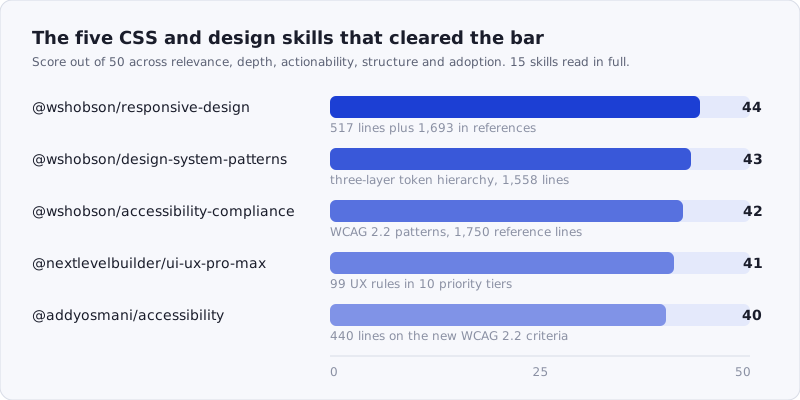
Figure: the five skills that cleared 40/50, with what each one ships. Browse the whole category at /tags/css/.
How We Scored
Each skill was scored out of 50 across five dimensions:
| Dimension | Max | What we looked at |
|---|---|---|
| Relevance | 10 | Does it address real CSS/design concerns — layout, theming, components, accessibility? |
| Depth | 10 | How much actual content? Specific CSS patterns, component specs, not vague advice |
| Actionability | 10 | Can a developer follow the guidance to build better UIs? |
| Structure | 10 | Well-organized with clear design system coverage? |
| Adoption | 10 | Install count, stars, verifications |
Skills that restated MDN docs without agent-oriented framing scored lower on depth. Skills with a single file and no reference structure scored lower on structure. Skills that bundled a searchable CLI or had multi-file archives with clear navigation scored higher.
Most of the 15 we evaluated were React component libraries wearing a CSS label — heavy on JSX, light on actual layout technique. A few were one-page checklists with no code. If you read our React roundup, you saw @giuseppe-trisciuoglio/shadcn-ui score well; it is excluded here because its strength is React component patterns, not CSS itself. This list is about the styling and design layer: the actual CSS, the token hierarchies, the WCAG criteria, and the responsive techniques that make interfaces work across devices.
1. @wshobson/responsive-design — 44/50
Source: github.com/wshobson/agents — 8,658 installs — 74 stars
This is the most complete responsive CSS skill in the registry. The SKILL.md runs 517 lines and covers six concrete patterns — container queries, fluid typography, CSS Grid layouts, responsive navigation, responsive images, and responsive tables — with both raw CSS and Tailwind CSS equivalents for each. Three reference files add another 1,693 lines of depth on breakpoint strategies, container queries, and fluid layouts.
Archive structure:
SKILL.md                             <- hub with 6 patterns + quick reference
references/
  breakpoint-strategies.md           <- 591 lines
  container-queries.md               <- 564 lines
  fluid-layouts.md                   <- 538 lines
The strongest section is the fluid typography scale. Instead of giving abstract advice about clamp(), it provides a complete set of CSS custom properties with min, preferred, and max values for eight type sizes:
:root {
  --text-xs: clamp(0.75rem, 0.7rem + 0.25vw, 0.875rem);
  --text-sm: clamp(0.875rem, 0.8rem + 0.375vw, 1rem);
  --text-base: clamp(1rem, 0.9rem + 0.5vw, 1.125rem);
  /* ... through --text-4xl */
}
It also includes a JavaScript utility function for generating clamp() values programmatically, which is the kind of detail that turns a reference into a tool. The container queries section covers container-type, container-name, container query units (cqi, cqw, cqh), and Tailwind’s @container syntax — not just the concept, but the fallback strategy for browser support gaps.
The responsive tables section is particularly useful because it provides two approaches side by side: horizontal scroll for desktop-friendly tables and card-based layouts for mobile. The agent gets a decision rule, not just a technique.
Where it loses points: The viewport units section (100vh vs 100dvh) is thin — two code blocks with no explanation of when svh or lvh are the right choice over dvh. For a skill this thorough elsewhere, it’s a notable gap.
Score breakdown: Relevance 10/10 — Depth 9/10 — Actionability 9/10 — Structure 9/10 — Adoption 7/10
npx skills add https://api.skillsafe.ai/wshobson/responsive-design2. @wshobson/design-system-patterns — 43/50
Source: github.com/wshobson/agents — 7,695 installs — 96 stars
Where the responsive-design skill handles layout, this one handles the foundation underneath it: design tokens, theming infrastructure, and component architecture patterns. The SKILL.md is 330 lines covering four core topics, with three reference files adding 1,558 lines of depth on component architecture, design tokens, and theming.
Archive structure:
SKILL.md                             <- token hierarchy, theme switching, CVA, Style Dictionary
references/
  component-architecture.md          <- 617 lines
  design-tokens.md                   <- 420 lines
  theming-architecture.md            <- 521 lines
The strongest pattern is the three-layer token hierarchy — primitive, semantic, and component tokens — implemented entirely in CSS custom properties:
/* Layer 1: Primitive tokens (raw values) */
:root {
  --color-blue-500: #3b82f6;
  --radius-md: 0.5rem;
}
/* Layer 2: Semantic tokens (meaning) */
:root {
  --interactive-primary: var(--color-blue-500);
}
/* Layer 3: Component tokens (specific usage) */
:root {
  --button-bg: var(--interactive-primary);
}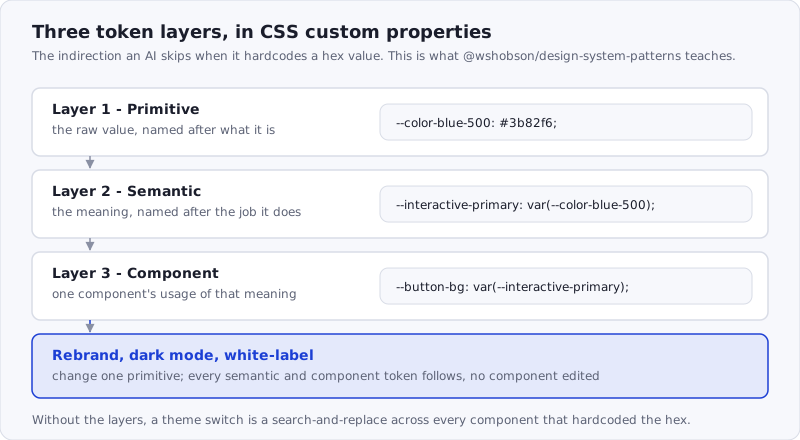
Figure: the indirection is the product. Without it, a theme switch is a search-and-replace across every component that hardcoded the hex.
This matters because most AI-generated code hardcodes hex values or uses Tailwind utility classes without a token layer. With this skill installed, the agent builds the indirection that makes theming and brand switching possible. The Style Dictionary configuration section covers multi-platform token generation — CSS, SCSS, iOS Swift, and Android XML — which is relevant for teams maintaining design systems across web and native.
The theme switching pattern includes React context, prefers-color-scheme detection, and localStorage persistence. The CVA (class-variance-authority) section covers variant systems with full TypeScript types — the same pattern used in shadcn/ui, but explained here at the design system level rather than the component library level.
Where it loses points: The Figma-to-code pipeline section mentions Style Dictionary but doesn’t cover the newer Figma Variables API or Token Studio plugin, which are the primary tools teams use in 2026. The token naming conventions section gives general principles but no concrete naming scheme to adopt.
Score breakdown: Relevance 10/10 — Depth 9/10 — Actionability 8/10 — Structure 9/10 — Adoption 7/10
npx skills add https://api.skillsafe.ai/wshobson/design-system-patterns3. @wshobson/accessibility-compliance — 42/50
Source: github.com/wshobson/agents — 2,255 installs — 136 stars
The highest-starred skill in this roundup, and the most complete WCAG implementation guide we found. The SKILL.md is 413 lines covering WCAG 2.2 guidelines, five key patterns (accessible button, modal dialog, form, skip link, live regions), and a color contrast utility. Three reference files add 1,750 lines on ARIA patterns, mobile accessibility, and WCAG guidelines.
Archive structure:
SKILL.md                             <- WCAG 2.2 checklist, 5 patterns, contrast utility
references/
  aria-patterns.md                   <- 567 lines
  mobile-accessibility.md            <- 538 lines
  wcag-guidelines.md                 <- 645 lines
The WCAG 2.2 success criteria checklist is the kind of thing an agent needs — a compact table mapping levels (A, AA, AAA) to criteria numbers and descriptions. The skill includes the new 2.2 criterion 2.5.8 Target Size (Minimum) — 24 by 24 CSS pixels, with five listed exceptions — which most accessibility skills miss.
The accessible modal dialog pattern is the most production-ready in the registry. It covers focus trapping with @headlessui/react, Escape key handling, body scroll prevention, aria-modal, aria-labelledby, and backdrop click dismissal — all in one component. The accessible form pattern includes error summaries linked to fields, aria-invalid, aria-describedby, and screen-reader-friendly required field indicators.
The mobile accessibility reference file is what differentiates this from other a11y skills. It covers touch target sizing (44x44dp), VoiceOver and TalkBack compatibility, gesture alternatives, and Dynamic Type support — topics that most web-focused skills ignore entirely.
Where it loses points: The testing tools section at the bottom is a bullet list of tool names without setup instructions. Given the depth elsewhere, a concrete axe-core integration example or Lighthouse CI configuration would round out the skill.
Score breakdown: Relevance 10/10 — Depth 9/10 — Actionability 8/10 — Structure 9/10 — Adoption 6/10
npx skills add https://api.skillsafe.ai/wshobson/accessibility-compliance4. @nextlevelbuilder/ui-ux-pro-max — 41/50
Source: github.com/nextlevelbuilder/ui-ux-pro-max-skill — 700 installs — 1 star
The install count is low, but this is the most ambitious design skill in the registry. A single 658-line SKILL.md containing 99 UX rules organized across 10 priority-ranked categories, plus a Python CLI tool that lets the agent search rules by domain. It covers accessibility, touch interaction, performance, style selection, layout, typography, color, animation, forms, navigation, and charts — each with specific rules referencing Apple’s Human Interface Guidelines and Material Design motion guidance.
The priority table at the top is the design choice that makes this skill work. Instead of a flat list, rules are ranked 1-10 by impact: accessibility and touch interaction are priority 1-2 (CRITICAL), layout and style selection are 3-5 (HIGH), and charts are 10 (LOW). This gives the agent a triage order when reviewing UI.
The animation section is the deepest in the registry for this topic — 24 rules covering duration timing (150-300ms for micro-interactions), transform-only performance, spring physics, stagger sequencing (30-50ms per item), exit-faster-than-enter timing, and interruptible animations. Each rule includes a reference to either Apple HIG or Material Design:
- `spring-physics` - Prefer spring/physics-based curves over
  linear or cubic-bezier for natural feel (Apple HIG fluid animations)
- `exit-faster-than-enter` - Exit animations shorter than enter
  (~60-70% of enter duration) to feel responsive (MD motion)
- `stagger-sequence` - Stagger list/grid item entrance by 30-50ms
  per item; avoid all-at-once or too-slow reveals (MD)
The bundled CLI (scripts/search.py) lets the agent search rules by domain — --domain ux "animation accessibility" or --domain color "fintech vibrant" — and generate complete design systems with --design-system. It also supports persisting design decisions to a design-system/MASTER.md file for cross-session consistency.
Where it loses points: The skill is mobile-app-focused (iOS/Android/React Native), and some rules don’t translate directly to web CSS. The pre-delivery checklist references React Native primitives like Pressable and hitSlop. The low install count (700) reflects this narrower scope — teams building web apps need to filter which rules apply.
Score breakdown: Relevance 7/10 — Depth 10/10 — Actionability 8/10 — Structure 9/10 — Adoption 7/10
npx skills add https://api.skillsafe.ai/nextlevelbuilder/ui-ux-pro-max5. @addyosmani/accessibility — 40/50
Source: nicholasray/lighthouse-skills — 7,799 installs
A 440-line SKILL.md plus two reference files (A11Y-PATTERNS.md at 233 lines and WCAG.md at 191 lines) covering WCAG 2.2 from the Lighthouse perspective. Where @wshobson/accessibility-compliance is a component-pattern guide, this skill is structured around the POUR framework (Perceivable, Operable, Understandable, Robust) with explicit before/after HTML examples for every failure type.
The skill’s strongest contribution is its coverage of WCAG 2.2’s new success criteria — specifically the ones most AI tools don’t know about:
- 2.4.11 Focus Not Obscured — focused elements must not be hidden by sticky headers, with a concrete
scroll-margin-topfix - 2.5.7 Dragging Movements — any drag action needs a single-pointer alternative
- 2.5.8 Target Size — minimum 24x24 CSS pixels with exceptions listed
- 3.3.7 Redundant Entry — don’t force re-entry of previously provided data
- 3.3.8 Accessible Authentication — login flows must support paste/autofill or offer passwordless alternatives
Each new criterion includes HTML code examples. The accessible authentication section is particularly relevant because AI-generated login forms routinely disable paste on password fields — this skill explicitly forbids it.
The testing checklist section connects guidelines to tools: npx lighthouse for automated audits, axe-core for programmatic testing, and a manual testing checklist covering VoiceOver, NVDA, TalkBack, 200% zoom, high contrast mode, and reduced motion.
Where it loses points: The reference files are thin compared to the main SKILL.md. A11Y-PATTERNS.md at 233 lines is more of an appendix than a standalone reference — the modal focus trap pattern and form labels pattern are referenced from the main file but not fully fleshed out. The skill also lacks the mobile accessibility depth of @wshobson/accessibility-compliance.
Score breakdown: Relevance 10/10 — Depth 8/10 — Actionability 8/10 — Structure 7/10 — Adoption 7/10
npx skills add https://api.skillsafe.ai/addyosmani/accessibilityFrequently Asked Questions
What is the best Claude Code skill for frontend design?
@wshobson/responsive-design at 44/50, if you mean the CSS itself: 517 lines of SKILL.md plus 1,693 lines of references on container queries, fluid typography and CSS Grid. For visual and interaction decisions rather than layout mechanics, @nextlevelbuilder/ui-ux-pro-max carries 99 prioritized UX rules with Apple HIG and Material Design citations. The two do not overlap, so installing both is reasonable.
How are CSS/design skills different from React or component library skills?
CSS and design skills operate at the styling and layout layer — responsive techniques, design tokens, color systems, typography scales, and accessibility compliance. Component library skills like @giuseppe-trisciuoglio/shadcn-ui (covered in our React roundup) are about React component APIs, prop patterns, and framework integration. The overlap is theming: both touch CSS custom properties and Tailwind configuration. But a CSS skill teaches the agent how to build a fluid type scale with clamp(), while a component skill teaches it how to wire up a Button with class-variance-authority. Install both layers if you want your AI to handle the full stack from tokens to components.
Which WCAG 2.2 criteria do AI-generated interfaces miss most?
The nine criteria added in WCAG 2.2, because they postdate most training data. In practice the frequent failures are 2.5.8 Target Size (icon buttons under 24 by 24 CSS pixels), 3.3.8 Accessible Authentication (paste disabled on password fields), 2.4.11 Focus Not Obscured (sticky headers covering the focused element) and 2.5.7 Dragging Movements (drag-only reordering with no click alternative). Both accessibility skills here cover all four.
Can I use multiple skills from this list together?
Yes, and the top three are specifically designed to complement each other. @wshobson/responsive-design handles layout, @wshobson/design-system-patterns handles tokens and theming, and @wshobson/accessibility-compliance handles WCAG compliance — all from the same source repo (github.com/wshobson/agents), so they share naming conventions and don’t overlap. Adding @addyosmani/accessibility gives you a second lens on a11y from the Lighthouse/audit perspective. The only potential redundancy is between the two accessibility skills, but they cover different angles: one is component patterns, the other is audit criteria.
Do these skills work with Tailwind CSS v4?
Three of the five reference Tailwind CSS directly. @wshobson/responsive-design includes Tailwind’s breakpoint utilities and @container syntax. @wshobson/design-system-patterns covers CVA and the cn() utility pattern used with Tailwind. @nextlevelbuilder/ui-ux-pro-max references Tailwind as one of its 10 supported stacks. The CSS custom property patterns in all five are framework-agnostic — they work with Tailwind, vanilla CSS, or CSS Modules, and none of the skills are locked to a specific Tailwind version.
Conclusion
If you install one skill from this list, install @wshobson/responsive-design — 4 files, 74 stars, and the most thorough coverage of container queries, fluid typography, and modern CSS Grid patterns in the registry. It changes how your AI handles layout from the ground up.
For design system foundations, pair it with @wshobson/design-system-patterns — the three-layer token hierarchy (primitive, semantic, component) and Style Dictionary configuration give your agent the vocabulary to build themeable, scalable CSS. For accessibility, @wshobson/accessibility-compliance with its 136 stars and mobile accessibility reference is the strongest single install, but adding @addyosmani/accessibility gives you coverage of the WCAG 2.2 criteria that are new enough to be absent from most training data.
And if you’re building mobile apps or want the most comprehensive UX checklist available, @nextlevelbuilder/ui-ux-pro-max packs 99 prioritized rules with Apple HIG and Material Design citations into a searchable format that no other skill in the registry matches.
# Install all five
npx skills add https://api.skillsafe.ai/wshobson/responsive-design
npx skills add https://api.skillsafe.ai/wshobson/design-system-patterns
npx skills add https://api.skillsafe.ai/wshobson/accessibility-compliance
npx skills add https://api.skillsafe.ai/nextlevelbuilder/ui-ux-pro-max
npx skills add https://api.skillsafe.ai/addyosmani/accessibility
A design skill ships a CLI, a Python script or a bundled config in four of these five archives, which is code your agent will run. Point the SkillSafe scanner at the repository URL first — it returns a severity-rated report on shell execution, network calls and credential reads.
Related roundups: Best AI Skills for React Development | Browse all Best Of roundups