Fork Any App, Read Its Source
Set allow_fork and anyone can read a SkillSafe app's whole source — prompt and files — then clone it in one call. Pricing, keys and user data never copy.
SkillSafe apps can opt into forking. A publisher sets one flag, allow_fork, and from then on anyone can read that app’s complete source — the pinned system prompt and every file in its latest release — then clone it into their own account in one call. Lineage is recorded. Pricing, provider keys and user data never copy.
Updated September 2026: the hosted-app caps a fork counts against have risen since launch — 100 apps on Free, 2,000 on Pro, unlimited on Team and Enterprise. The fork mechanics below are unchanged.
Key figures
| Figure | What it measures | Source |
|---|---|---|
| 1 flag | allow_fork, off by default, set per app by its publisher | Apps Platform docs |
| 2 endpoints | GET /v1/apps/{slug}/source to read, POST /v1/apps/{slug}/fork to clone | Apps Platform docs |
| 64 KB | maximum size of the system-prompt snapshot a fork copies | SkillSafe APP_SYSTEM_PROMPT_MAX_BYTES |
| 0 | markup basis points a fork inherits — you set your own, up to 100% | Pricing |
| 100 / 2,000 | hosted apps per account on Free / Pro; unlimited on Team and Enterprise | Pricing |
| 0 secrets | secret values a fork receives; it gets the names as empty placeholders | This post |
| 1 scan | security scans a fork passes before it can run — the same gate as any upload | Security model |
Why source matters more for an AI app
An AI app asks for a strange kind of trust. You type into a box, tokens get metered against your wallet, and something happens on a server you can’t see. The pitch of every hosted-app platform — ours included — is “trust the platform’s review.” That’s necessary, but it shouldn’t be the ceiling.
An ordinary web app can be audited from the outside: open devtools, read the bundle, watch the network tab. An AI app can’t, because its behaviour is its system prompt, and the prompt is the one artifact a normal deployment never ships to the client. Click around all you like; the interesting part is precisely what’s hidden.
That asymmetry is why OWASP files system prompts under risk LLM07:2025, System Prompt Leakage — not because the text is a secret worth keeping, but because publishers keep putting secrets in it:
Sensitive data such as credentials, connection strings, etc. should not be contained within the system prompt language.
— OWASP GenAI Security Project, LLM07:2025
Read that the other way around and it becomes an argument for publishing the prompt. A prompt that is safe to show is a prompt that holds no credentials. allow_fork gives a publisher a way to prove it, and gives a user a way to check what an app is instructed to do with their input before they paste anything sensitive into it.
View source, the whole source
For a forkable app, GET /v1/apps/{slug}/source returns everything that makes the app what it is: the pinned system-prompt snapshot and the full file listing of its latest release — static frontend and server functions alike — with each file readable individually. This is the allow_fork contract: not a README or a marketing page, but the actual artifacts the platform serves and runs.
The one deliberate exception is a publisher’s private reference corpus — the files under private/ that the app reads but never serves. Those are excluded from the source listing, and the response reports them as withheld rather than dropping them quietly, because allow_fork promises the complete source and a silent omission would make that a lie.
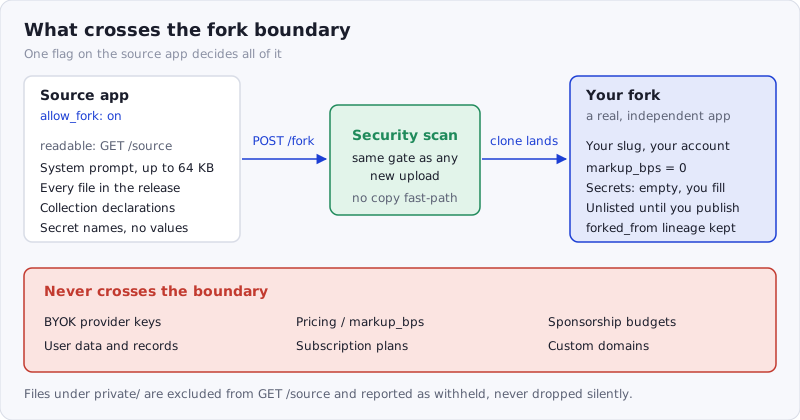
Figure: what crosses the fork boundary. Everything on the left is readable and copyable; everything in the red band stays with the source app.
Fork it, make it yours
POST /v1/apps/{slug}/fork clones a forkable app into your account under a slug you choose. A fork is a real, independent app, and it goes through the front door: the source prompt is saved as a fresh skill in your account, the release is re-uploaded, and both pass the same security scan as any new upload. No side channel, no scan exemption for copies.
| What a fork copies | What a fork never copies |
|---|---|
| The prompt snapshot — the app’s brain, copied directly onto your new app | Pricing. Markup resets to 0; you set your own, up to 100% |
| The latest release — every frontend file and server function | BYOK provider keys, subscription plans and sponsorship budgets |
| Collection declarations — the data schema, re-synced from the release | User data. The source app’s users and records stay where they are |
| Secret names only — empty placeholders naming the secrets the app expects | Custom domains and the source app’s directory listing |
Every fork records forked_from lineage, so a fork is always attributable to its source — credit flows backward even as the code flows forward. And forks start unlisted: your clone isn’t in the directory until you choose to publish it, which runs the normal scan gate.
This is the same shape git gave open source. GitHub’s fork model is a copy you own outright, with the parent recorded; what it never carries across is the parent’s secrets, its deploy keys or its production database. A forkable SkillSafe app is that model applied to a running, metered AI app — and it satisfies the part of the Open Source Definition that most hosted AI products quietly fail, namely that “the program must include source code” and permit derived works.
The fine print, briefly
Forking requires a verified account, and forks count toward your hosted-app cap like any other app: 100 on Free, 2,000 on Pro, unlimited on Team and Enterprise. allow_fork is opt-in per app — publishers who’d rather keep their prompt closed simply leave it off, and nothing changes for them. Note the asymmetry is deliberate: view-source comes with forkability, because a source you can read but not run somewhere you control is only half a promise.
Frequently Asked Questions
Can anyone read my app’s system prompt?
Only if you turn on allow_fork. The flag is off by default and set per app, so an app you never touch stays closed. When it is on, GET /v1/apps/{slug}/source returns the pinned prompt snapshot (up to 64 KB) and the full release file listing to any caller. Files under private/ are excluded and reported as withheld.
Does forking an app copy its API keys or user data?
No. A fork receives secret names as empty placeholders and nothing else — no BYOK provider keys, no subscription plans, no sponsorship budget, no custom domain. User records stay in the source app’s collections; only the collection declarations (the schema) are re-synced from the release. You supply your own values before your fork will run.
Do forked apps get scanned again?
Yes. A fork goes through the same upload path as a new app: the prompt is saved as a fresh skill in your account and the release is re-uploaded, so both pass the identical security scan. There is no copy fast-path and no scan exemption. Publishing your fork to the directory runs that gate a second time.
Does the original publisher earn anything from a fork?
Not in credits. A fork resets markup to 0, so any revenue on the clone is yours to set — up to 100% — and the original earns nothing from your runs. What the original does get is attribution: every fork records forked_from lineage permanently, so the source is always traceable from the copy.
How is this different from just open-sourcing the app?
An open-source repo gives you code you still have to host, key and meter yourself. A fork gives you a running app on a subdomain, with the scan, the CSP and the credit metering already wired — one call instead of a deployment project. The lineage record also survives the copy, which a git clone of a tarball does not.
If you’ve built an app worth learning from, flip the flag. If you’ve been meaning to build one, find a fork-friendly starting point and skip the blank page — or start from a skill you already have. The platform mechanics are covered in the Apps Platform docs.