From Skill to App: Give Your Skill to People Who Don't Run Claude Code
Deploy any SkillSafe skill as a hosted app at your-slug.skillsafe.ai: sign-in, credit billing, storage and models included. No servers, no Stripe, no auth code.
Any skill on SkillSafe can be deployed as a hosted web app at https://your-slug.skillsafe.ai/. Anyone can open it in a browser: no install, no API key, no account required to try it. The platform supplies sign-in, credit billing, storage, file uploads and the AI model. You supply the skill.
You wrote a skill. It does something genuinely useful — summarizes contracts, reviews pull requests, plans travel, tutors math. A skill is a Markdown instruction file, the Agent Skills format Anthropic introduced and documents for Claude Code, which Cursor and Windsurf read too. Today the only people who can use yours are developers running one of those tools with your skill installed.
That’s a hard ceiling on your audience. Developers have a good install path — npx skills add, Vercel’s skills CLI, works against any SkillSafe skill directly. Everyone else has none. Your colleague on the sales team can’t use it. Your friend on their phone can’t use it. Most of the internet can’t use it.
SkillSafe Apps removes the ceiling.
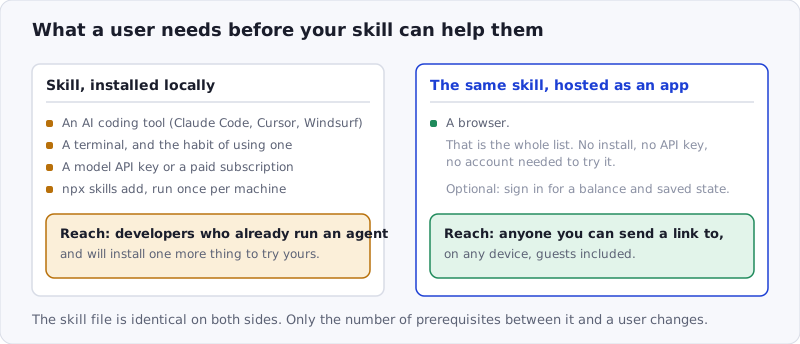
Figure: the skill file is identical on both sides. What changes is the number of prerequisites standing between it and a user — four, or one.
What a Hosted App Includes
| What you’d otherwise build | What the platform gives you | The number |
|---|---|---|
| Hosting | A subdomain with streaming output | 1 URL, 0 servers |
| Login | Guest access by default, one-click SSO for SkillSafe accounts | 0 lines of auth code |
| Payments | Per-run metering: estimate, hold, settle at real usage | $1 = 10,000 credits |
| Your revenue | Creator markup on every run, kept in full | 0-100%, default 10% |
| A free tier for your users | Signup credit plus a daily grant on active days | $0.30 + $0.20/day, 7-day expiry |
| A backend | Record collections with ACLs and a safe query DSL | 10,000 records per collection |
| Vector search | Semantic similarity over declared fields | up to 4 embedded fields |
| Models | One model per app, with per-job caps on every run | 1-credit minimum on BYOK runs |
| Distribution | An SEO-indexed detail page in the directory | 1 clean scan required |
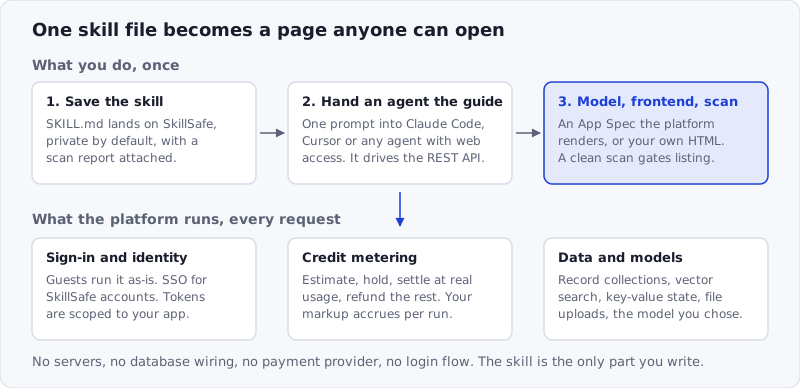
Figure: the top row is work you do once. The bottom row is infrastructure the platform runs on every request, and none of it is yours to write.
What “Deploying a Skill as an App” Means
An app on SkillSafe is your skill with everything around it already built:
- Your skill’s
SKILL.mdis snapshotted as the app’s system prompt — pinned at deploy time, so the app’s behavior doesn’t drift when the skill changes. - The platform serves a web frontend for it at your app’s own subdomain, with streaming output.
- Users type into a page instead of a terminal. Behind the scenes, each run is a metered job against the model you chose.
You don’t provision servers, wire up a database, integrate a payment provider, or write a login flow. That’s the platform’s job.
Deploy It in Four Steps
There’s no separate build tool to learn. The deploy flow is agent-driven.
-
Save the skill on SkillSafe. Saving is private and requires no scan; it’s the share step that needs one. Skills you’ve already published are ready as they are.
-
Hand the guide to your agent. Paste this into Claude Code, Cursor, or any agent with web access:
Read https://deploy.skillsafe.ai/llms.txt, then deploy my skill @you/your-skill as a hosted app. -
Let it drive the API. The guide at that URL documents the whole platform API — saving the skill, creating the app, uploading a frontend (or an App Spec the platform renders for you), and publishing. Your agent runs it end to end and hands you a live URL. Prefer to do it by hand? Every REST call is in the same guide.
-
Set your markup and publish. Pick a creator margin between 0% and 100% (the default is 10%), decide whether guests can run it, and list it. A public listing requires a clean scan on both the skill and the frontend.
What the Platform Gives You
Users, without auth code. Anyone can use your app as a guest — no SkillSafe account needed. Users who do sign in get one-click SSO with their existing SkillSafe account, and your app can request consent for their profile or email. Every token is scoped to your app and that user alone; one app can never read another app’s data.
Billing as credits. Runs are metered at actual token usage, at $1 = 10,000 credits. The platform estimates the worst case before each run, holds it, then refunds whatever wasn’t used; failed runs are refunded automatically. On top of that you can:
- set your own markup (0–100%, default 10%) and keep 100% of it on every run,
- or flip on sponsorship and cover your users’ runs from your own wallet, with per-user and per-app daily caps.
Earnings, active subscribers, and MRR show up in your dashboard. No Stripe integration, ever. The full arithmetic — base, the platform’s 10%, your markup, and how a hold settles — is in what it costs to run an AI app.
A backend, included. Apps can declare record collections with per-collection access control and a safe query DSL, use vector similarity search for semantic features, store per-user key-value state, and accept file uploads — including images your app can feed to vision-capable models.
AI models, included. Pick from the catalog per app — OpenAI models or Cloudflare Workers AI for the cheap lane. Your users never bring their own key, and per-job caps bound what any single run can spend.
Trust, by construction. This is SkillSafe, so the bar for public listing is the same as everywhere else on the registry: every public app is built from a security-scanned skill, and both the skill and the frontend must pass a clean scan before the app appears in the directory. Listed apps also get an SEO-indexed detail page — distribution you don’t have to earn.
Fair to Your Users
The metering model is deliberately boring: users see a cost estimate before they run anything, they’re charged for what the run actually consumed, and refunds are automatic on failure. New accounts start with a $0.30 signup credit and active users receive a $0.20 daily grant (free credits expire after 7 days) — so there’s always an audience that can try your app without reaching for a credit card. If you want your app to be completely free, sponsor it or ship it with no paid calls at all; the directory labels genuinely free apps as such.
Frequently Asked Questions
Do my users need a SkillSafe account to use my app?
No. Guests can run a guest-enabled app with no account and no API key — that is the default. Signing in adds one-click SSO, a credit balance and per-user storage, and lets your app request consent for a profile or email. Guest runs are only possible on apps the creator sponsors.
How do I make money from a hosted skill app?
Set a creator markup between 0% and 100% of each run’s base compute cost; 10% is the default. You keep 100% of it — nothing is deducted. Earnings accrue per run and show up in your dashboard alongside active users. The creator-side math is in how to monetize a Claude Code skill.
What does it cost me to host an app?
Nothing per run by default — the user pays for their own runs, at the model’s list price plus 10% to the platform and your markup. Hosting, storage and the frontend are not billed separately. The exception is sponsorship: if you cover your users’ runs, those credits come from your wallet, bounded by per-user and per-app daily caps.
Can I ship my own frontend instead of the generated one?
Yes. Upload an HTML/JS bundle and the platform serves it at your subdomain with the SDK injected. If you’d rather not write one, declare an App Spec — a list of input widgets — and the platform’s renderer builds the page for you. Either way, the bundle must pass a release scan before it goes public.
What happens to my app if I update the skill?
Nothing, until you say so. The SKILL.md is snapshotted as the app’s system prompt at deploy time, so editing the skill later does not change a running app’s behavior. That’s deliberate: an app in front of real users shouldn’t shift because you pushed an unrelated edit upstream. Re-point the app when you’re ready.
Try It
- Browse the live apps to see what’s already running.
- Read how the conversion works.
- Pick a skill from your dashboard and hand your agent the prompt above.
Your skill already knows how to do the work. Now let everyone use it.