Introducing the AI SkillSafe Desktop App for AI Coding Artifacts
AI SkillSafe is a macOS, Windows and Linux app that browses, edits, converts and verifies the skills, agents and commands your AI tools read from disk.
AI SkillSafe is a desktop app for macOS, Windows and Linux that manages every AI coding artifact on your machine: skills, agents and commands across 5 tools. It browses each tool’s native file layout, edits artifacts with a schema-aware frontmatter form, converts them between tools, and re-scans registry installs before writing anything.
Updated September 2026: the desktop app and npx skills add remain the two supported install paths for SkillSafe skills. The legacy MCP install flow has been retired; the MCP endpoint stays online only for backwards compatibility and MCP config scanning.
The problem it solves is filesystem sprawl. Claude looks under ~/.claude/skills/, Codex reads ~/.codex/prompts/, Cursor wants .cursor/rules/, Cline reads .clinerules/, and every project mixes global and per-repo scopes on top. Edit one in the wrong place and your AI assistant silently picks up the wrong version.
Key figures
| Figure | What it measures | Source |
|---|---|---|
| 5 | AI coding tools whose artifact layouts the app reads natively | Layout table below |
| 3 | Desktop platforms shipped: macOS, Windows, Linux | app.skillsafe.ai |
| 3 | Artifact types handled: skills, agents, commands | Agent Skills docs |
| 3 | Scopes per tool: global, project, lockfile | App sidebar |
| 3 | Install verdicts surfaced before files are written | Security model |
| 7 | Rust plugins in the Tauri shell (fs, dialog, shell, os, http, updater, process) | Source repository |
| 2 | Supported install paths: desktop app, npx skills add | Registry |
What it is
The AI SkillSafe desktop app is a cross-platform native app for macOS, Windows, and Linux that browses, edits, creates, and converts the markdown-frontmatter artifacts your AI tools rely on. It speaks the file layout of every major tool natively, so there’s no translation step, no proprietary database, and nothing to sync — your files stay where your AI tool already expects them.
| Tool | Skills | Agents | Commands |
|---|---|---|---|
| Claude | <scope>/skills/<name>/SKILL.md | <scope>/agents/*.md | <scope>/commands/*.md |
| Codex | — | AGENTS.md | ~/.codex/prompts/*.md |
| Cursor | .cursor/rules/*.{md,mdc} | — | — |
| OpenClaw | <scope>/skills/<name>/SKILL.md | — | — |
| Cline | <scope>/.clinerules/*.{md,txt} | — | — |
Those layouts are the tools’ own, not ours: the SKILL.md folder convention is documented in Anthropic’s Agent Skills reference, the AGENTS.md file follows the agents.md convention Codex reads, and Cursor’s rule files follow its project rules format.
Pick a tool, pick a scope (Global, Project, or Lockfile), and the sidebar shows you everything the tool sees. Click an artifact and you get a Monaco editor on the right plus a generated frontmatter form on the left — no remembering which fields are required or which enum values are valid.
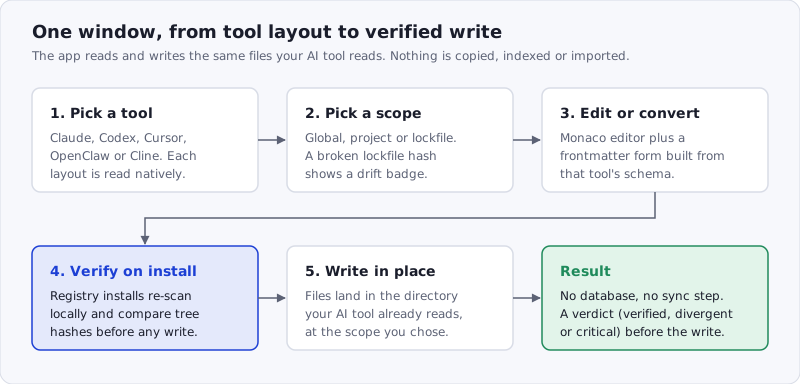
Figure: the app never becomes the source of truth. It reads the tool’s directory, writes back to the tool’s directory, and puts one verification step in front of anything that arrives from the registry.
How to use it, in 5 steps
- Install a build for your platform from app.skillsafe.ai and open it. No account is needed to browse local artifacts.
- Pick a tool and a scope. The sidebar lists every skill, agent and command that tool can see at that scope. Toggling between global and project shows exactly what each layer contributes.
- Edit or create. The frontmatter form on the left is generated from the tool’s schema; the Monaco editor on the right holds the body. Invalid enum values are rejected before you save.
- Convert, if you want it elsewhere. Promote a Cursor rule to a Claude skill, or turn a Codex prompt into a Cline rule. The converter maps frontmatter fields between schemas.
- Install from the registry with verification. Click View in AI SkillSafe app on any skill page; the app downloads, re-scans locally, compares its report against the publisher’s, and only then writes the files. If you would rather stay in a terminal, the same skill installs with
npx skills add, minus the local re-scan.
Why a desktop app
The legacy MCP integration at api.skillsafe.ai/mcp let your AI tool search and scan verified skills programmatically — it still exists for backwards compatibility, but it’s no longer the recommended way to work with the registry. The desktop app solves the other half: managing the artifacts that already live on your machine.
A few things only a native app can do well:
- Direct filesystem access. Open the project folder you actually work in. The app reads and writes the same files your AI tool reads and writes — nothing is copied, indexed, or imported.
- Scope awareness. Toggle between
~/.claude/(global) and./.claude/(project) to see exactly what each layer contributes. The same toggle works across every supported tool. - Lockfile drift detection. If you commit
skills-lock.jsonand a teammate’s edit breaks a hash, you see adriftbadge in the sidebar before your next install lies to you about what’s pinned. - Cross-tool conversion. Promote a Cursor rule to a Claude skill, or turn a Codex prompt into a Cline rule. The converter maps frontmatter fields between schemas (description, globs, paths) so you don’t lose metadata in translation.
- Routine backups. Generate a
launchdplist (macOS) orcronentry (Linux) that snapshots your.claude/,.codex/,.cursor/directories on a schedule, so a bad save doesn’t take an hour of skill tuning with it.
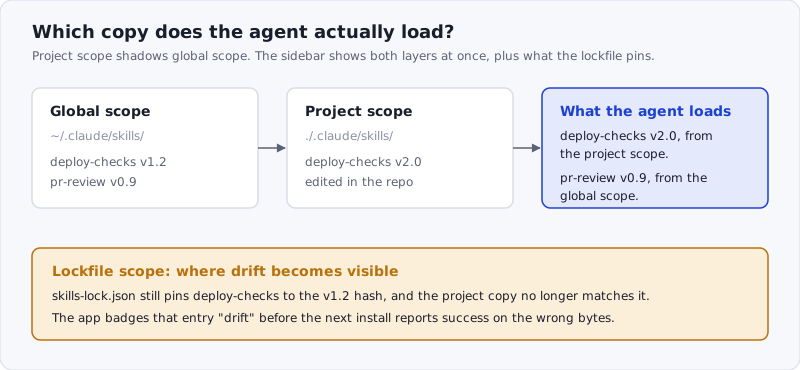
Figure: the failure mode the scope toggle exists for. Two copies of one skill, one loaded and one ignored, and a lockfile pinning a third set of bytes.
Connected to skillsafe.ai
The app is also a client for the SkillSafe registry:
- Sign in with Google or GitHub once and the app holds your session.
- Browse, search, and install verified skills directly into the scope of your choice — global, project, or pinned to a lockfile entry.
- View scan reports for any skill before installing. The registry’s dual-side verification runs here, with verdicts (verified / divergent / critical) shown inline.
- Save and share the skill you’re editing without leaving the editor. The cloud panel handles version bumps, share-link creation, and visibility toggles.
Verification matters because the install step is the one an attacker wants. The ClawHavoc post-mortem covers what a poisoned registry listing looks like in practice; the short version is that the artifact you fetch and the artifact the publisher scanned have to be proven byte-identical, and that proof has to run on your machine, not theirs. That is the reasoning behind the registry itself.
If you previously used the legacy MCP integration with Claude Code or Cursor, the app is its successor — same registry, same accounts, same verification.
Built thin on purpose
Under the hood it’s Tauri 2 + React 19 + TypeScript. The Rust shell is intentionally small — it registers 7 plugins (fs, dialog, shell, os, http, updater, process) and runs the window, and that’s it. Every artifact-touching function lives in TypeScript so the same code is unit-tested under Node and runs unchanged in the desktop bundle. That’s what lets us ship updates fast without re-auditing native code each release.
A thin native surface is also a deliberate security choice: Tauri’s own security model scopes what the shell may touch, and every capability we don’t register is one an attacker cannot reach through the app.
The app is open-source — the full source lives at github.com/skillsafe/ai-skillsafe-app. PRs welcome.
Install
Grab a build from app.skillsafe.ai:
- macOS (Apple Silicon + Intel, universal):
.dmg— drag intoApplications. First launch may need a right-click → Open to bypass Gatekeeper. - Windows:
.exeinstaller (recommended) or.msifor IT-managed installs. - Linux:
.AppImage(chmod +xand run) or.deb(sudo apt install ./*.deb).
Auto-updater is wired in, so once you’ve installed, new releases ship in the background.
Prefer the command line? Every SkillSafe skill is cloneable over git, so Vercel’s skills CLI installs one in a single command:
npx skills add https://api.skillsafe.ai/{ns}/{name}That path skips the local re-scan the app performs, so pair it with the web scanner if you are installing something you did not write.
What’s next
We’re focused on 3 follow-ups:
- More tools. Tracking Aider, Continue, and Zed AI — each has its own artifact layout and the converter abstraction makes them tractable.
- Team scopes. A “shared” scope that mirrors a team’s skill set into every member’s machine, with the same drift detection that already works on lockfiles.
- In-app scan. Run the SkillSafe scanner against a local skill before saving, with findings shown inline in the editor.
Frequently Asked Questions
Which AI coding tools does the desktop app support?
5 tools today: Claude (Claude Code), Codex, Cursor, OpenClaw and Cline. The app reads each tool’s own directory layout — SKILL.md folders for Claude and OpenClaw, AGENTS.md and ~/.codex/prompts/ for Codex, .cursor/rules/ for Cursor, .clinerules/ for Cline — so nothing is imported or converted unless you ask for it.
Do I need the desktop app to install a SkillSafe skill?
No. Every SkillSafe skill is a git repository, so Vercel’s skills CLI works natively: npx skills add https://api.skillsafe.ai/{ns}/{name}. The app adds the verification step — it re-scans the downloaded archive locally and compares tree hashes with the publisher’s report, producing 1 of 3 verdicts before any file is written.
Where does Claude Code look for skills on disk?
At 2 scopes: ~/.claude/skills/<name>/SKILL.md for global skills and ./.claude/skills/<name>/SKILL.md inside a project, with agents under <scope>/agents/*.md and commands under <scope>/commands/*.md. The folder convention is documented in Anthropic’s Agent Skills reference. The app’s scope toggle shows which layer a given artifact comes from.
Is the AI SkillSafe app open source?
Yes — the source is at github.com/skillsafe/ai-skillsafe-app. It is Tauri 2 plus React 19 and TypeScript, with a deliberately small Rust shell that registers 7 plugins and nothing else; all artifact handling is TypeScript, unit-tested under Node.
Does the app replace the SkillSafe MCP server?
For installing skills, yes. The MCP endpoint at api.skillsafe.ai/mcp still answers for backwards compatibility, but it is no longer the documented install path. The separate MCP scanner — which checks your MCP server configs for poisoning and exfiltration patterns — is unrelated and still supported; see MCP security.
Try it out, and tell us what’s missing — open an issue or start a discussion. The app gets better the more tools and workflows it has to handle. More posts on tooling are collected under the Claude Code tag.