How to Monetize a Claude Code Skill
Save the skill, pass the scan, ship it as a hosted app, set a markup of 0-100% per run and keep all of it. Worked numbers, plus the cash-out rules.
You monetize a Claude Code skill by hosting it. Save the skill on SkillSafe, pass the security scan, deploy it as an app at your-slug.skillsafe.ai, then set a markup of 0-100% on each run’s compute cost. You keep 100% of that markup and redeem it 14 days later. Billing code you write: none.
A skill is a portable folder of instructions that an agent loads on demand — Anthropic’s own Agent Skills documentation describes the format, and Claude Code’s skills docs cover the local side. That file is free to install and always will be. The thing you can charge for is the same judgment delivered as a working tool in a browser.
Key figures
| Figure | What it measures | Source |
|---|---|---|
| 0-100% | Markup range you set per app; new apps start at 10% | SkillSafe app dashboard |
| 10% | Platform margin, taken from the same base as your markup | /models/ |
| 0% | Fee deducted from your markup | SkillSafe payout terms |
| $1 = 10,000 credits | Fixed credit rate users see before every run | /models/ |
| 14 days | Maturity before earnings become redeemable | Card-dispute window |
| $25 | Minimum redemption, by PayPal or USDC | /account/billing/ |
| $2 / $12 per MTok | List input/output price of gpt-5.6-terra, the worked example below | OpenAI pricing |
| $0.10 / $0.30 per MTok | Cheapest lane (Workers AI gemma) for a skill that runs constantly | Workers AI pricing |
| 3,000 credits | Signup grant, so a stranger can try your app for free | SkillSafe billing |
| 2,000 credits | Daily grant to active accounts; grants expire after 7 days | SkillSafe billing |
Why skills are suddenly worth money
A Claude Code skill encodes judgment — how to review a PR, structure a report, migrate a codebase. That judgment is valuable to two audiences: developers who install the skill file into their own agent, and the much larger group who want the capability without owning an AI coding tool at all.
The first group won’t pay for a file they can fork — and shouldn’t have to, since npx skills add from Vercel’s skills CLI clones any SkillSafe skill in one command. The second group will happily pay per use for a working tool in a browser; they just need someone to host it, meter it, and bill for it. That packaging step is what turns a starred repo into an earning product, and it’s exactly the step platforms now automate.
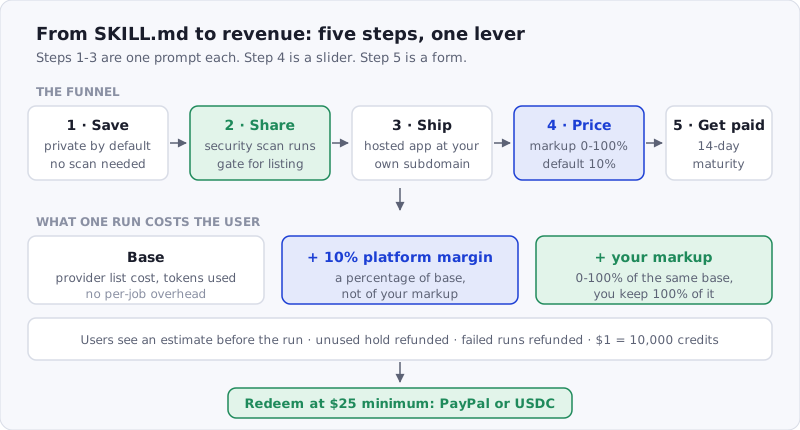 Figure: the whole funnel. Steps 1-3 are one prompt each, step 4 is a slider, step 5 is a form.
Step 1: Save your skill on SkillSafe
Skills save privately by default — no listing, no scan required, no size negotiation with a marketplace reviewer. Point your agent at the platform API or use the web flow; either way the versioned skill lands in your account, and the version you save is the version your app will pin.
If your skill already lives on GitHub, it can be imported directly — the repo stays the source of truth and SkillSafe links back to it.
Step 2: Share it and pass the security scan
Sharing is what makes strangers able to trust you. Every shared skill goes through the security scanner (prompt-injection patterns, exfiltration attempts, credential harvesting — the threat database shows what it catches), and installs are re-scanned on the consumer’s side with the two reports cryptographically compared. A clean scan is also your gate to a public app listing, so this step isn’t optional for sellers — it’s the trust infrastructure your price rides on.
Sharing the skill file free is deliberate strategy, not lost revenue: installs and stars are your marketing funnel, and the scan badge is your storefront’s window sticker.
Step 3: Ship it as a hosted app
One prompt to your coding agent deploys it — the agent saves the skill, creates the app, and uploads a frontend in a handful of API calls (the copyable prompt is on Turn your skill into an app, and the detailed walkthrough is in How to Turn a Claude Code Skill Into a Web App).
What you get for free: hosting at your-slug.skillsafe.ai, user accounts and guest sessions, per-user data storage, and your choice of model per app — the full allowlist with rates is on the model catalog. Public listing requires the clean scan from Step 2 covering both skill and frontend.
Step 4: Set your markup
One lever, and it’s a slider on your app’s dashboard: your markup, 0-100% of each run’s compute cost. New apps start at 10%.
The arithmetic is worth knowing exactly, because it’s the whole of your income here. A run’s base is the model provider’s list cost for the tokens it used — there is no per-job overhead. Two separate cuts are added to that base: the platform’s 10%, and your markup. At the default 10% you and the platform earn the same amount per run — and you keep 100% of your markup, with no fee deducted from it.
The dashboard slider shows what each setting pays you per run, priced against your app’s own average run once it has traffic. Change it any time; it applies to the next run.
Credits are dollars at a fixed rate — $1 = 10,000 credits — and users see cost estimates before they run. New accounts get 3,000 credits ($0.30) at signup plus 2,000 credits ($0.20) per active day, so trying your app is free for them and paid trials cost you nothing.
Step 5: Get paid — earnings, maturity, cash-out
Your markup accrues to your account in full — nothing is deducted. Earnings mature for 14 days — the card-dispute window — then become redeemable at face value from your billing page. Per-app earnings and per-run metering live on your dashboard.
One deliberate limitation: credits can’t be transferred between accounts, so there’s no in-app-purchase or subscription API. Everything you earn comes from usage of your app, which is also what makes the free-credit grants uncashable and keeps the payout lane clean.
What the economics look like
A concrete example on a model that actually runs here. Say your skill runs on gpt-5.6-terra, billed at its list price of $2 per million input tokens and $12 per million output tokens, and a typical run uses 3,000 input + 1,000 output tokens. Compute cost is $0.006 + $0.012 = $0.018, and with no per-job overhead that is the base.
| Your markup | User pays per run | You earn per run | At 100 runs/day |
|---|---|---|---|
| 10% (default) | 216 credits ($0.0216) | $0.00180 | ~$5.40/month |
| 25% | 243 credits ($0.0243) | $0.00450 | ~$13.50/month |
| 50% | 288 credits ($0.0288) | $0.00900 | ~$27.00/month |
| 100% (the cap) | 378 credits ($0.0378) | $0.01800 | ~$54.00/month |
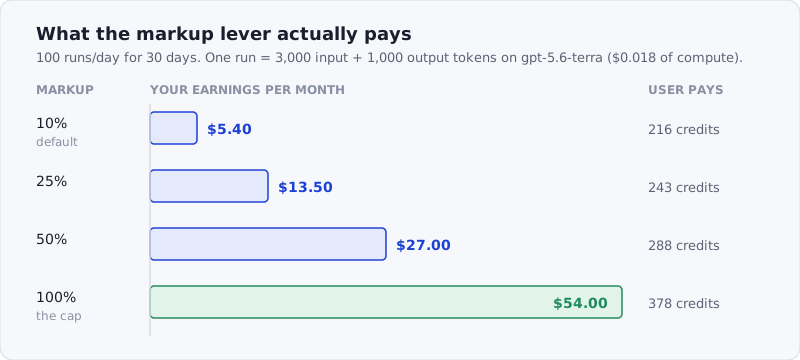 Figure: the same run at four markup settings. The bar is your income; the right column is what the user pays.
Every cent in that “you earn” column reaches you — there’s no fee to net out. Not startup money; very real side-project money, from an asset that was previously earning stars. And the lever is honest in both directions: at 100% your users pay roughly 1.75x compute, which is a decision you make in the open, since your margin is printed on your app’s public page.
The same run on Workers AI gemma ($0.10 in / $0.30 out per million tokens) costs $0.0006 of compute and settles at 8 credits with the default markup. Model choice moves the price of your app by a factor of 30 before you touch the slider at all.
Frequently Asked Questions
Can you actually make money with Claude Code skills?
Yes, but from usage rather than from the file. A skill installed with npx skills add is free to copy, so revenue comes from hosting the same judgment as an app and charging a markup on each run — $0.0018 to $0.018 per run in the worked example above, or roughly $5 to $54 a month at 100 runs a day. Traffic, not price, is the variable that matters.
Do I need to run any servers or write billing code?
No. Hosting, metering, holds and refunds, accounts, and payouts are the platform’s job. Your job is the skill and (optionally) a nicer frontend. If you’d rather wire Stripe yourself, here’s that comparison.
What if my skill is expensive to run?
Pick a cheaper model (the catalog spans $0.11 to $11.00 per million input tokens billed), or bring your own provider key — BYOK runs bill users a flat 1 credit and your key pays for inference directly. Note that BYOK forces markup to zero, so it’s a way to run cheaply, not a way to earn.
Can people still use my skill for free?
Yes, and they should be able to — the skill file stays free to install for developers. For the app, you can sponsor usage from your own wallet with daily caps (labeled “Free to run — sponsored” in the directory), or run a genuinely free app, which gets the “Completely free” label.
How do I cash out?
From your account’s redeem page once earnings mature (14 days), with a $25 minimum — by PayPal, or as USDC stablecoin on Base, Ethereum, Polygon or Solana. Redemptions are at face value and free, and since nothing was taken from your markup on the way in, what you see in earnings is what you cash out.
Conclusion
The funnel is: save → share (scan) → ship as app → price → get paid. Each step is either one prompt to your agent or one form on a dashboard, and the trust and billing infrastructure — the parts that used to make “selling a prompt” a fantasy — are already built. Your skill is already good. Give it a storefront.
More on the same thread: what it costs to run an AI app here, and every Claude Code post.