How to Turn a Claude Code Skill Into a Web App
Save the skill, give your agent one deploy prompt, get a live app at your-slug.skillsafe.ai. No server, no auth code, no billing integration. Five steps.
Save the skill on SkillSafe, then give your coding agent one prompt: deploy it as a hosted app. The agent returns a live URL at your-slug.skillsafe.ai that anyone can open and run as a guest — no install, no API key. Your SKILL.md becomes the app’s system prompt; hosting, accounts and billing are platform features.
A skill is a folder of instructions an agent loads on demand (Anthropic’s Agent Skills docs define the format; Claude Code’s skills page covers the local side). Everything below turns that folder into a URL. Here is the whole flow, step by step.
Key figures
| Figure | What it measures | Source |
|---|---|---|
| 2 | API calls the agent makes: create app, upload release | deploy guide |
| 1,000 files / 10 MB each | Per-release file count and per-file size caps | SkillSafe release limits |
| 50 MB | Max decoded release bundle (chunked session path) | SkillSafe release limits |
| $1 = 10,000 credits | Fixed credit rate; every run shows an estimate first | /models/ |
| 3,000 credits | Signup grant ($0.30), so a stranger can try your app free | SkillSafe billing |
| 2,000 credits | Daily grant to active accounts; grants expire in 7 days | SkillSafe billing |
| 10% | Platform margin on a run’s compute cost | /models/ |
| 0-100% | Your markup range; new apps start at 10% | /blog/how-to-monetize-a-claude-code-skill/ |
| 10,000 / 1,000 | Records per declared collection, and per user within one | SkillSafe data layer |
| 64 KB | Max size of one stored record document | SkillSafe data layer |
Why turn a skill into an app?
A skill’s audience is capped at people who run an AI coding tool with your skill installed — and installing means a CLI: npx skills add from Vercel’s skills CLI works against any SkillSafe skill, but it still assumes a terminal. An app’s audience is everyone with a browser: your teammate on the sales floor, your friend on their phone. We covered the reasoning in From Skill to App; this post is the hands-on version.
Step 1 — Get the skill onto SkillSafe
If your skill is already saved on SkillSafe, skip ahead. If it only exists on your machine, ask your agent to save it — the creator guide documents the save flow:
Read https://deploy.skillsafe.ai/llms.txt, then save the skill
in ./my-skill to SkillSafe.
You can also upload it from your dashboard. Skills are private by default, so saving publishes nothing.
Step 2 — Hand your agent the deploy prompt
This is the step that does the work. Paste into Claude Code, Cursor, or any agent with web access:
Read https://deploy.skillsafe.ai/llms.txt, then deploy my skill
@you/your-skill as a hosted app.
Under the hood, the agent drives the SkillSafe platform API end to end: it creates the app (POST /v1/apps), which snapshots your skill’s SKILL.md as the app’s pinned system prompt, then uploads a release (POST /v1/apps/:slug/releases) — either a static frontend bundle or an App Spec the platform renders for you. When it finishes, you have a live URL. Prefer to do it by hand? Every REST call is documented in the same guide.
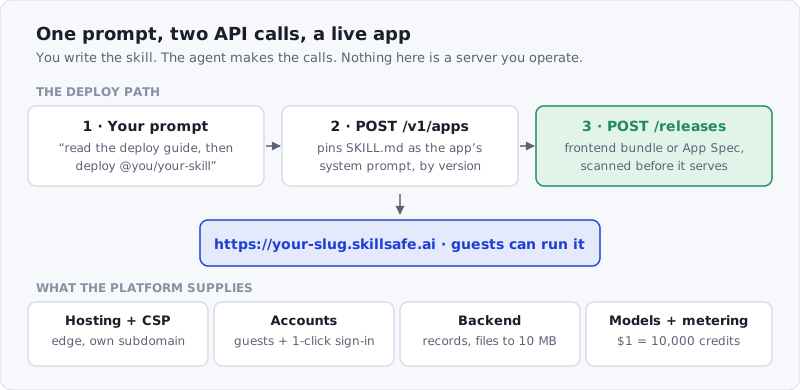 Figure: the two calls that matter, and the four things you no longer have to build.
Step 3 — Open it in a browser and run it as a guest
Visit https://your-slug.skillsafe.ai/ on your phone. You are now your own first user: guests need no SkillSafe account, and every run shows a cost estimate before it starts. Runs are metered at actual token usage ($1 = 10,000 credits), the unused portion of the hold is refunded when the run completes, and failed runs are refunded automatically.
Step 4 — Pass the scan, publish to the directory (optional)
Your app already works at its URL — you can share the link privately and stop here. To list it in the public app directory, the skill and the frontend bundle must both pass a clean security scan. That scan gate is the point of shipping on a registry: people who find your app can see it was reviewed before they run it. Listed apps also get an SEO-indexed detail page.
Step 5 — Set pricing, if you want to earn
Your users pay for their own runs: compute cost, plus a 10% platform margin, plus your markup — which starts at 10% on a new app and goes up to 100%. You keep every cent of your markup, and there’s no payment provider to touch. Two follow-ups: How to Monetize a Claude Code Skill has the worked arithmetic, and How to Charge Users for an AI App Without Stripe covers why there’s no checkout page.
What you get without building it
| You would normally build | What the platform gives you | Limit to know |
|---|---|---|
| Hosting + TLS + CDN | Edge hosting at your own subdomain, streaming output, strict CSP | 1,000 files, 10 MB per file |
| Auth | Guest sessions, one-click SkillSafe sign-in, per-app consent for profile or email, tokens scoped to your app | tokens never leave your app’s origin |
| Database | Declared record collections with ACLs and a query DSL, vector similarity search, per-user key-value state | 10,000 records per collection, 64 KB per record |
| File uploads | Per-app storage with image inputs for vision runs | 10 MB per file |
| Model access | Model per app, no key from your users | pricing on /models/ |
| Billing | Estimates, holds, settle-at-actual, refunds, payouts | $1 = 10,000 credits |
Frequently Asked Questions
How to share an AI agent with someone who doesn’t code?
Host it as an app and send them the URL. A SkillSafe app runs in any browser on any device — phone, tablet, locked-down work laptop — with no install, no API key, and no CLI setup. Guests can use it without creating an account, and because every public app is built from a security-scanned skill, the person you share with can check its scan status before running it.
How to host an AI app without a server or backend?
Deploy it on a platform that owns the infrastructure. SkillSafe apps are hosted at your-slug.skillsafe.ai with nothing for you to deploy or operate, and the backend pieces — data collections, vector search, per-user storage, file uploads to 10 MB, and model access — are built in.
Do people need a SkillSafe account to run my app?
No. Guests get their own session and a capped credit wallet, so anyone can try your app from a link. Signing in (one click with an existing SkillSafe account) gives users persistent identity across devices and lets your app request their profile or email with consent.
What does the app cost to run?
Each run is paid by the person running it, metered at actual model-token usage with a pre-run estimate. New SkillSafe accounts start with 3,000 free credits ($0.30) and active users receive 2,000 credits a day — free credits expire after 7 days — so your app always has an audience able to try it. If you want the app to be free for your users, enable sponsorship and cover their runs from your own wallet, with per-user and per-app daily caps.
Can the same skill stay installable as a file?
Yes, and it should. The app and the skill are the same versioned artifact: developers keep installing the file with npx skills add, while everyone else uses the hosted app. Browse the catalogue at /skills/ or the Claude Code tag for more of both.