How to let people use a skill in a browser
Turn a skill into a browser app in two API calls: compose the skills into one prompt, then design a frontend for the goal. Apps are private until you publish.
An app is not a skill in a different wrapper. A skill records how to do one step correctly; an app is built for a goal and usually composes several skills behind one form. SkillSafe hosts 583 public apps built that way. Two API calls deploy one; the design work between them is the real job.
Updated September 2026: the deploy path below is unchanged, and the SkillSafe directory now lists 583 public apps from 2,766 publishers.
This is the fourth way to run a skill, and the only one that changes what the skill is. The other three keep it a skill — installed, shared or scheduled — because in all three the person on the other end has an agent. When they don’t (a colleague in ops, a customer, your non-technical co-founder), they need something they can open and type into.
Key figures
| Figure | What it measures | Source |
|---|---|---|
| 2 | API calls from owned skill to live app (POST /v1/apps, then a release) | SkillSafe platform API |
| 583 | Public apps in the SkillSafe directory, 17 September 2026 | /apps/ |
| 2,766 | Publishers with a listed profile on the registry | SkillSafe sitemap feed |
| private | Visibility of a newly deployed app until you change it | SkillSafe apps API |
| 1,000 files / 50 MB | Ceiling on one frontend release bundle | SkillSafe release limits |
| 10,000 credits | What $1 buys; runs are metered at actual token usage | SkillSafe pricing |
| 10% | Default owner markup on a run, adjustable from 0% to 100% | SkillSafe pricing |
| 3,000 credits | Free balance a new SkillSafe account starts with ($0.30) | SkillSafe billing |
The distinction that changes everything
A skill records how to perform a step correctly. An app is built for a goal.
Those aren’t two names for the same thing. Anthropic’s own documentation describes a skill as a packaged procedure the model loads when it matches the request:
Skills are reusable, filesystem-based resources that give Claude domain-specific expertise: workflows, context, and best practices that turn a general-purpose agent into a specialist.
— Agent Skills overview, Anthropic
“Extract the tables from a PDF” is a skill in exactly that sense — a reusable procedure. “Turn a quarterly PDF into a one-page board summary” is a goal, and reaching it might draw on three skills: extract the tables, summarize the narrative, format the output. The app is the product built for that goal; the skills are the know-how it leans on for particular steps.
This is why turning a skill into an app is not a format conversion. There’s nothing in a SKILL.md that tells you what the app’s form should ask for — the frontmatter carries a name and a description, and that’s it. Deciding what a user needs to supply to reach the goal is design work, done over the goal and its skills together. It’s the interesting part, and it’s not something a template can do for you.
Step 1 — Compose the skills into one app
Create an app from several owned skills at once:
POST /v1/apps
{
  "slug": "board-summary",
  "title": "Board Summary Builder",
  "description": "Turn a quarterly PDF into a one-page board summary.",
  "skill_ids": ["skl_extract", "skl_summarize", "skl_format"]
}
The skills are composed, in order, into one prompt under a preamble that states the app’s goal and frames them as procedures serving it — not as three alternative tasks to choose between, which is what an agent does when you paste three SKILL.md files end to end without that framing. A single skill is snapshotted verbatim; several become a goal-directed whole. The snapshot is pinned at deploy time, so editing the skill later doesn’t silently change the app.
Step 2 — Design the frontend for the goal
Creating the app gives it a prompt, not a face. The frontend is the part you design for the goal: what does this app need from the user that it can’t work out itself? For the board summary, maybe a file upload and a “tone” selector — decisions that come from the goal, not from any one skill.
The fastest way to build that face well is to let an agent do it. The deploy guide is written for exactly this: an agent — yours, or the platform’s chat builder at creator.skillsafe.ai — reads it, designs a spec or a full frontend bundle for the goal, and uploads it with POST /v1/apps/{slug}/releases. Accounts, credit billing, and storage are already there; you’re designing an interface, not building a backend. If you have used Streamlit to put a Python script in front of colleagues, this is the same instinct with the hosting, auth and metering already solved.
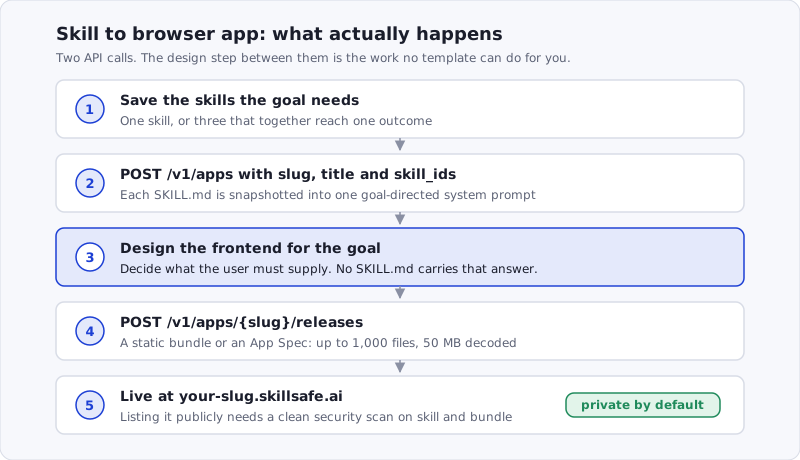 Figure: the deploy path. Steps 1, 2, 4 and 5 are mechanical; step 3 is the one that decides whether the app is usable.
Step 3 — Ship the scaffold, then replace it
The chat builder can do the whole thing in one turn — create the app, ship a runnable frontend — and it’s the fastest way to see your skill in a browser. But be clear about what a first pass ships: a scaffold. One free-text box, enough to prove the deploy works. It is not a designed frontend, and it should not pass for a finished product. Use it to verify, then design the real thing.
Deployed apps are private by default — only you can open one until you decide otherwise. An agent deploying on your behalf should never make your work world-runnable as a side effect; going public is an explicit step that requires a clean security scan, since a public app is running code in front of strangers.
When to reach for this
Not every skill should become an app, and most shouldn’t. If the people who need your skill have agents, share it or install it — Vercel’s skills CLI puts a skill on their machine in one command, and that’s less work for everyone. Reach for an app when the audience is people without an agent, when the task is self-contained enough to express as “inputs in, result out,” or when you want a link you can hand to anyone. That’s the moment a skill has outgrown being a skill, and a browser is the right place for it to live.
For the click-by-click version of the deploy itself, see How to Turn a Claude Code Skill Into a Web App.
Frequently Asked Questions
Can I run a Claude Code skill in the cloud?
Yes — deploy it as a hosted app and the skill’s prompt runs on the platform instead of in your terminal. The app lives at your-slug.skillsafe.ai, anyone with the link can run it in a browser, and each run is metered at actual token usage ($1 = 10,000 credits) with a cost estimate shown before it starts.
How many skills can one app use?
As many as the goal needs. POST /v1/apps takes a skill_ids array and composes those skills, in order, into a single system prompt under a preamble that states the goal. One skill is snapshotted verbatim. Three become a goal-directed whole rather than three competing instruction sets — which is what you get if you paste three SKILL.md files end to end.
Do people need an account to use my app?
No. Guests run apps without signing in, and new SkillSafe accounts start with 3,000 free credits ($0.30) plus a small daily grant for active users. You can also sponsor an app and cover your users’ runs from your own wallet, with per-user and per-app daily caps so a burst can’t drain it.
Is my app public as soon as I deploy it?
No. A newly deployed app is private — only you can open it. Making it public is a separate, explicit step, and the directory only accepts apps whose skill and frontend bundle both pass a clean security scan. Until then you can still hand the URL to specific people.
What if my users already have an agent?
Then skip the app. Sharing the skill is cheaper for both sides: a share link their agent fetches in one request, or npx skills add if they want it installed. See how to share a skill without installing anything for that path.
More ways to run a skill: on any machine · shared with no install · on a schedule