How to share a skill with a teammate who doesn't code
Create a share link on a saved version, append ?md, and one GET returns the whole SKILL.md plus provenance and install commands. No account, no install.
The zero-install way to hand someone a skill is a URL. Create a share link on a saved version, append ?md, and 1 HTTP GET returns a self-contained document: provenance, the tree hash, the install commands, and the complete SKILL.md. Their agent reads it and acts. No account, no install, and the link is revocable.
Updated September 2026: unchanged behaviour, re-verified against the live share route and the 30,423 skills in the registry.
That matters because the agent tools have no person-to-person sharing of their own. Anthropic’s Agent Skills documentation sets out the sharing model per surface, and for the one most non-developers use it is blunt:
claude.ai: Individual user only. Each team member must upload separately.
— Anthropic, Agent Skills documentation
A skill is only useful to someone who can run it. When that someone is a teammate with their own agent but no appetite for a setup dance, the friction is the install — cloning a repo, pointing a tool at it, hoping the versions line up. One npx skills add command collapses all of that, but it still asks them to run something. The lowest-friction thing you can send another person’s agent is not a repo. It’s a URL.
Share creates a link, not a package
Save your skill, then create a share link for the version — from its page on skillsafe.ai, or over HTTP:
POST /v1/skills/@you/my-skill/versions/1.0.0/shareThat returns a link like https://skillsafe.ai/share/shr_abc123def456. The id is shr_ plus 12 random lowercase alphanumeric characters drawn from an alphabet of 36, which is what makes it unguessable rather than merely obscure. The request body takes 3 options:
| Option | Values | Default | What it controls |
|---|---|---|---|
visibility | private, public | private | private is link-only; public also lists the skill in the searchable registry |
expires_in | 1d, 7d, 30d, never | never | 4 choices: the link dies after 1 day, 7 days, 30 days, or not at all |
allow_reshare | true, false | false | whether the recipient may pass the link on |
A share link is revocable and can be set to expire — it’s a Dropbox link for a skill, not a permanent public listing. Either way, your teammate opens the link and sees what the skill is, its version, its trust verdict, and the install command.
But the real trick is one query parameter.
Append ?md and the link becomes agent-ready
Add ?md to any share URL:
https://skillsafe.ai/share/shr_abc123def456?mdand it returns a single self-contained plain-text document. Not a summary — everything an agent needs to use the skill, in 1 response:
| Section | What it contains |
|---|---|
| Header | The @ns/name reference and the shared version |
| Provenance | Skill, version, tree hash, visibility, and the expiry date if the link has one |
| Why the hash matters | 2 sentences on how the tree hash makes tampering detectable |
| Install | npx skills add … for the CLI, plus the curl call that fetches the file manifest |
| SKILL.md | The complete instructions, verbatim, with nothing elided |
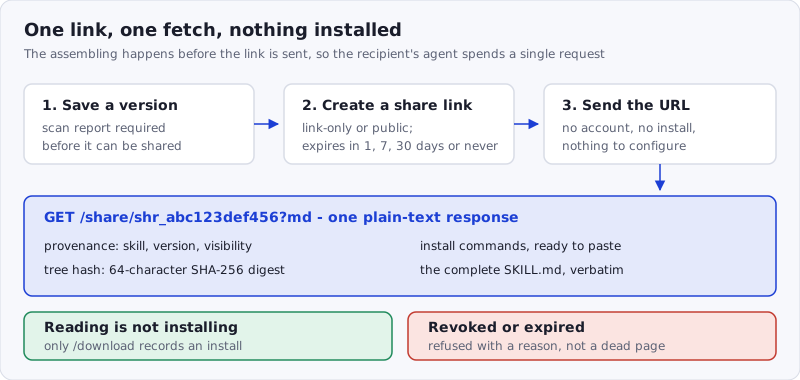
Figure: the assembling is done before the link is sent. The recipient’s agent spends 1 request and has everything.
That last row is the one that makes it work for a non-coder. A metadata-only summary would leave the agent needing a second endpoint to find the actual instructions, and a human to narrate the gap. You send the link; their agent fetches it, reads the whole skill, and can act immediately. There’s nothing for your teammate to configure. If they later want it installed permanently, the same document tells their agent exactly how — npx skills add, Vercel Labs’ CLI, which writes into whichever of 79 supported agents they happen to run.
Serving plain text to agents is becoming a convention rather than a trick: the llms.txt proposal makes the same argument for documentation sites, that an agent should be able to fetch one clean markdown document instead of parsing a rendered page. A skill is the case where that document is the product.
Reading a skill this way deliberately doesn’t count as an install. The ?md route reads the SKILL.md through a read-only endpoint; /v1/share/{shareId}/download is the call that records an install. So a link that gets opened, crawled, or previewed never inflates the owner’s numbers.
Why not just send the repo?
You can, and for another developer it’s fine. But a repo asks the recipient to do the assembling — clone, place, pin, verify. A share link with ?md inverts that: the assembling is already done, and the payload is one fetch away. For a teammate whose relationship with the terminal is “please, no,” that inversion is the whole difference between “I’ll get to it” and “done.”
It also keeps the skill small enough to be read in one pass. Anthropic’s authoring guidance recommends keeping the SKILL.md body under 500 lines and caps the description field at 1,024 characters; a skill written to that shape fits comfortably in a single fetched document, which is exactly what ?md returns.
The security is still there
A shared skill carries its scan report and tree hash — a SHA-256 over the file manifest, a 64-character hex digest. Sharing requires that report: a version with no scan cannot be shared at all. When someone installs from the link rather than just reading it, the files are verified against that hash, the same dual-side verification every SkillSafe install gets, against the ruleset we publish. Sharing widely doesn’t mean trusting blindly; the trust travels with the link.
That verdict is worth passing on, because the recipient is being asked to run someone else’s instructions inside their agent. Anthropic’s own security note is that “a malicious Skill can direct Claude to invoke tools or execute code in ways that don’t match the Skill’s stated purpose.” A link that carries a scan report and a hash answers a question a raw repo URL leaves open — we go through the failure modes in what a malicious skill can do.
Revoked and expired links fail loudly rather than quietly: the page returns a clear “this link isn’t available” with the reason and a noindex header, instead of a dead page or, worse, a stale copy of the skill.
Frequently Asked Questions
How do I share a Claude Code skill with someone else?
Save the skill, create a share link on the version (POST /v1/skills/@you/my-skill/versions/{version}/share), and send the URL. The recipient needs no account and no install. Claude Code itself has no person-to-person sharing: Anthropic’s documentation describes Claude Code Skills as personal (~/.claude/skills/) or project-based (.claude/skills/), shared only by committing them or through plugins.
Does reading a shared skill count as an install?
No. The ?md document is served from a read-only endpoint, so opening, crawling or previewing a link never touches the owner’s install count. Only /v1/share/{shareId}/download, which returns the file manifest, records an install. That separation is deliberate: reading a skill and running it are different acts with different risks.
Can I revoke or expire a share link?
Yes, both. expires_in accepts 4 values at creation — 1d, 7d, 30d or never — and DELETE /v1/share/{shareId} revokes a link at any time. Once revoked or expired, the link returns an explicit “not available” message naming the reason, so the recipient knows to ask for a fresh one rather than assuming the skill is gone.
What is the difference between a private share link and a public skill?
Visibility. A private share link is link-only: unguessable, revocable, and absent from search. Making the version public lists it among the registry’s 30,423 skills, where anyone can find it. Both carry the same scan report and tree hash; the only difference is who can discover the skill without being sent the URL.
Is it safe to open a skill someone sends me?
Reading the ?md document is just fetching text. Installing it is running someone else’s instructions inside your agent, which Anthropic warns to treat “like installing software.” The share document puts the scan verdict and the tree hash in front of you first, and you can re-scan any repository yourself with the SkillSafe scanner before installing.
Send a skill to a person who has an agent and this is the shortest path there is. Send it to a person who has no agent — someone who needs to click a button and get an answer — and a link to a skill isn’t enough. That person needs an app.
More ways to run a skill: on any machine · on a schedule · in a browser · browse the registry